83
Technical Notes
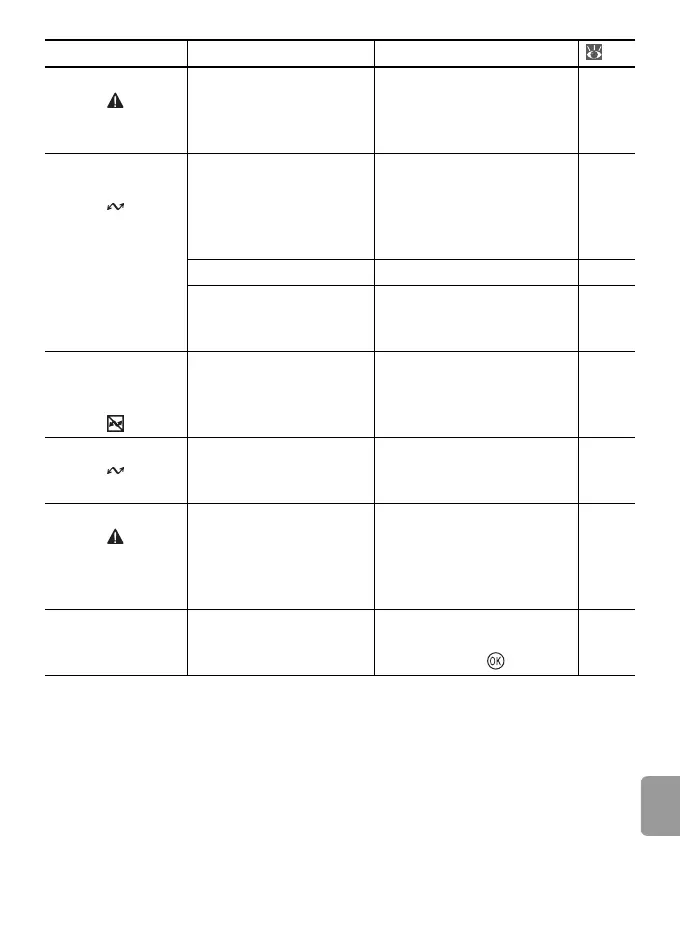
LENS ERROR Lens error. Turn camera off and then
on again. If error persists,
contact retailer or Nikon
representative.
13
COMMUNICA-
TIONS ERROR
USB cable disconnected
during transfer or print-
ing.
If PictureProject displays
error, click OK to exit.
Resume operation after
turning camera off and
reconnecting cable.
41, 42
USB option incorrect. Choose correct USB option. 44
PictureProject did not
start.
See the PictureProject refer-
ence manual (on CD) for
more information.
—
NO IMAGES ARE
MARKED FOR
TRANSFER
No pictures selected for
transfer.
Select pictures for transfer
and try again.
73
TRANSFER ERROR Transfer error.
• Check battery level.
• Check that USB cable is
connected.
13
43
SYSTEM ERROR Error has occurred in
camera’s internal cir-
cuitry.
Turn camera off, remove
and reinsert batteries, and
turn camera on. If error per-
sists, contact retailer or
Nikon representative.
6, 13
PRINTER ERROR
CHECK PRINTER
STATUS
Printer error. Check printer. To resume,
highlight Resume (if avail-
able) and press .
—
Display Problem Solution




 To Next Page