EasyManua.ls Logo

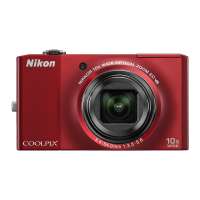
Nikon COOLPIX S800c - User Manual

Nikon COOLPIX S800c
271 pages
Print Icon
To Next Page IconTo Next Page
Loading...

Table of Contents

Other manuals for Nikon COOLPIX S800c

Questions and Answers

  • R
    Robert MartinSep 8, 2025
    Why are the colors unnatural in my Nikon COOLPIX S800c Digital Camera photos?
    • L
      Lori WhiteSep 8, 2025
      The colors in your Nikon Digital Camera photos might be unnatural because the white balance does not match the light source.
  • M
    mark62Aug 25, 2025
    Why is my Nikon COOLPIX S800c not able to turn on?
    • M
      Melissa CraneAug 25, 2025
      Your Nikon Digital Camera might not be turning on because the battery is exhausted. Also, the camera cannot be turned on while connected to an electrical outlet via the Charging AC Adapter.
  • J
    John DavisAug 25, 2025
    Why doesn't the flash fire on my Nikon COOLPIX S800c Digital Camera?
    • E
      Elizabeth WilliamsAug 26, 2025
      If the flash on your Nikon Digital Camera doesn't fire, it could be due to several reasons: the flash mode is set to Off, you've selected a scene mode that disables the flash, Blink proof is enabled in smart portrait mode, you're shooting a movie, or another function is restricting the flash. Check these settings to resolve the issue.
  • M
    martinezkyleSep 18, 2025
    Why do images appear smeared on my Nikon COOLPIX S800c?
    • J
      Jason GonzalezSep 18, 2025
      If images appear smeared on your Nikon Digital Camera, the lens is likely dirty. Clean the lens to resolve this issue.
  • L
    laurawrightSep 8, 2025
    Why do randomly spaced bright pixels (“noise”) appear in my Nikon COOLPIX S800c Digital Camera images?
    • J
      Jacqueline CrosbySep 9, 2025
      Randomly spaced bright pixels (“noise”) might appear in your Nikon Digital Camera images if the shutter speed is too slow or the ISO sensitivity is high because the subject is dark. You can reduce noise by using the flash or specifying a lower ISO sensitivity setting.
  • J
    Jill YorkSep 13, 2025
    Why can't I edit images on my Nikon COOLPIX S800c Digital Camera?
    • R
      Ronald HarrisSep 13, 2025
      Movies cannot be edited. Select images that support editing functions. Images taken with another make or model of camera cannot be edited. Images edited with this camera may not be displayed correctly on other cameras and cannot be transferred to computers from other cameras.
  • S
    sarahwagnerSep 3, 2025
    How to fix Nikon COOLPIX S800c Wi-Fi (wireless LAN) function that turns off and will not turn on?
    • M
      Megan JamesSep 3, 2025
      If the Wi-Fi function on your Nikon Digital Camera turns off and won't turn back on, press the d button, tap Settings > Privacy > Reboot on the Android platform home screen, and reboot the camera, then turn on the Wi-Fi settings.
  • M
    Monique MooreSep 4, 2025
    Why is digital zoom not working on my Nikon COOLPIX S800c?
    • D
      Donna DavisSep 4, 2025
      Digital zoom might not be working on your Nikon Digital Camera because it is set to Off in the setup menu. Also, digital zoom is not available in certain scene modes like Portrait, Night portrait, Backlighting (when HDR is set to On), Easy panorama, or Pet portrait. It's also unavailable when touch shooting is set to Subject tracking, when shooting in smart portrait mode, or when Multi-shot 16 is selected for the Continuous setting.
  • M
    Matthew SteinSep 23, 2025
    Why is the print date not available on my Nikon COOLPIX S800c?
    • A
      Andrea ArmstrongSep 23, 2025
      If the print date is not available on your Nikon Digital Camera, it could be because the Date & time setting has not been made in the Android platform setting menu, or another function that restricts the Print date option is enabled.
  • X
    xaviergibbsAug 29, 2025
    What to do if my Nikon Digital Camera is not taking images?
    • C
      Charles PattonAug 29, 2025
      If your Nikon Digital Camera is not taking images, make sure you press the shutter-release button when the camera is not in playback mode or when setting items or the setup menu are displayed. Also, check if the battery is exhausted or if the flash indicator is flashing, indicating that the flash is charging.

Summary

Confirming the Package Contents

First Steps

Camera Anatomy and Controls

Identifies external parts, buttons, and touch panel operations.

Battery and Memory Card Handling

Guides through attaching strap, inserting battery, memory card, and charging.

Powering On and Initial Setup

Steps to turn on the camera and perform initial configuration.

Shooting and Playback

Shooting Procedures

Guides through framing, focusing, and shooting images.

Playback Procedures

How to view, navigate, and delete images.

Sharing Images

Uploading to Online Services

Step-by-step guide for uploading images via Wi-Fi.

Using ViewNX 2

Installing and Using ViewNX 2

Steps to download, install, and transfer images with the software.

Other Functions

Basic Shooting Settings

Details on flash, self-timer, macro, and exposure compensation.

Shooting Mode Selection

How to change shooting modes like Auto, Scene, etc.

For Your Safety

General Safety Precautions

Important warnings to prevent damage or injury during use.

Battery and Adapter Safety

Specific safety guidelines for batteries and charging accessories.

Operational and Environmental Precautions

Warnings related to specific environments and operations.

Nikon COOLPIX S800c Specifications

General IconGeneral
Sensor TypeCMOS
Optical Zoom10x
LensNIKKOR
Aperturef/3.2-5.8
Screen Size3.5 in.
Wi-FiYes
Digital Zoom4x
ISO sensitivity125 - 3200
Shutter typeMechanical and CMOS electronic shutter
MeteringMatrix, Center-weighted, Spot
FlashBuilt-in
Flash range0.5 - 5.0 m
Movie recording timeUp to 29 minutes
SecurityWEP, WPA, WPA2
Supported languagesMultiple
BatteryEN-EL12
Charging timeApprox. 2 hours
Tripod socketYes
Android OSAndroid 2.3
Megapixels16.0
Effective Pixels16.0
Image Sensor Size1/2.3 in
Focal Length4.5-45.0mm
Video Resolution1920 x 1080
Weight184g
Vibration ReductionLens shift
AutofocusContrast detect AF
Focus range50 cm - infinity
Focus-area modeFace priority, auto
Storage mediaSD/SDHC/SDXC
File systemDCF, Exif 2.3
File formatsJPEG
Shutter Speed1/2000 - 1 sec
Exposure controlProgrammed auto exposure
White balanceAuto, Presets
Flash controlAuto, Off, Red-eye reduction
Shooting modesAuto, Scene, Movie
WirelessYes
Power sourcesBattery
Battery lifeApprox. 140 shots
Movie recording (actual battery life for recording)Approx. 60 minutes
Operating environment0 to 40 °C
ConnectivityHDMI

Related product manuals