EasyManua.ls Logo

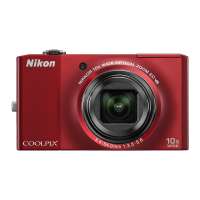
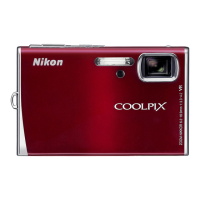
Nikon CoolPix S80 - User Manual

Nikon CoolPix S80
204 pages
Print Icon
To Next Page IconTo Next Page
Loading...
No reproduction in any form of this manual, in whole or in part
(except for brief quotation in critical articles or reviews), may be
made without written authorization from NIKON CORPORATION.
YP0I02(11)
6MM84611-02
DIGITAL CAMERA
Users Manual
En
En

Table of Contents

Other manuals for Nikon CoolPix S80

Questions and Answers

  • M
    Monica ConnerAug 16, 2025
    Why isn't the battery charging in my Nikon CoolPix S80 Digital Camera when connected to a computer?
    • K
      Kristen WattsAug 16, 2025
      If the battery in your Nikon Digital Camera isn't charging when connected to a computer, it could be because the camera is turned off. Charging also stops if the computer enters sleep mode during charging, or the camera may be turned off. Depending on your computer's specifications, settings, and status, it may be impossible to charge the battery via a computer connection.
  • J
    Jessica LynchAug 22, 2025
    How to correct the date and time on my Nikon CoolPix S80 recordings?
    • P
      Paul CarterAug 22, 2025
      If the date and time of recording are incorrect on your Nikon Digital Camera, the camera clock may not be set. If the clock hasn't been set, a 'Date not set' indicator will blink. Set the correct time and date from the Date option in the setup menu. It's also recommended to regularly check the camera clock against more accurate timepieces and reset as needed.
  • T
    Tiffany BrockAug 26, 2025
    Why is the monitor blank on my Nikon CoolPix S80 Digital Camera?
    • J
      Jennifer MillsAug 26, 2025
      The monitor may be blank on your Nikon Digital Camera because the camera is off, the battery is exhausted, or the camera is in standby mode. If in standby mode, press the shutter-release button halfway. Also, check if the camera is connected to a computer via USB or to a TV via audio/video or HDMI cable. The camera also cannot be turned on when connected to an electrical outlet using a Charging AC Adapter.
  • D
    Daniel RussellAug 28, 2025
    What to do if my Nikon CoolPix S80 Digital Camera turns off without warning?
    • K
      Kelly DudleyAug 28, 2025
      If your Nikon Digital Camera turns off unexpectedly, it could be due to an exhausted battery. Additionally, the camera will turn off if you connect the Charging AC Adapter while it is on. Check if the USB cable connecting the camera to the computer or printer has been disconnected and reconnect it if necessary. The camera may also turn off if the internal temperature of the camera or the memory card is high, so allow them to cool down. Finally, the camera and battery may not work properly at low temperatures.
  • J
    Julie HollowayAug 31, 2025
    Why is the monitor hard to read or darkened on my Nikon Digital Camera?
    • S
      Shannon HarrisAug 31, 2025
      The monitor on your Nikon Digital Camera might be hard to read or darkened due to several reasons. Try adjusting the monitor brightness. The monitor may darken to reduce heat generation when the internal temperature of the camera is high, and it will brighten again when it cools. Also, if the power-on lamp is covered after the camera has automatically increased monitor brightness, the monitor may darken. Lastly, a dirty monitor can also cause readability issues, so clean it.
  • C
    Connie RogersSep 3, 2025
    What to do if date is not imprinted on Nikon CoolPix S80 pictures even when enabled?
    • S
      Sharon SummersSep 3, 2025
      If the date is not imprinted on your Nikon Digital Camera pictures even when the date imprint option is enabled, it could be due to another function restricting the date imprint option. Also, the selected shooting mode may not support date imprint.
  • A
    Ashley JordanSep 6, 2025
    Why is the date imprint not available on my Nikon CoolPix S80 Digital Camera?
    • M
      Marie PattersonSep 6, 2025
      The date imprint may not be available on your Nikon Digital Camera because the camera clock has not been set. Alternatively, another function that restricts the date imprint option might be enabled.
  • B
    bramseySep 9, 2025
    Why does the monitor turn off and the power-on lamp blink green rapidly on my Nikon CoolPix S80?
    • M
      markjohnsonSep 9, 2025
      If the monitor turns off and the power-on lamp blinks green rapidly on your Nikon Digital Camera, it indicates that the battery temperature is high. Turn off the camera and allow the battery to cool down before resuming use.
  • T
    Theresa WardSep 10, 2025
    Why did my Nikon Digital Camera settings reset?
    • S
      Samantha DudleySep 12, 2025
      Your Nikon Digital Camera settings may have reset because the clock battery is exhausted, causing all settings to revert to their default values.
  • A
    Allison AdamsSep 12, 2025
    Why are no indicators displayed in the monitor of my Nikon Digital Camera?
    • W
      Wendy ThomasSep 12, 2025
      No indicators may be displayed in the monitor of your Nikon Digital Camera because Auto info is selected for Playback in Monitor settings of the setup menu.

Summary

Safety and Notices

For Your Safety

Essential safety precautions, warnings, and cautions for proper product usage.

Notices

Important regional notices, FCC compliance, and legal disclaimers.

Getting Started

Introduction

Overview of the manual, symbols, conventions, and camera storage.

First Steps

Initial setup: inserting battery, charging, and memory cards for camera operation.

Core Camera Operations

Basic Photography and Playback: G (Easy Auto) Mode

Guide to shooting, focusing, and playback in Easy Auto mode.

Basic Shooting Functions

Adjusting flash, image mode, touch controls, and self-timer.

More on Playback

Navigating, viewing, rating, protecting, and editing pictures.

Advanced Features and Editing

More on Shooting

Selecting shooting modes, scene modes, and subject tracking.

Editing Pictures

In-camera functions for enhancing pictures like retouch, filter effects, and crop.

Movie Recording and Playback

How to record and play back movies, including movie options.

Connectivity and Configuration

Connecting to Televisions, Computers and Printers

Connecting camera to TVs, computers for data transfer, and printers for output.

The Setup Menu

Configuring camera settings: language, date, monitor, format, reset, and other options.

Support and Reference

Troubleshooting

Common problems and solutions for camera operation, display, and power issues.

Specifications

Technical details, features, and compatibility of the Nikon COOLPIX S80 camera.

Nikon CoolPix S80 Specifications

General IconGeneral
BrandNikon
ModelCoolPix S80
CategoryDigital Camera
LanguageEnglish

Related product manuals