44
Basic Shooting Functions
Basic Photography and Playback: G (Easy Auto) Mode
r Tapping the Monitor to Focus (Touch AF/AE)
The touch shooting setting can be changed from Touch shutter (default setting)
to Touch AF/AE.
Tap a subject in the monitor to select the area at which the camera focuses. Press
the shutter-release button halfway to lock focus and exposure for the area tapped,
and press the shutter-release button the rest of the way down to take the picture.
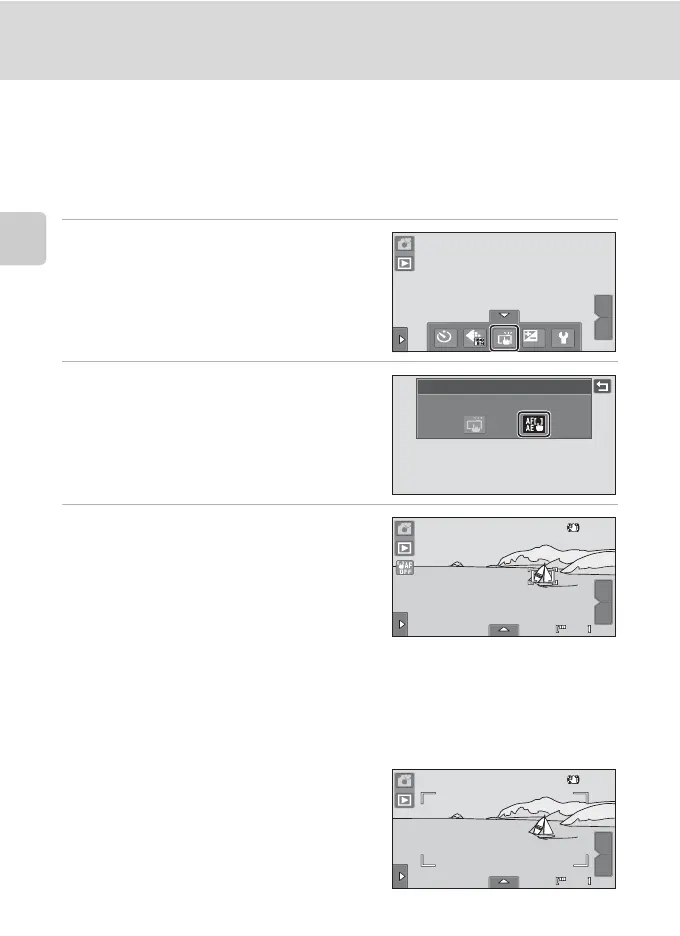
1 Tap the bottom tab to display the
setting controls (A 12) and tap the
touch shooting icon.
The menu of the touch shooting setting is
displayed in the monitor.
2 Tap r (touch AF/AE).
Tap J to return to the previous screen.
To hide the setting controls after applying the
setting, tap the tab again.
3 Tap the subject at which the camera
focuses.
When faces are detected in G (easy auto)
mode, only those faces surrounded by the
frame can be tapped to change the focus
subject. When multiple faces are detected, tap
a face framed by a single border to move the
focus area to that face.
When no face is detected, the camera focuses on the area that is tapped.
u or a double border will be displayed at the area tapped.
When digital zoom is in effect, the focus area cannot be selected.
To cancel the focus area selection, tap a displayed at the left side of the monitor.
If a position at which focus cannot be
acquired is tapped, X will be displayed in
the monitor. Tap another position inside X.
OFF
OFF
0.0
0.0
W
T
Touch shooting
Touch AF/AE
36
36
W
T
W
T
36
36






 To Next Page