60
Adjusting the A (Auto) Mode Setting
More on Shooting
Preset Manual
Preset manual is effective with mixed lighting or to compensate for light sources
with a strong color cast (for example, to make pictures taken under a lamp with a
red shade look as though they had been taken under white light).
Follow the procedure below to measure the white balance value according to the
light source when shooting.
1 Place a white or gray reference object under the lighting that will be
used during shooting.
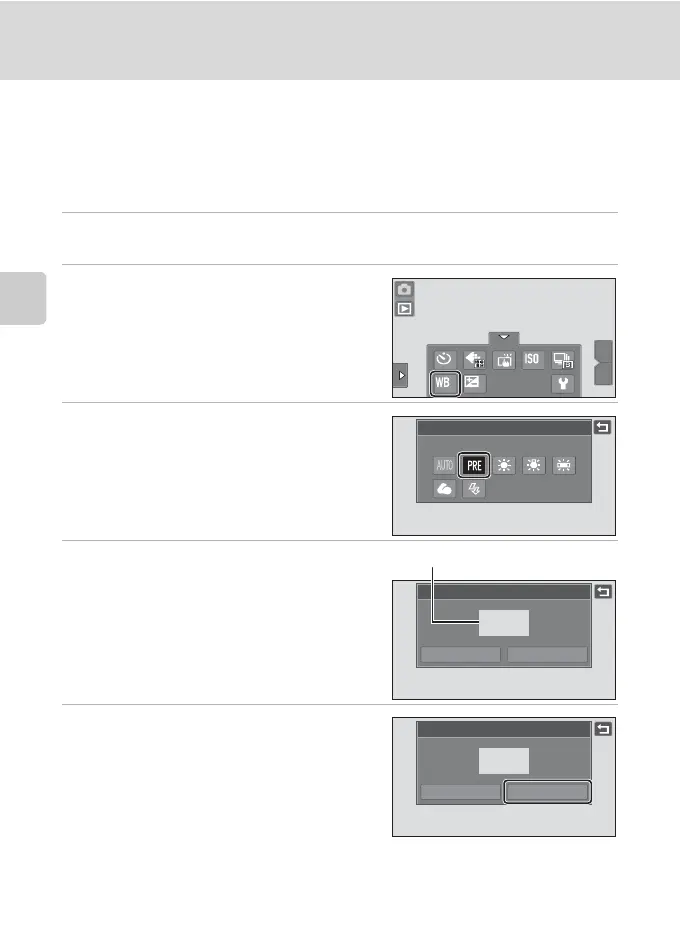
2 Tap the bottom tab to display the
settings controls (A 12) and tap
w.
3 Tap b.
The camera zooms in to the position for
measuring white balance.
4 Frame the reference object in the
measuring window.
To apply the most recently measured value
for preset manual, tap Cancel.
5 Tap Measure to measure a value for
preset manual.
The shutter is released and the new white
balance value is set. No picture is recorded.
B Note on Preset Manual
A value for flash lighting cannot be measured with Preset manual. When shooting using the flash,
set White balance to Auto or Flash.
W
T
OFF
OFF
AUTO
0.0
0.0
AUTO
White balance
Preset manual
Preset manual
Cancel Measure
easur
ng w
n
ow
Preset manual
Cancel Measure






 To Next Page