81
6 Can not be used with shifting or tilting.
7 Optimal exposure will only be achieved if the lens is at maximum aperture and the lens is not
shifted or tilted.
8 When AF 80–200mm f/2.8, AF 35–70mm f/2.8, AF 28–85mm f/3.5–4.5 (New), or
AF 28–85mm f/3.5–4.5 lenses are zoomed all the way in at the minimum focus distance, the
in-focus indicator (I) may be displayed when the image on the matte screen in the viewfinder
is not in focus.
Before shooting, confirm that the image in the viewfinder screen is in focus.
9 With maximum aperture of f/5.6 or faster.
D IX NIKKOR Lenses
IX NIKKOR lenses can not be used.
Attempting to attach an IX NIKKOR
lens could damage the lens or camera.
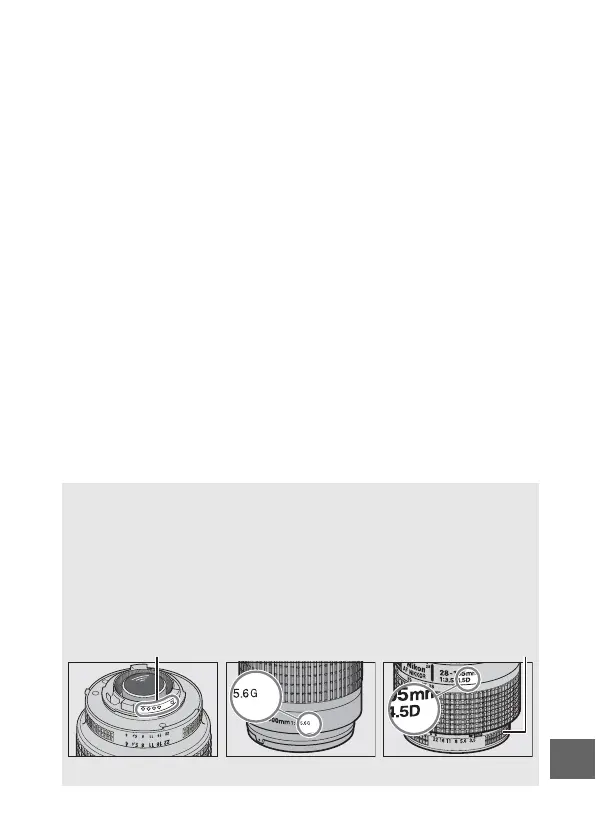
A Identifying CPU and Type G, E, and D Lenses
CPU lenses can be identified by the presence of CPU contacts, type G,
E, and D lenses by a letter on the lens barrel.
Type G and E lenses are
not equipped with a lens aperture ring.
CPU contacts Aperture ring
CPU lens Type G or E lens Type D lens



 To Next Page