10
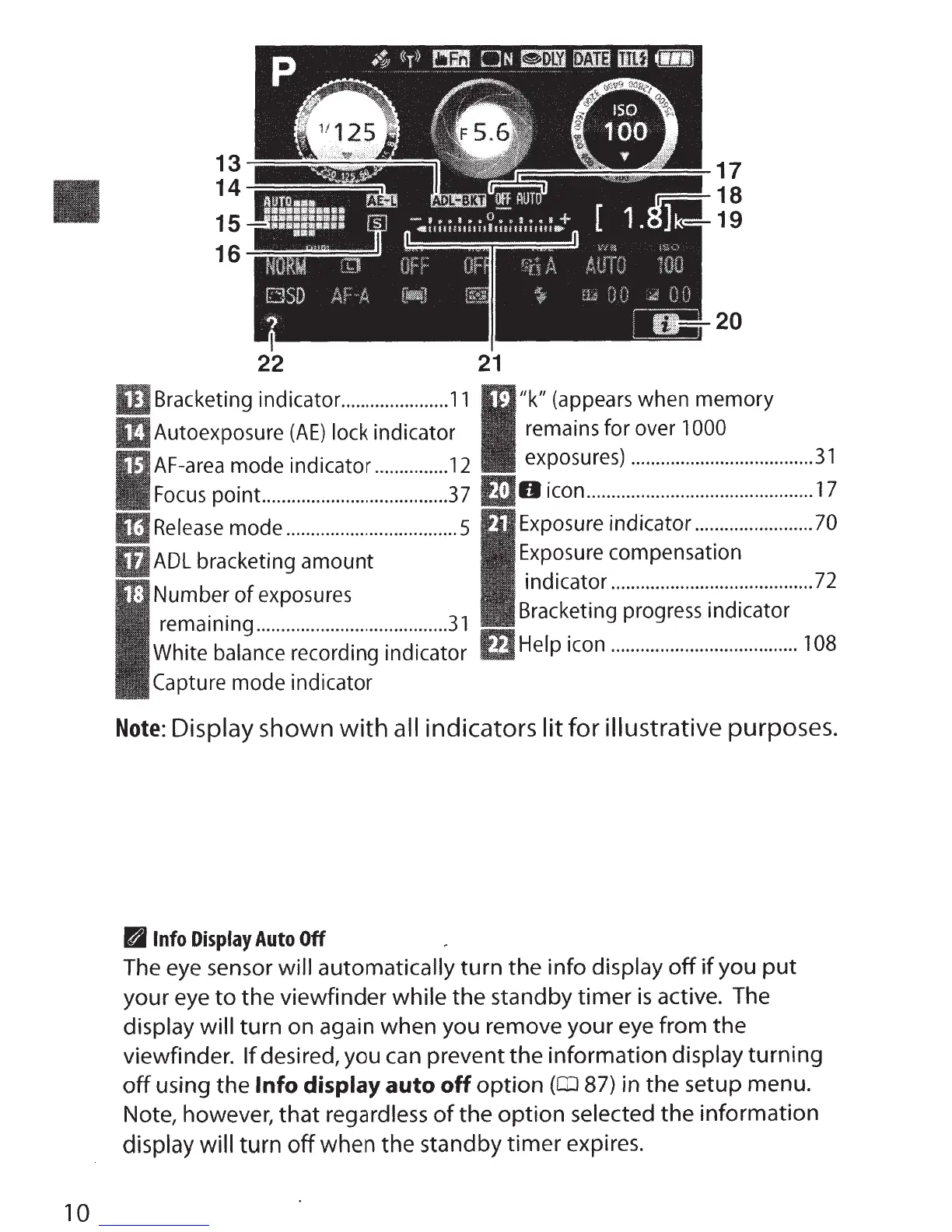
13
14
15
16-==::::::;::::::::~::::::;::::::::;:;:;::
22
20
21
Bracketing indicator.
.....................
11
"k"
(appears
when memory
Autoexposure
(AE)
lock indicator remains for over
1000
AF-area
mode indicator
...............
12
exposures)
........................
..
...........
31
Focus
point
......................................
37
IJO
icon
..............................................
17
Release
mode
...................................
5
Exposure
indicator
........................
70
ADL
bracketing amount
Exposure
compensation
indicator
.........................................
72
Number
of
exposures
remaining
.......................................
31
White balance recording indicator
Capture mode indicator
Bracketing
progress
indicator
Help
icon
......................................
108
Note:
Display shown
with
all
indicators
lit for
illustrative
purposes.
B
Info
Display
Auto
Off
The eye sensor
will automatically
turn
the
info
display
off
if
you
put
your
eye
to
the
viewfinder
while
the
standby
timer
is
active. The
display will
turn
on
again
when
you remove
your
eye
from
the
viewfinder.
If
desired, you can prevent
the
information
display
turning
off
using
the
Info
display
auto
off
option
(CD
87)
in
the
setup menu.
Note, however,
that
regardless
of
the
option
selected
the
information
display will
turn
off
when
the
standby
timer
expires.



 To Next Page