EasyManua.ls Logo

Nikon D5500 - Page 33

Nikon D5500
583 pages
Print Icon
To Next Page IconTo Next Page
To Previous Page IconTo Previous Page
Loading...
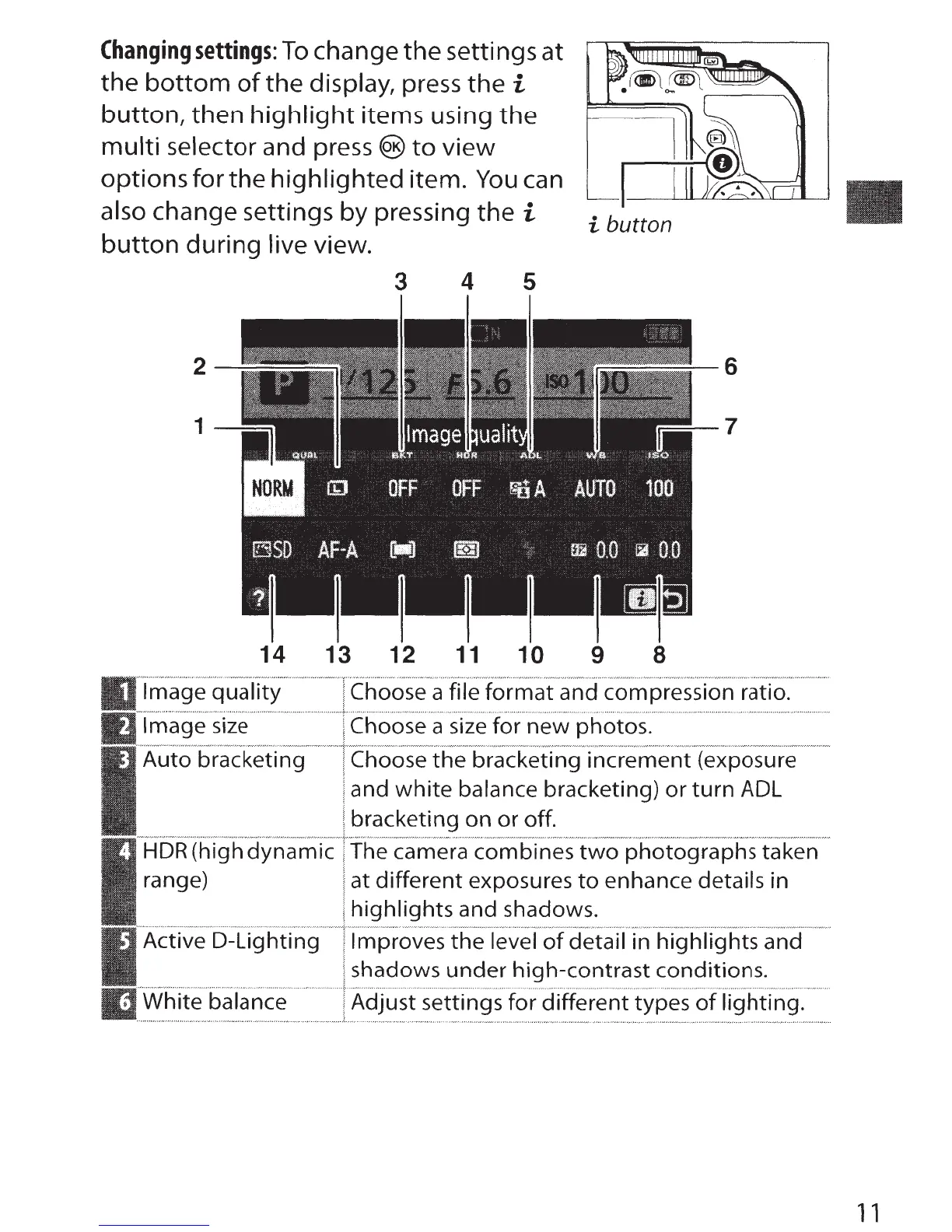
Changing
settings:
To
change the settings at
the
bottom
of
the display, press the i
button, then
highlight
items using the
multi selector and
press®
to
view
options for the highlighted item.
You
can
also change settings by pressing the
i
button
during live view.
i button
3
4
5
14 13 12
11
10
9
8
Image
quality
Image
size
Auto bracketing
HDR
(high dynamic
range)
Active D-Lig hti ng
White balance
Choose a file
format
and compression ratio.
Choose a size for
new
photos.
Choose
the
bracketing increment (exposure
and
white
balance bracketing)
or
turn
ADL
bracketing on or off.
The camera combines
two
photographs
taken
at different exposures
to
enhance details in
highlights
and shadows.
Improves
the
level
of
detail in
highlights
and
shadows
under
high-contrast conditions.
Adjust settings for different types
of
lighting.
1 1

Table of Contents

Other manuals for Nikon D5500

Related product manuals