EasyManua.ls Logo

Nikon D5500 - Page 59

Nikon D5500
583 pages
Print Icon
To Next Page IconTo Next Page
To Previous Page IconTo Previous Page
Loading...
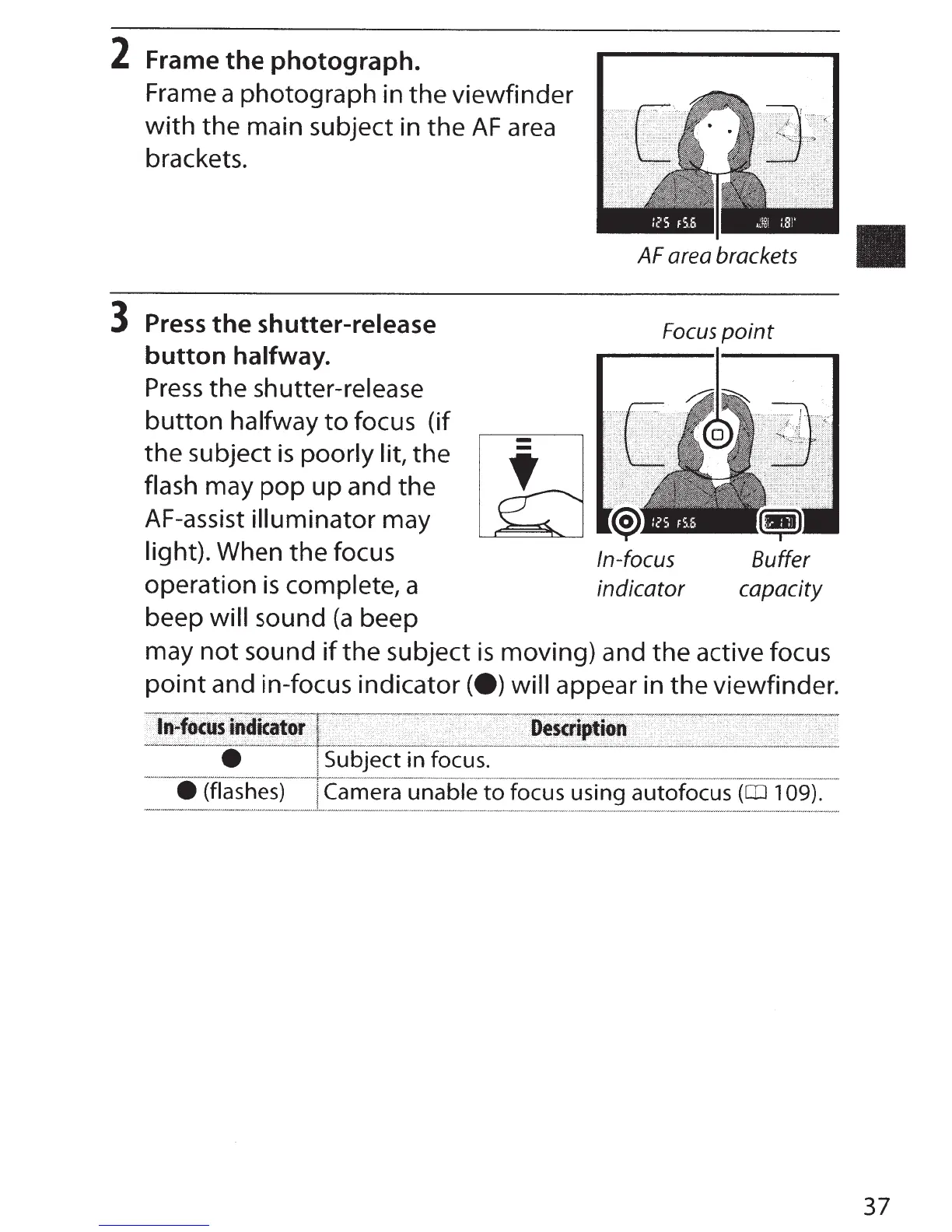
2
Frame
the
photograph.
Frame a photograph in
the
viewfinder
with
the main subject in the
AF
area
brackets.
3
Press
the
shutter-release
button
halfway.
Press
the
shutter-release
button
halfway
to
focus (if
the subject
is
poorly lit,
the
flash may
pop
up
and the
AF-assist
illuminator
may
light).
When
the
focus
operation
is
complete,
a
beep
will
sound
(a
beep
-
-
AF area brackets
Focus
point
In-focus
Buffer
indicator
capacity
may
not
sound
if
the subject
is
moving) and the active focus
point
and in-focus indicator
(e)
will
appear in the viewfinder.
bject in focus.
Camera unable
to
focus using autofocus
(CD
1
09).
37

Table of Contents

Other manuals for Nikon D5500

Related product manuals