22
F.
Unload
the
Film
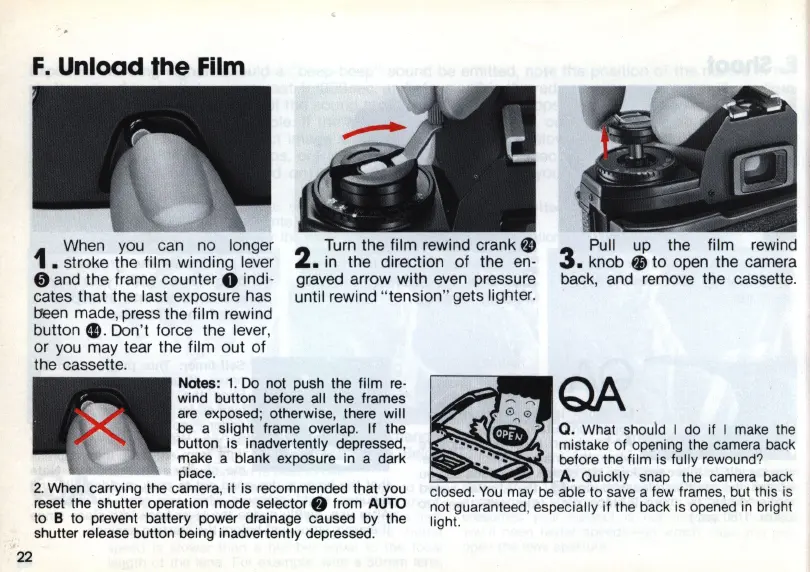
When you can no longer
1 . stroke the film winding lever
o and the frame counter 0 indi-
cates that the last exposure has
t:1een
made, press the film rewind
button
Ell
.
Don
't force the lever,
or you may tear the film out of
the cassette.
2
Turn the film rewind crank
fJl
•
in
the direction
of
the
en
-
graved arrow with
even
pressure
until rewind "tension" gets lighter.
Pull up the film rewind
3. knob
~
to open the camera
back, and remove the cassette.
Notes: 1.
Do
not push the film
re-
wind button before all the frames
are
exposed; otherwise, there will
be
a slight frame overlap. If the
button is inadvertently depressed,
make a blank exposure in a dark
pi
ace.
2. When carrying the camera, it is recommended that you
reset the shutter operation mode
selector.
from
AUTO
to B
to
prevent battery power drainage caused by the
shutter release button being inadvertently depressed.
~
"
QA
. 0 0
••
~
-
Q_
What should I do if I make
th
e
•••••
• mistake of opening the camera
ba
ck
.'
before the film is fully
rew
o
und
?
A. Quic
kl
y snap the c
am
e
ra
back
closed. You m
ay
be able to save a few fram
es
, but this is
not guarante
ed
, especially if
th
e
ba
ck is opened
in
bri
ght
light.














 To Next Page