10
Nomenclature/Controls—continued
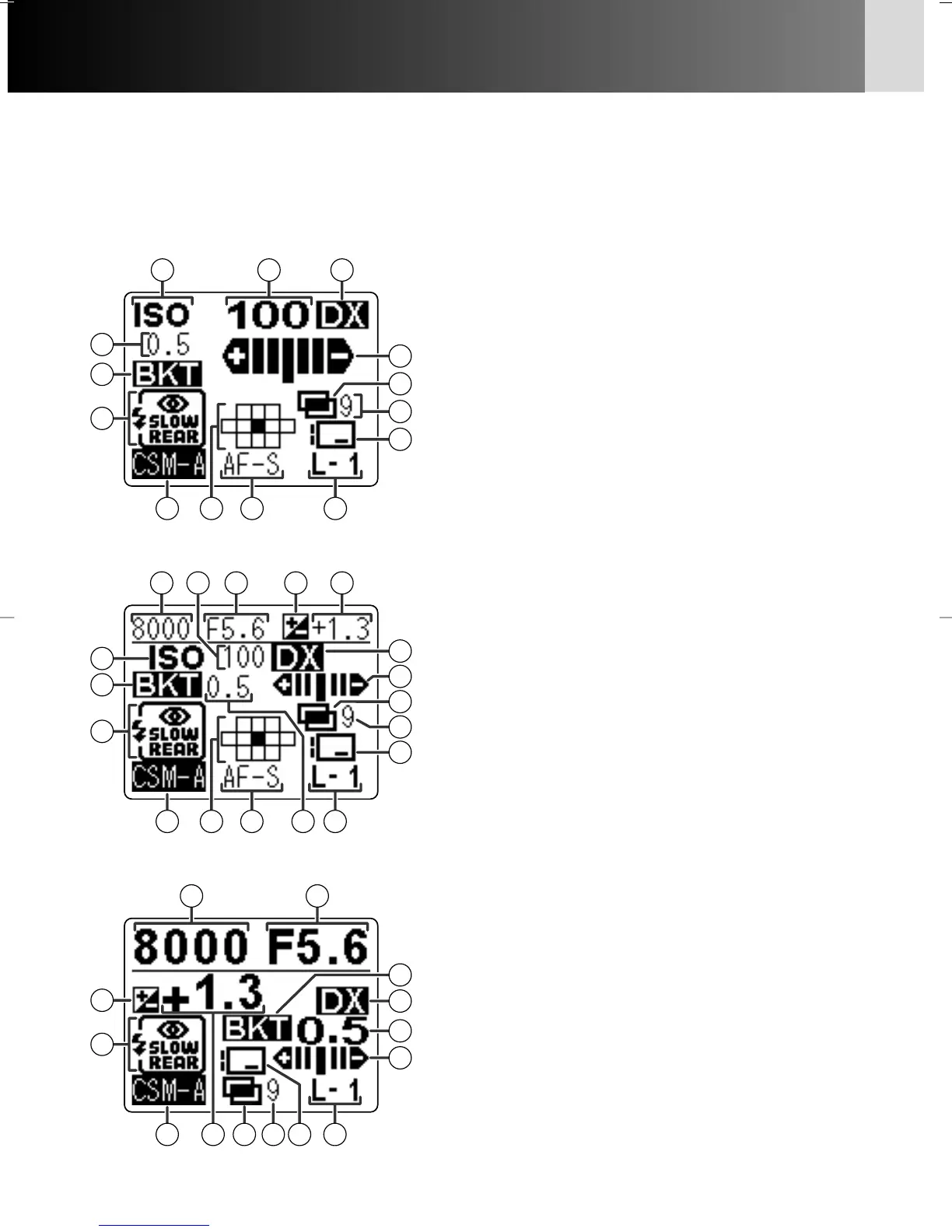
• Rear LCD panel (shooting data displays)
• At the default setting, shooting data is displayed in normal mode. It can be changed
to detailed or large display by selecting “Detailed” or “Large” in Custom Setting “d7:
Rear panel info” (x 103).
Normal display
3
7
15 2
14
16
10
17
9
18
8
13
12
4
1
5
6
11
Detailed display
Large display
1 ISO...................................................x 44
2 Film speed........................................x 44
3 DX ...................................................x 23
4 EV steps in Auto Exposure Bracketing
........................................................x 75
5 Auto Exposure Bracketing ................x 75
6 Flash sync mode.............................x 157
7 Auto Exposure Bracketing status ......x 75
8 Multiple exposures .........................x 138
9 Number of shots in multiple exposure
......................................................x 138
!p Data imprint...........................x 128, 133
!q Custom Setting ................................x 91
!w Focus area........................................x 50
!e AF servo mode .................................x 48
!r Lens number ..................................x 145
!t Shutter speed ......................x 66, 70, 80
!y Aperture ....................................x 68, 70
!u Exposure compensation....................x 74
!i Exposure compensation value ..........x 74
P930_En 04.10.19 7:18 PM Page 10



 To Next Page