141
Menu Guide
• Setting interval timer
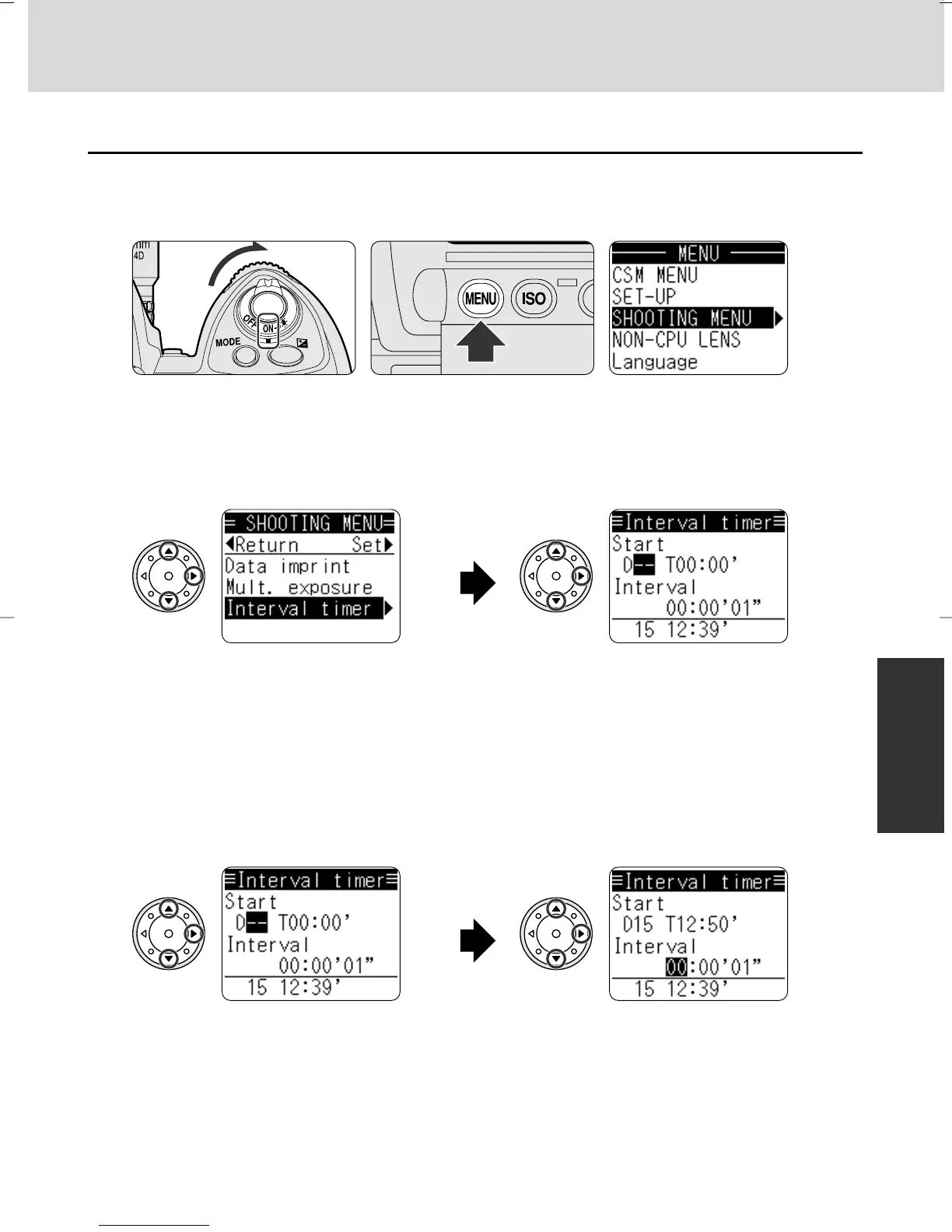
1
Turn the power switch on and press the MENU button so MENU is
displayed in the rear LCD panel.
2
Select Interval timer display in the SHOOTING MENU.
• Press P/{ on the multi-selector
to select “SHOOTING MENU”
and press > so the SHOOTING
MENU appears.
• Press P/{ to select “Interval
timer” and press > to set. Start
time/Interval display is shown
and the current time appears at
the bottom.
3
Set start day/time and interval.
• Press P/{ to select the
highlighted start day and press
> to set.
• Press P/{ to select highlighted
minute/second and the > to set.
• Press P/{ to select the highlighted
hour interval and press > to set.
• Press P/{ to select the highlighted
minute/second and > to set. Press
> to display repeating time and the
number of shots in one operation.
• Make sure to set date and time (x 35) before setting the interval timer.
P930_En 04.10.19 7:19 PM Page 141



 To Next Page