EasyManua.ls Logo

Nikon L35 AF - Shooting

Nikon L35 AF
19 pages
Print Icon
To Next Page IconTo Next Page
To Previous Page IconTo Previous Page
Loading...
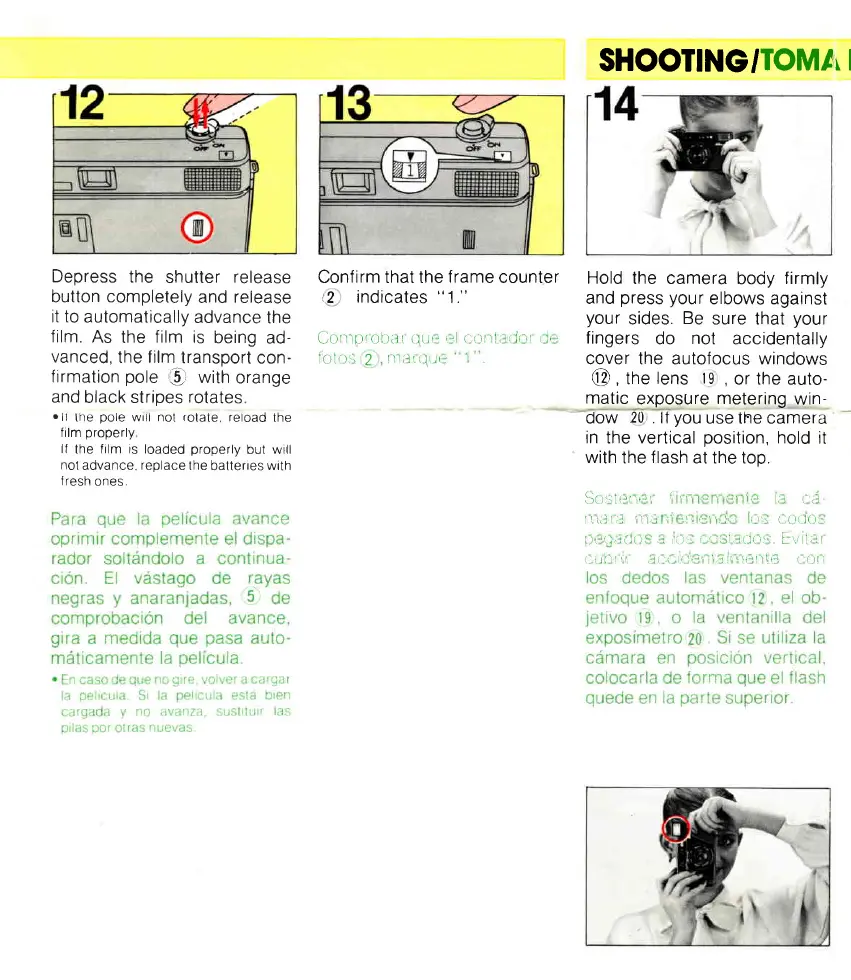
Depress
the
shutter
release
button completely
and
release
it to
automatically
advance
the
film.
As
the
film
is
being
ad-
vanced,
the film
transport
con-
firmation
pole
e
with
orange
and
black strioes
rotates
olr
tne
pole
wrlt not
rotate.
retoad
the
film
properly
lf
the
film is
loaded
properly
but will
not
advance.
replace
the
batteries
with
lresh
ones
Confirm that the
frame
counter
,2
indicates
"
1."
Contprobitr
t.1 tt,,r
r)
oorlir(lor
rir'
f
otos
2
lllilr(lttr
I
SHOOTINGITOMA
I
Hold
the camera
body
firmly
and
press
your
elbows against
your
sides.
Be
sure that
your
f ingers
do
not
accidentally
cover the autofocus windows
@ ,
the
lens
tg
,
or the auto-
matic
exposure
metering
win-
dow
20
. lf
you
use the camera
in
the
vertical
position,
hold
it
with
the
f lash
at the too.
Q3516:111,r
I"',,
",,
,'
it
atil
illillil
'll,i
I
j'
'
"r
i
O:-
(IOLJO:,
f)t'(lilfi[),,i
i):.
1'r,' l'1;1115.
f\/
l;]l
(lr.ti)lr,lIt'f.l','
r,1
ltl(,rll{'
ltOll

Related product manuals