APERTURE·PRIORITY
EXPOSURE
MODE
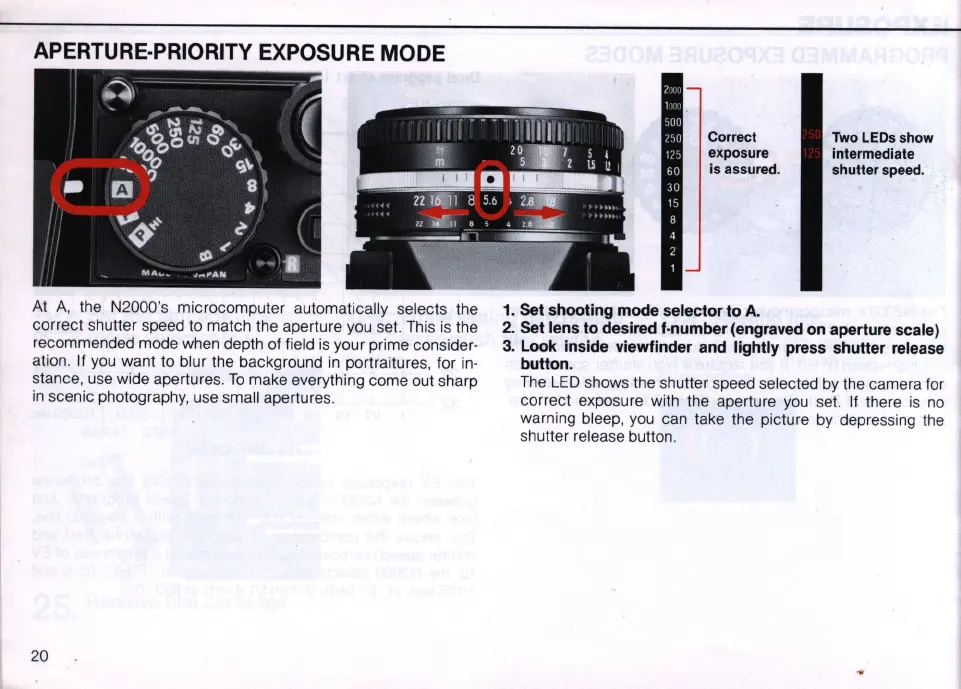
At
A,
the N2000's microcomputer automatica
ll
y selects the
correct
shu
tter speed to match the aperture you
se
t.
This
is
the
recommended mode when depth of field
is
your prime consider-
ation. If you want to blur the background
in
portraitures, for
in-
stance, use
wi
de apertures.
To
make everything come out sharp
in
scenic photograp
hy
, use sma
ll
apertures.
20
Correct
exposure
Is
assured.
1. Set shooting mode selector to
A.
Two
LEOs
show
intermediate
shutter
speed.
2. Set lens to desired f·number (engraved on aperture scale)
3.
Look inside viewfinder and lightly press shutter release
button.
The
LED
shows the shutter speed selected
by
the camera for
correct exposure with the aperture
you
set. If there
is
no
warning bleep,
you
can take the picture
by
depressing the
shutter release button.



 To Next Page