MANUAL
EXPOSURE
MODE
It
20
m
00
5
UU
1I!III!IIIE _
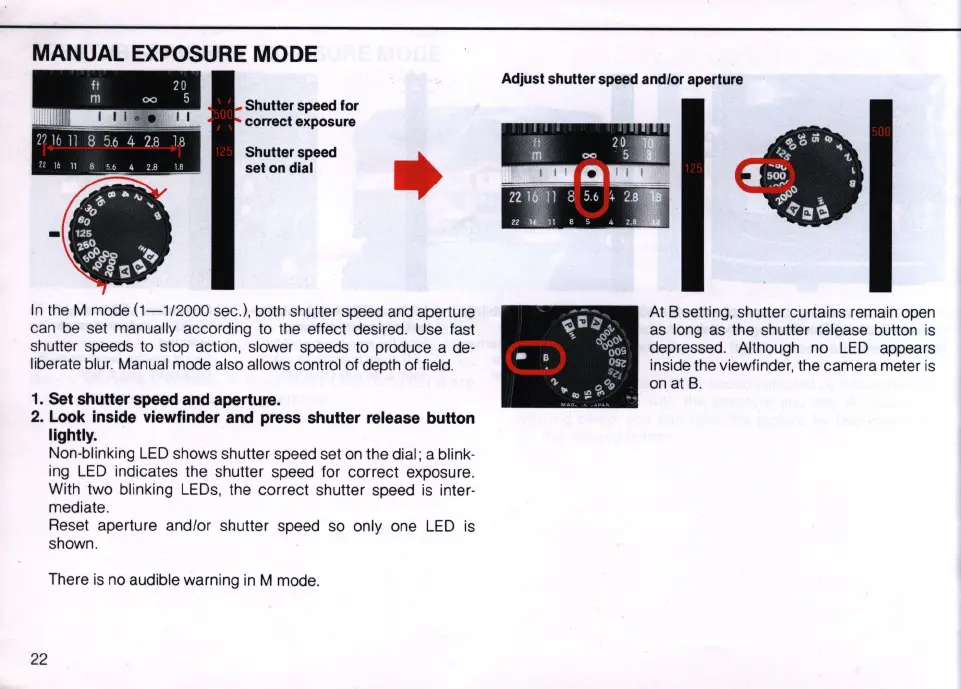
Shutler speed for
correct exposure
21
I b
I:
8
56
4 28
Ie
Shutler speed
set on dial
•
11
8
,~
.:.
~
rl
IS
In
the
M mode
(1-1/2000
sec.), both shutter speed
and
aperture
can
be
set manually according to the effect desired. Use fast
shutter speeds to stop action, slower speeds to produce a de-
liberate
blur.
Manual mode also allows control of depth of field.
1. Set shutter speed and aperture.
2. Look inside viewfinder and press shutter release button
lightly.
22
Non-blinking
LED
shows shutter speed set
on
the dial ; a blink-
ing
LED
indicates the shutter speed for correct exposure.
With two
bl
inking
LEOs
, the correct shutter speed
is
inter-
mediate.
Reset aperture and/or
shu
tter speed
so
only one
LED
is
shown.
There
is
no audible warning
in
M mode.
Adjust shutler speed and/or aperture
At B setting, shutter curtains remain
open
as
long
as
the shutter release button
is
depressed. Although no
LED
appears
inside the viewfinder, the camera meter is
on
at
B.



 To Next Page