Adjusting date and time
1
2
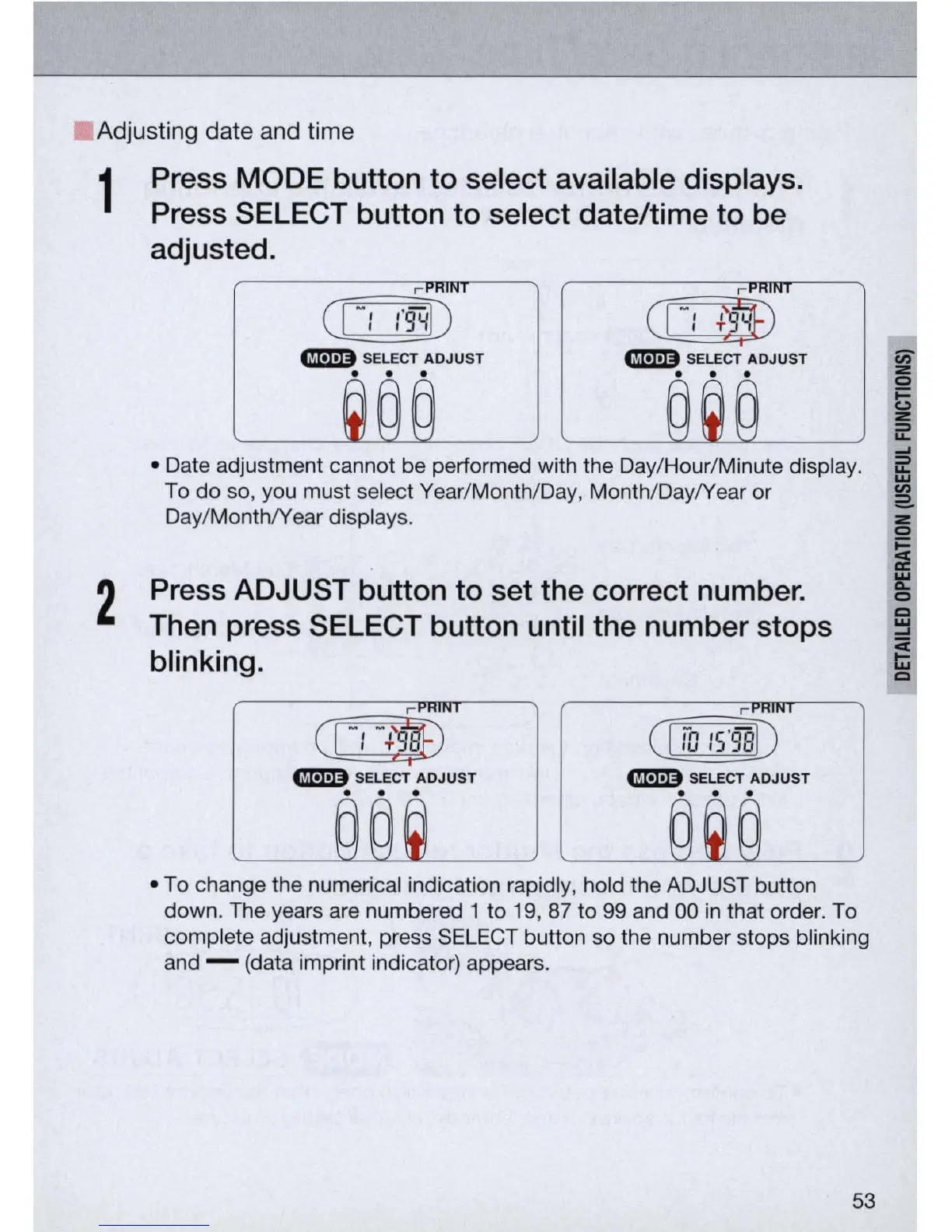
Press
MODE
button to select available displays.
Press SELECT button to select date/time to be
adjusted.
CIJJfl)
CIJJ!!8
GImI)
SELECT
ADJUST
GImI)
SELECT
ADJUST
. . .
. . .
• Date adjustment cannot be performed with the Day/Hour/Minute display.
To do so, you must select Year/Month/Day, Month/Day/Year or
Day/Month/Year displays.
Press ADJUST button to set the correct number.
Then press SELECT button until the number stops
blinking.
CCL£DB
GImI)
SELECT
ADJUST
GImI)
SELECT
ADJUST
. . . . . .
• To change the numerical indication rapidly, hold the ADJUST button
down. The years are numbered 1 to 19, 87 to 99 and 00
in
that order. To
complete adjustment, press SELECT button so the number stops blinking
and - (data imprint indicator) appears.
53



 To Next Page