Available
Mode
Combinations
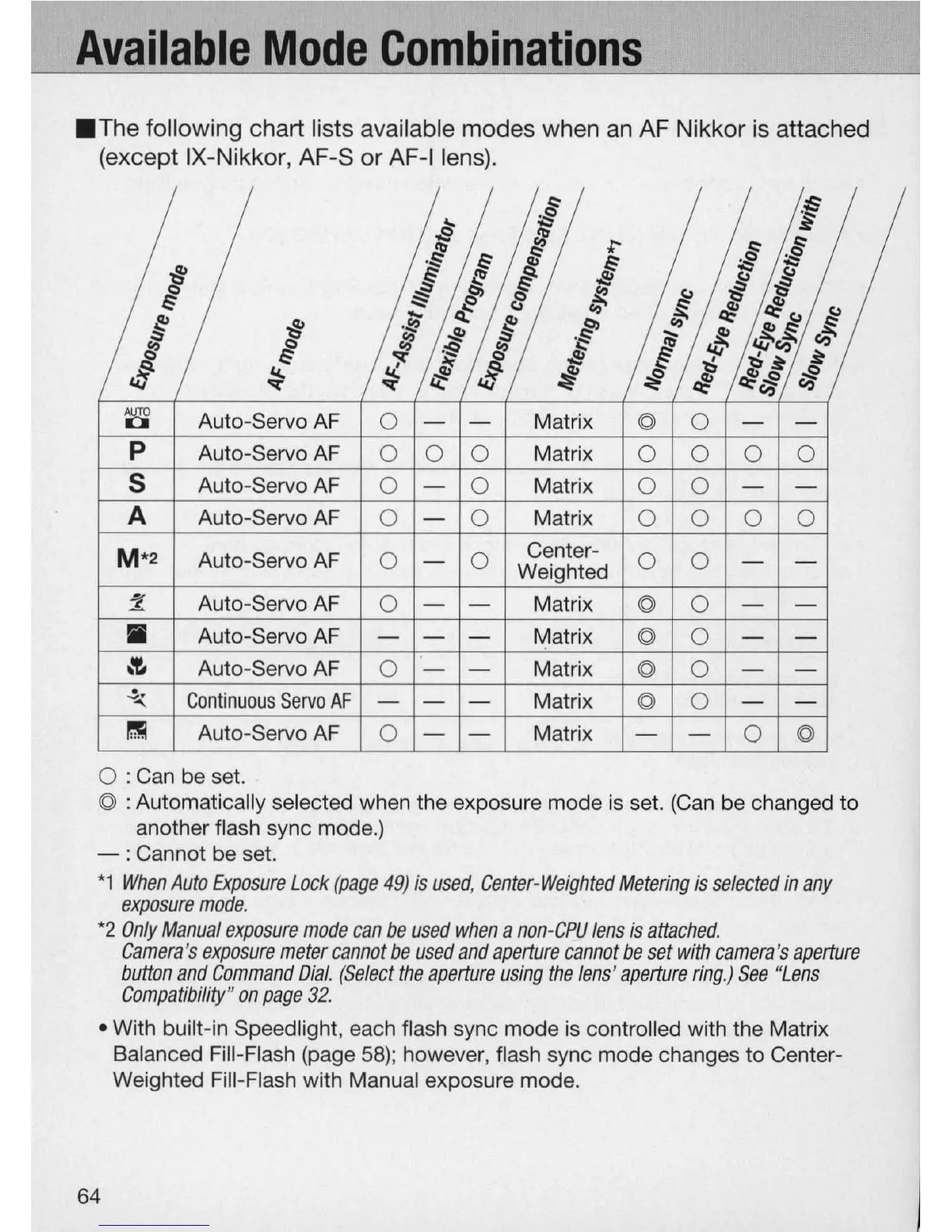
.The
following chart lists available modes when
an
AF
Nikkor
is
attached
(except IX-Nikkor,
AF
-S or
AF
-I lens).
:!
;S
t;
~
~
~
;-
,8
:!
·s
f
~
9
-§
$
f
"/j
~
~
-;;
:::;
~
~
;:;;
I:
8
~
tg
"t)
Cl>
.....
~
ct'~
tg
{!:
...
q;
{!:
.
1'
if'
-§
.
!t/
~
tg
.!!:
~
Ii;
Cl>
/!;:~
~
~
.iI!
~
§
4:f'
'" C') C')
~
~
<:)
,
l)
~ ~
.tJ
~
~
#j
~
i
~
~
Cl>
<:)
,!i?
it:
I.4j
ct' ct'
~
'"
3 Auto-Servo AF
0
- -
Matrix
© 0
- -
P Auto-Servo AF
0 0 0
Matrix
0 0 0 0
S
Auto-Servo AF
0
-
0
Matrix
0 0
- -
A Auto-Servo AF
0
-
0
Matrix
0 0 0 0
M*2
Auto-Servo AF
0
-
0
Center-
0 0
- -
Weighted
~
Auto-Servo
AF
0
- -
Matrix
© 0
- -..!:
iii
Auto-Servo
AF
- - -
Matrix
© 0
- -
~'"
Auto-Servo
AF
0 -
-
Matrix
© 0
- -
~
Continuous
Servo
AF
- - -
Matrix
© 0
- -
~
Auto-Servo
AF
0
-
-
Matrix - -
0
©
o : Can be set.
© : Automatically selected when the exposure mode is set.
(Can
be changed to
another flash sync mode.)
- : Cannot be set.
*1
When
Auto
Exposure
Lock
(page
49)
is
used
,
Center-Weighted
Metering
is
selected
in
any
exposure
mode.
*2
Only
Manual
exposure
mode
can
be
used
when
a
non
-CPU
lens
is
attached.
Camera
's
exposure
meter
ca
nnot
be
used
and
aperture
cannot
be
set
with
camera
's
aperture
button
and
Command
Dial
.
(Select
the
aperture
using
the
lens'
aperture
ring
.)
See
"
Lens
Compatibility
"
on
page
32
.
• With built-in Speedlight, each flash sync mode
is
controlled with the Matrix
Balanced
Fill
-Flash (page
58);
however, flash sync mode changes to Center-
Weighted Fill-Flash with Manual exposure mode.
64



 To Next Page