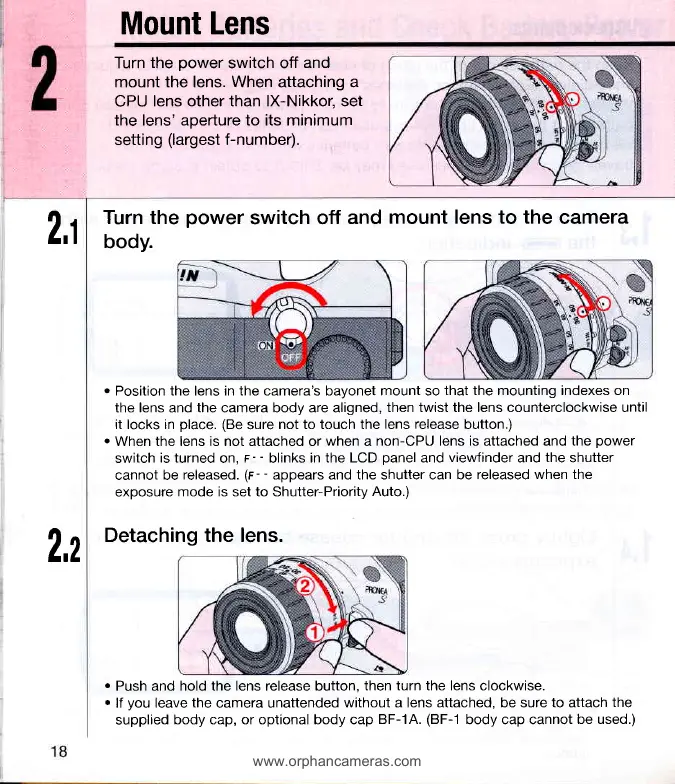
Mount Lens
Turn
the
power
switch off
and
mount the lens. When attaching a
CPU
lens other than lX-Nikkor, set
the lens' aperture to its minimum
setting
(largest
f-number).
2,1
2,2
Turn the
power
switch off
and
mount lens to the
camera
body.
o
Position the lens in the camera's bayonet mount so
that the mounting indexes on
the lens and the camera body are aligned,
then twist the lens counterclockwise until
it locks in
place.
(Be
sure
not to touch the
lens release
button.)
.
When the lens is not attached or
when
a
non-CPU lens is attached and the
power
switch
is turned
on,
F-
-
blinks
in the LCD
panel
and
viewfinder
and
the
shutter
cannot be
released.
(r-
-
appears and the shutter can be
released when the
exoosure
mode is set to Shutter-Prioritv
Auto.)
Detaching the lens.
.
Push and hold the lens release button,
then turn the lens clockwise.
.
lf
you
leave
the
camera unattended
without a lens attached, be sure to attach
the
supplied
body cap, or optional body cap
BF-1A.
(BF-1
body cap cannot
be used.)













 To Next Page