EasyManua.ls Logo

Nikon PRONEA S - About Exposure Mode and Type of Program

Nikon PRONEA S
44 pages
Print Icon
To Next Page IconTo Next Page
To Previous Page IconTo Previous Page
Loading...
Z
Check
points
n
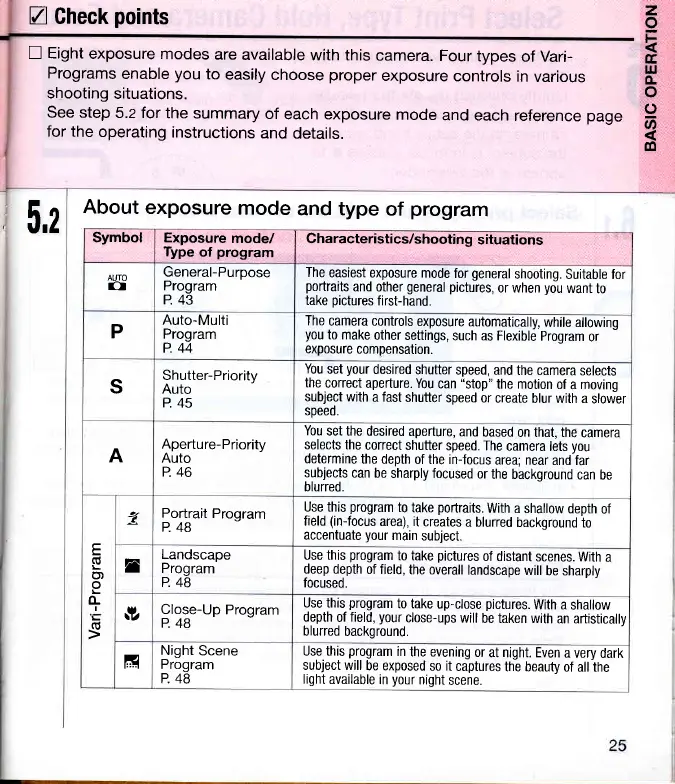
Eight
exposure
modes
are
available
with this
camera.
Four
types
of Vari-
Programs
enable
you
to
easily
choose
proper
exposure
controls
in
various
shooting
situations.
see step
5.2 for
the
summary
of
each exposure
mode
and each
reference
page
for
the operating
instructions
and details.
z
o
tr
tr
IJJ
o.
o
o
@
c0
5,2
About
exposure
mode
and type
of
program
Symbol Exposure
mode/
Type
of
program
Characteristics/shooting
situations
AUTO
o
General-Purpose
Program
P.
43
The
easiest
exposure mode
for
general
shooting.
Suitable for
portraits
and
other
general pictures,
or when
you
want
to
take
pictures
first-hand.
P
Auto-Multi
Program
P.44
The
camera controls
exposure
automatically,
while allowing
you
to make
other
settings,
such as Flexible
Program
or
exposure
compensation.
S
Shutter-Priority
Auto
P.45
You
set
your
desired
shutter
speed, and
the camera
selects
the
correct
aperture. You
can
"stop"
the motion
of
a
moving
subject with
a fast
shutter
speed
or create
blur with a
slower
soeed.
A
Aperture-Priority
Auto
P.46
You
set the desired
aperture,
and
based
on that, the
camera
selects the
correct
shutter
speed. The
camera
lets
yOu
determine
the depth
of the in-focus
area; near
and far
subjects
can be
sharply focused
or
the background
can be
blurred.
E
G
L
o)
o
(L
I
(U
z
Portrait
Program
P.48
Use this
program
to
take
portraits.
With
a shallow
depth
of
field
(in{ocus
area), it
creates
a blurred
background
to
accentuate
your
main
subject.
n
Landscape
Program
P.48
Use this
program
to take
pictures
of distant
scenes. Witn
a
deep depth
of field,
the overall
landscape
will
be sharply
focused.
v
Close-Up
Program
P.48
Use this
program
to take
up-close
pictures.
With a
shalrow
depth
of
field,
your
close-ups
will
be taken with
an artisticallv
blurred
background.
l,l
Night
Scene
Program
P. 48
Use this
program
in
the evening
0r
at night. Even
a very
dark
subject will
be exposed
so it
captures
the beauty
of all the
light
available in
your
night
scene.

Related product manuals