EasyManua.ls Logo

Nikon PRONEA S - Select Print Type, Hold Camera and Focus

Nikon PRONEA S
44 pages
Print Icon
To Next Page IconTo Next Page
To Previous Page IconTo Previous Page
Loading...
0
Select Print Type,
Hold
Camera
and Focus
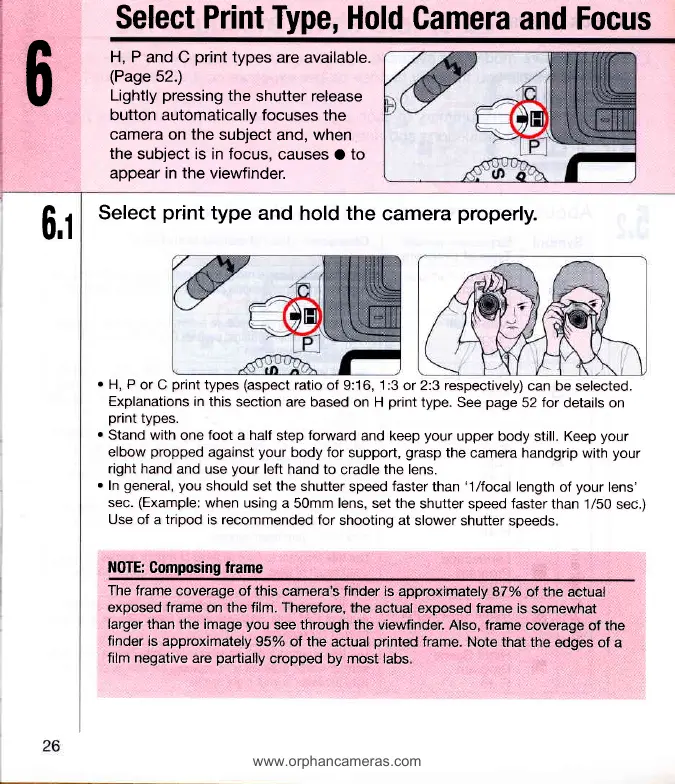
H, P and
C
print
types
are available.
(Page
52.)
Lightly
pressing
the
shutter release
button automatically focuses
the
camera
on
the
subject
and, when
the
subject is in focus,
causes
O
to
appear in the viewfinder.
6,1
Select
print
type
and hold the
camera
properly.
.
H, P
or C
print
types
(aspect
ratio of
9:16,
1 :3
or 2:3 respectively)
can be
selected.
Explanations in
this section
are based on H
print
type.
See
page
52
for
details on
print
types.
r
Stand with
one
foot
a half
step
forward
and keep
your
upper body
still. Keep
your
elbow
propped
against
your
body for
support,
grasp
the
camera handgrip with
your
right hand
and use
your
left
hand to
cradle
the lens.
.
In
general, you
should
set the shutter
speed
faster
than
'1lfocal
length
of
your
lens'
sec.
(Example:
when using
a 50mm lens, set the
shutter speed faster
than 1/50
sec.)
Use
of a
tripod is
recommended for
shooting at
slower shutter
speeds.
NOTE: Gomposing
trame
The
frame coverage
of
this
camera's
finder
is
approximately 87%
of the
actual
exposed
frame on
the
film. Therefore,
the
actual exposed frame
is
somewhat
larger than
the
image
you
see through the viewfinder.
Also, frame
coverage
of the
finder is
approximately 95%
of
the
actual
printed
frame.
Note
that
the edges of
a
film
negative are
partially
cropped
by most
labs.
www.orphancameras.com

Related product manuals