EasyManua.ls Logo

Nikon PRONEA S - Confirm Indications in Viewfinder and Release Shutter

Nikon PRONEA S
44 pages
Print Icon
To Next Page IconTo Next Page
To Previous Page IconTo Previous Page
Loading...
7
Confirm
Indications in
Uieurdinder
and Release
Shutter
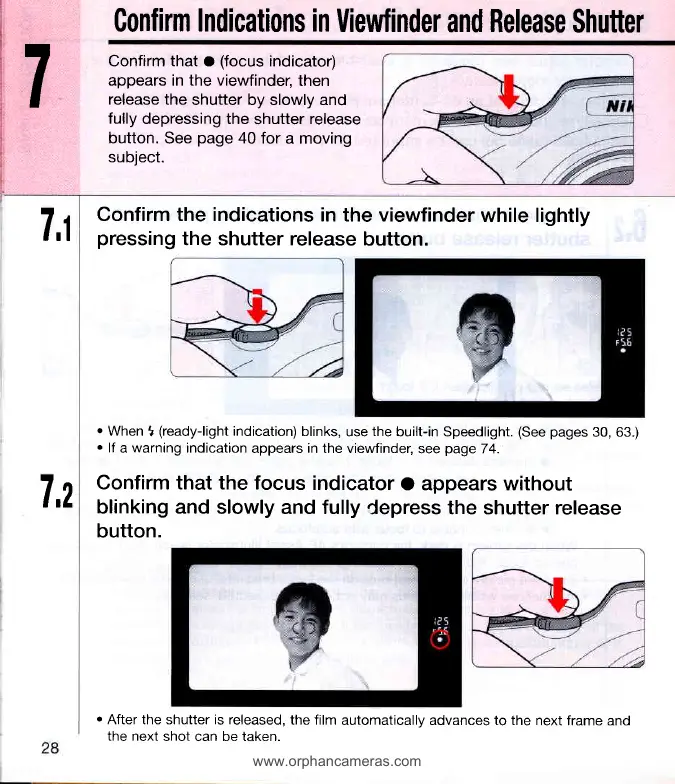
Confirm that o
(focus
indicator)
appears in the viewfinder,
then
release the
shutter by slowly and
fully
depressing the
shutter
release
button.
See
page
40
for a moving
subject.
7,1
7,2
Confirm the indications
in the viewfinder
while lightly
pressing
the shutter release
button.
.
When
t
(ready-light
indication)
blinks,
use
the
built-in Speedlight.
(See pages
30, 63.)
.
lf
a
warning
indication
appears
in
the viewfinder,
see
page
74.
Confirm that the focus
indicator
O appears without
blinking and
slowly and fully
Cepress the shutter release
button.
r
After the shutter is released,
the film
automatically advances to the
next frame and
the next
shot can be taken.
www.orphancameras.com

Related product manuals