EasyManua.ls Logo

Nikon PRONEA S - Lens Compatibility

Nikon PRONEA S
44 pages
Print Icon
To Next Page IconTo Next Page
To Previous Page IconTo Previous Page
Loading...
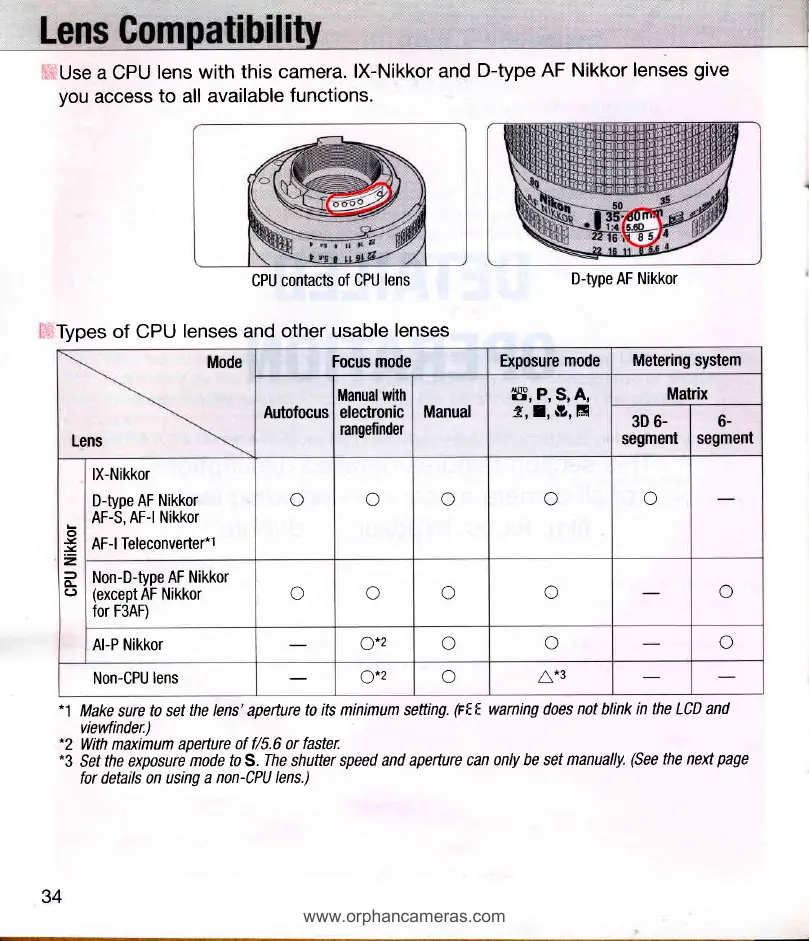
ffUse
a CPU
lens
with
this camera.
lX-Nikkor
and
D-type
AF Nikkor
lenses
give
you
access
to
all
available
functions.
CPU contacts
of CPU
lens
+i+Types of CPU
lenses and
other usable
lenses
*1
Make
sure
to set
the lens' aperture
to its minimum setting.
(rEF-
warning does
not
blink
in the LCD and
vievvfinder.)
*2
With maximum aperture
of f/5.6 or
faster.
"3 Sef
the exposure
mode to S.
The
shutter
speed and
apefture can
only be set
manually.
(See
the next
page
for details on using
a non-CPU
lens.)
D-type AF Nikkor
Mode
Lens
Focus
mode
Exposure
mode
Metering system
Autofocus
Manualwith
electronic
rangefinder
Manual
ff, P, SN A'
Z,I,
S?,;fi
Matrix
3D 6-
segment
6-
segment
o
x
v
2
=
CL
(J
lX-Nikkor
D-type AF
Nikkor
AF-S,
AF-l Nikkor
AF-l Teleconverter*1
o
o
o
o
o
Non-D-type
AF Nikkor
(except
AF
Nikkor
for F3AF)
o
o
o
o
o
Al-P Nikkor
o*2
o
a)
a
Non-CPU
lens
('\*)
o
n*2
l\
"
34
www.orphancameras.com

Related product manuals