EasyManua.ls Logo

Nikon PRONEA S - Page 39

Nikon PRONEA S
44 pages
Print Icon
To Next Page IconTo Next Page
To Previous Page IconTo Previous Page
Loading...
Film-continued
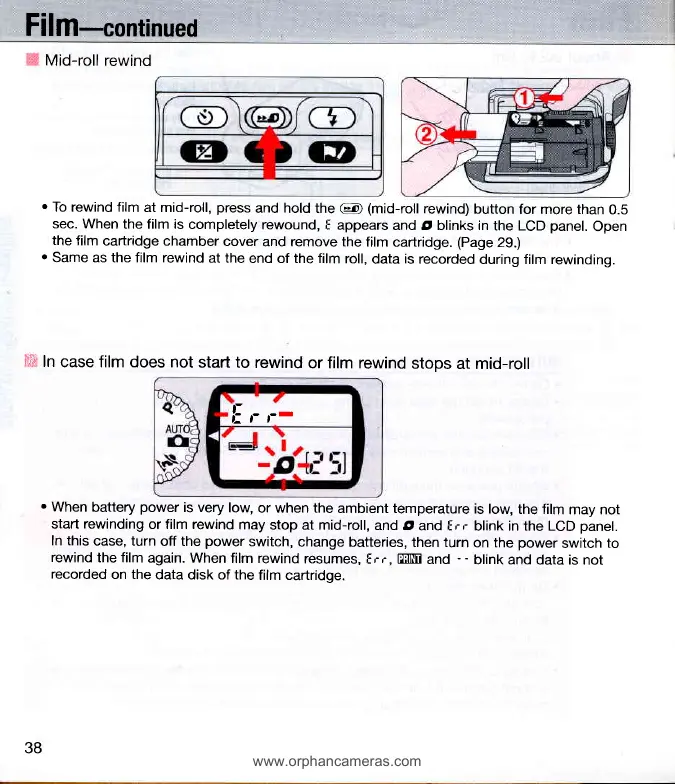
Mid-roll rewind
.
To rewind film
at mid-roll,
press
and hold the
@
(mid-roll
rewind)
button
for more than
0.5
sec. When
the film is
completely
rewound,
I appears
and O blinks in
the LCD
panel.
Open
the
film
cartridge chamber
cover
and remove the
film cartridge.
(Page
29.)
.
Same as the film rewind
at the
end of the film
roll,
data
is
recorded
during film rewinding.
iii,,
In
case film does not
start to
rewind
or film rewind
stops
at mid-roll
li
,' ,'-
'When
battery
power
is very
low,
or when the
ambient temperature
is low,
the film
may not
start rewinding
or film rewind
may
stop at mid-roll,
and d
and Frr
blink in the LCD
panel.
In this
case, turn
off the
power
switch,
change batteries,
then turn
on the
power
switch
to
rewind
the film
again. When
film rewind
resumes,
I
r r,
EEIM
and
- -
blink and
data is not
recorded
on the
data disk of the
film cartridge.
38
www.orphancameras.com

Related product manuals