-CONTROLS
IN
DETAIL-confinued---------
----l
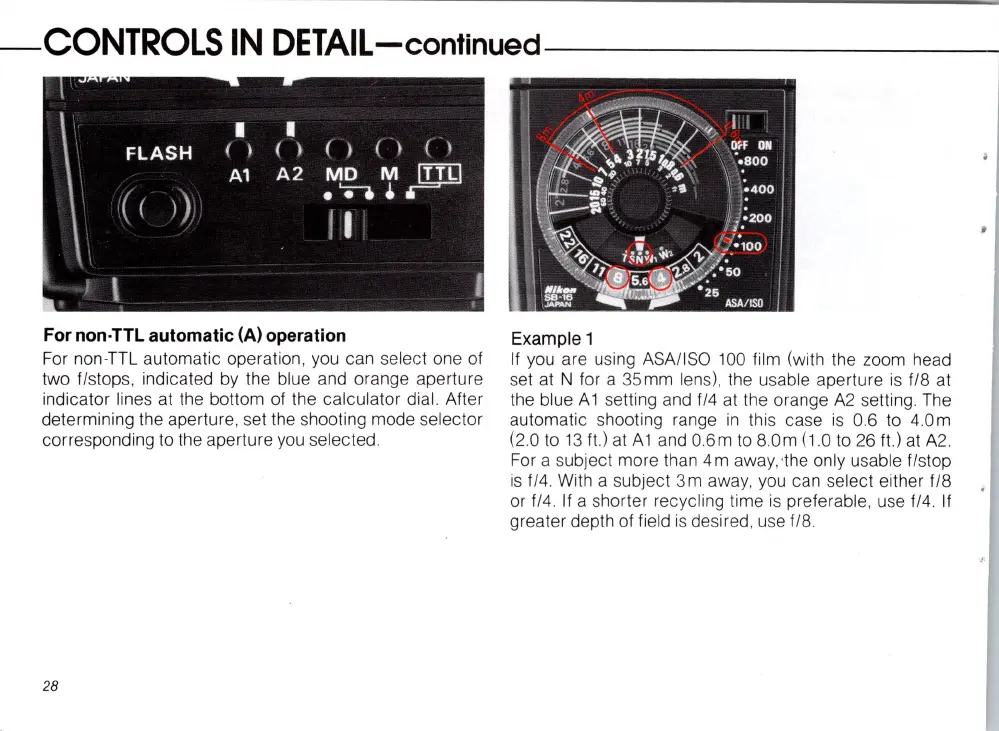
For non·TTL automatic (A) operation
For non-TTL automatic operation, you can
se
le
ct one of
two
fl
st
op
s,
indicated by the blue and orange aperture
indicator lines at the bottom of the calculator dial. After
determining the aperture, set the shooting mode
se
lector
corresponding
to
the aperture you
se
lected.
28
Example 1
If
you are using ASAIISO
100
film
(wi
th
the zoom head
set at N for a 35mm
le
n
s),
the usable aperture
is
f/8 at
the blue
Ai
setting and fl4
at
the orange
A2
se
tting . The
automatic shooting range
in
thi
s case is 0.6
to
4.
0m
(2
.0
to
13
ftl
at
Ai
and 0.6m
to
80m
(1
.0
to
26
ftl
at
A2
.
For
a subject more than 4 m away, ,the
on
ly usable flstop
is
fl4. With a
su
bject 3m away, you can
se
lect either fl8
or
f/4.
If
a shorter recycling time is preferable, use f/4. If
greater depth of field
is
desired, use fl8.














 To Next Page