EasyManua.ls Logo

Nikon SB-21 - Page 35

Nikon SB-21
56 pages
Print Icon
To Next Page IconTo Next Page
To Previous Page IconTo Previous Page
Loading...
TTL
AUTO
FLASH
SHOOTING------------
1
Set
the
light
output
selector
on
the
58
·
21
to t
he
TTL
pos
itio
n.
~----------------,
I For
TIL
auto flash shooting with the controller \
I AS-12, use only Nikon
F3
-series cameras. I
I
With the AS-14, use only Nikon F4-series, I
I
F-801/N8008,
FA, FE2,
F-501/N2020,
I
\ F-301/N2000 or
FG
cameras. I
-----------------,
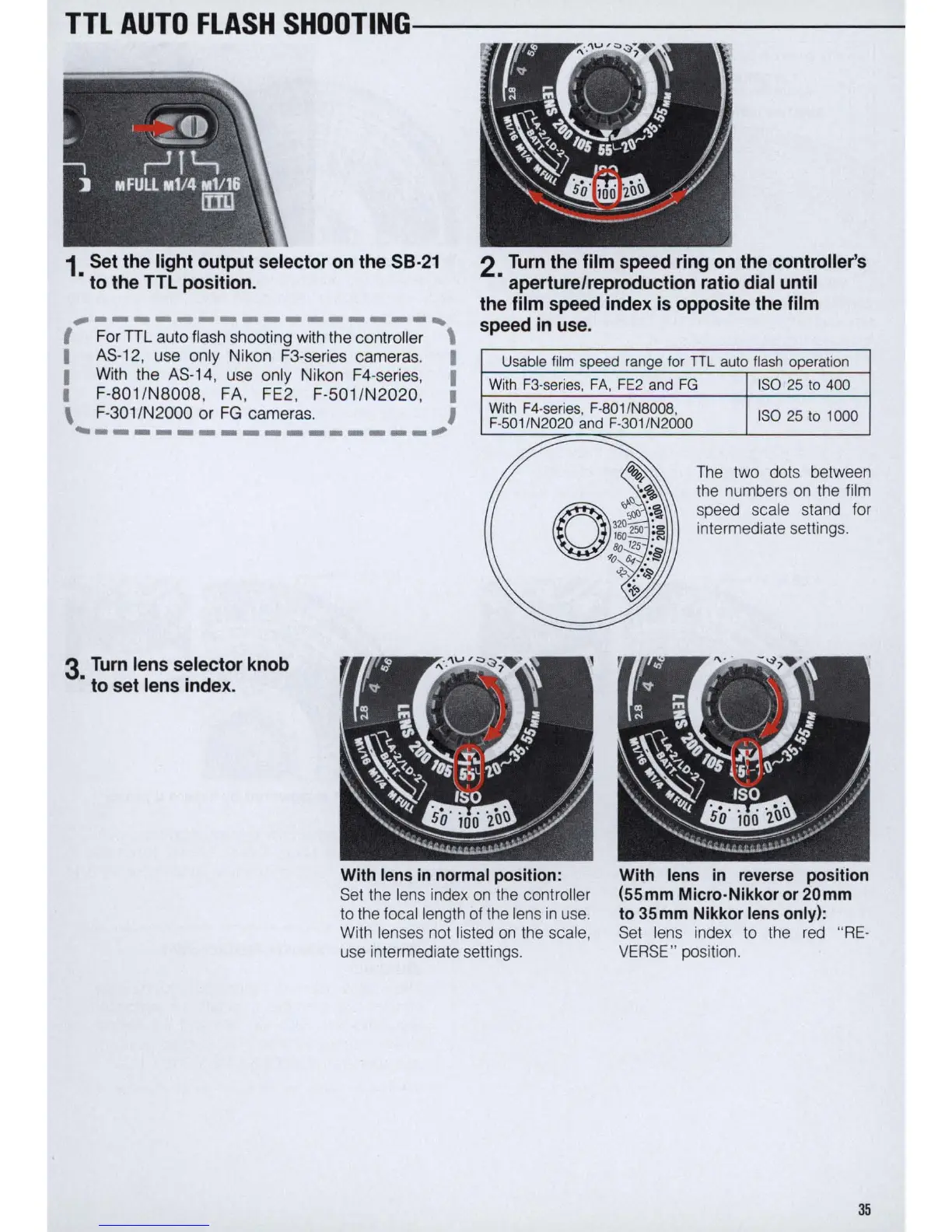
3
Turn
lens
selector
knob
to
set
lens
index
.
2
Turn
the
film
speed
ring
on
the
controller
's
aperture/repr
oduction
rat
io
dial
unt
il
the
film
speed
index
is
opposite
the
film
speed
in
use.
Usable film speed range for
TIL
auto flash operation
With
F3
-se
ries,
FA
,
FE2
and
FG
ISO
25
to 400
With
F4
·s
er
ies,
F-801
/N8008,
F
-5
01/N2020 and
F-301
/N2000
ISO
25 to 1000
The
two dots between
the
numbers
on
the
film
speed scale stand for
intermedia
te
se
tting
s.
With lens in normal
pos
iti
on
: With lens
in
reverse position
(55mm Micro-Nikkor or 20mm
to 35mm Nikkor lens
onl
y):
Set
the
len
s index
on
the controller
to
the
focal length of the lens
in
use.
With
len
ses
not
li
sted
on
the
sca
le
,
use intermediate
se
ttings
Set
lens
in
de
x
to
the
red
"
RE-
VERSE
" position.
35

Related product manuals