63
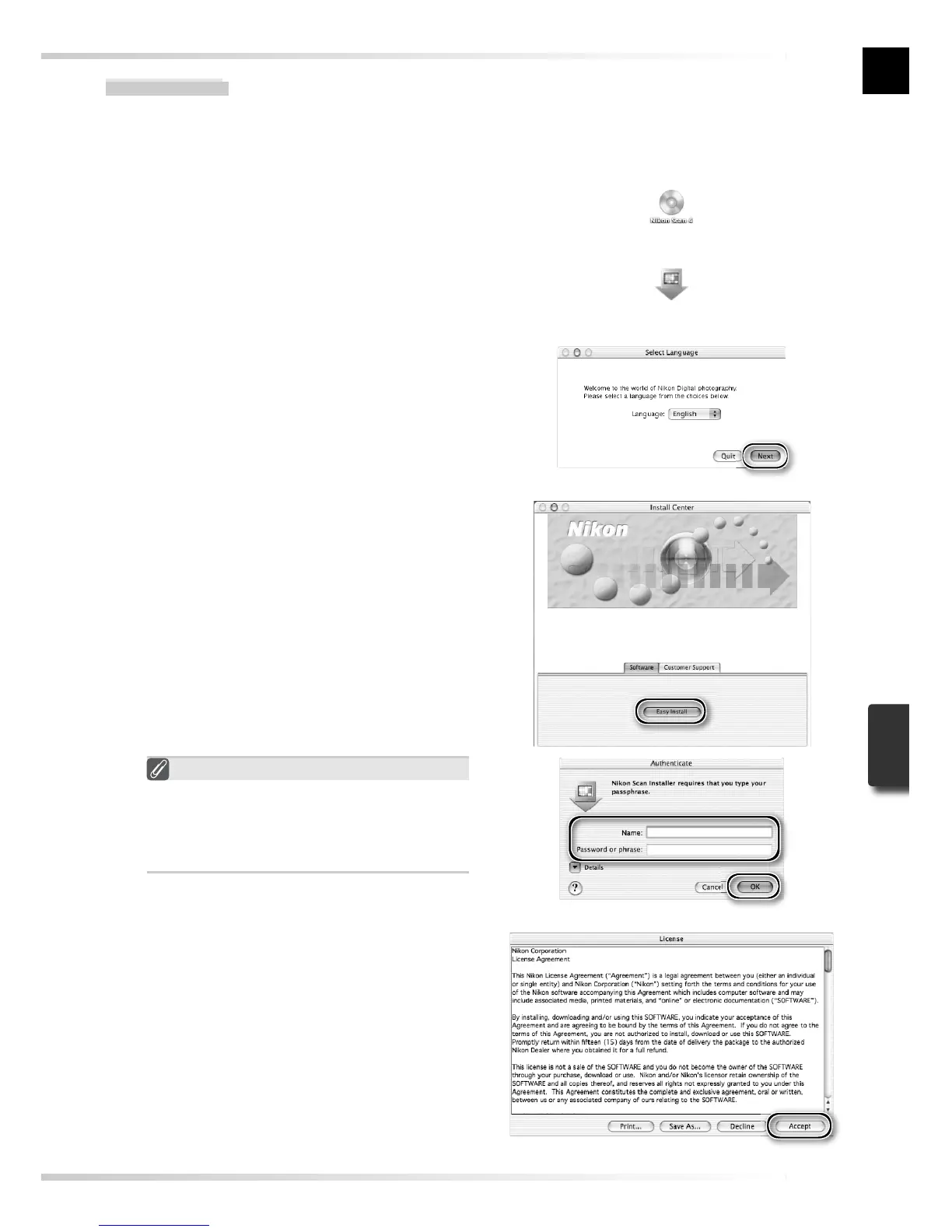
“Authenticate” (Mac OS X Only)
Clicking Easy Install in the software
panel displays the “Authenticate” dialog
shown at right. Enter the administrator
name and password and click OK.
6
Click Accept
The license agreement will be displayed.
Click Accept.
5
Start the installer
The “Install Center” dialog will be dis-
played. Open the “Software” panel and
click Easy Install.
Macintosh
1
Quit all applications
2
Insert the Nikon Scan CD into the CD-ROM drive
A Nikon Scan 4 CD icon will appear on
the desktop. Double-click the icon to
open the “Nikon Scan 4” window.
3
Double-click the Welcome icon in
the “Nikon Scan 4” window
4
Choose a language
A language-selection dialog will be
displayed. Select a language and click
Next.













 To Next Page