13
Fire thermostat / external fire automation system
The ventilation unit can be connected up to an external fire thermostat that will stop the ventilation unit in the event of fire. The same
port can be used for connection of an external fire automation system.
The control system identifies a broken input signal as fire, and stops. It will only restart once connection to the fire thermostat has been
established or the external fire automation system starts signaling again. This must be done manually via the control panel.
When you connect up an external fire automation system, it will be necessary for the ventilation unit to restart automatically. You can
set for this to happen on the control panel. Please consult the software instructions for further information.
Connection via Nilan Functional cable
Connection of fire thermostat or external fire automation system
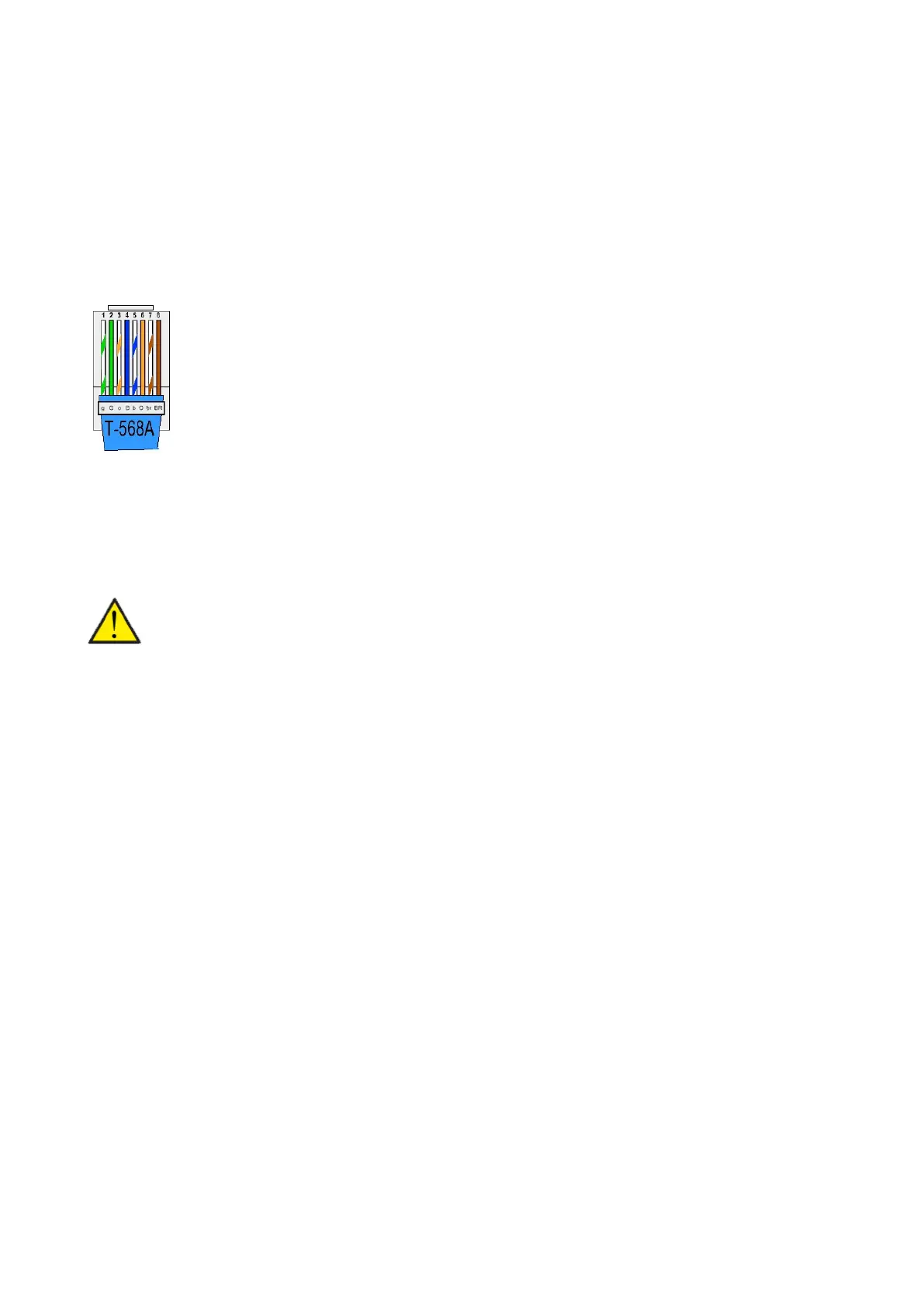
Establish the connection via the following::
1. Green/white
7, Brown/white
1. Green/white
2. Green
3. Orange/white
4. Blue
5. Blue/white
6. Orange
7. Brown/white
8. Brown
GND
Fire thermostat / external fire automation system
ATTENTION
If you are not using the Cooker hood setting in User selection, you will be able to use any RJ45 cable. In that case, wire 8
Brown will not carry 12V.


 To Next Page