EasyManua.ls Logo

nilan VPL 25 - Temp. control

nilan VPL 25
23 pages
Print Icon
To Next Page IconTo Next Page
To Previous Page IconTo Previous Page
Loading...
This document may be subject to change Side 16 of 23
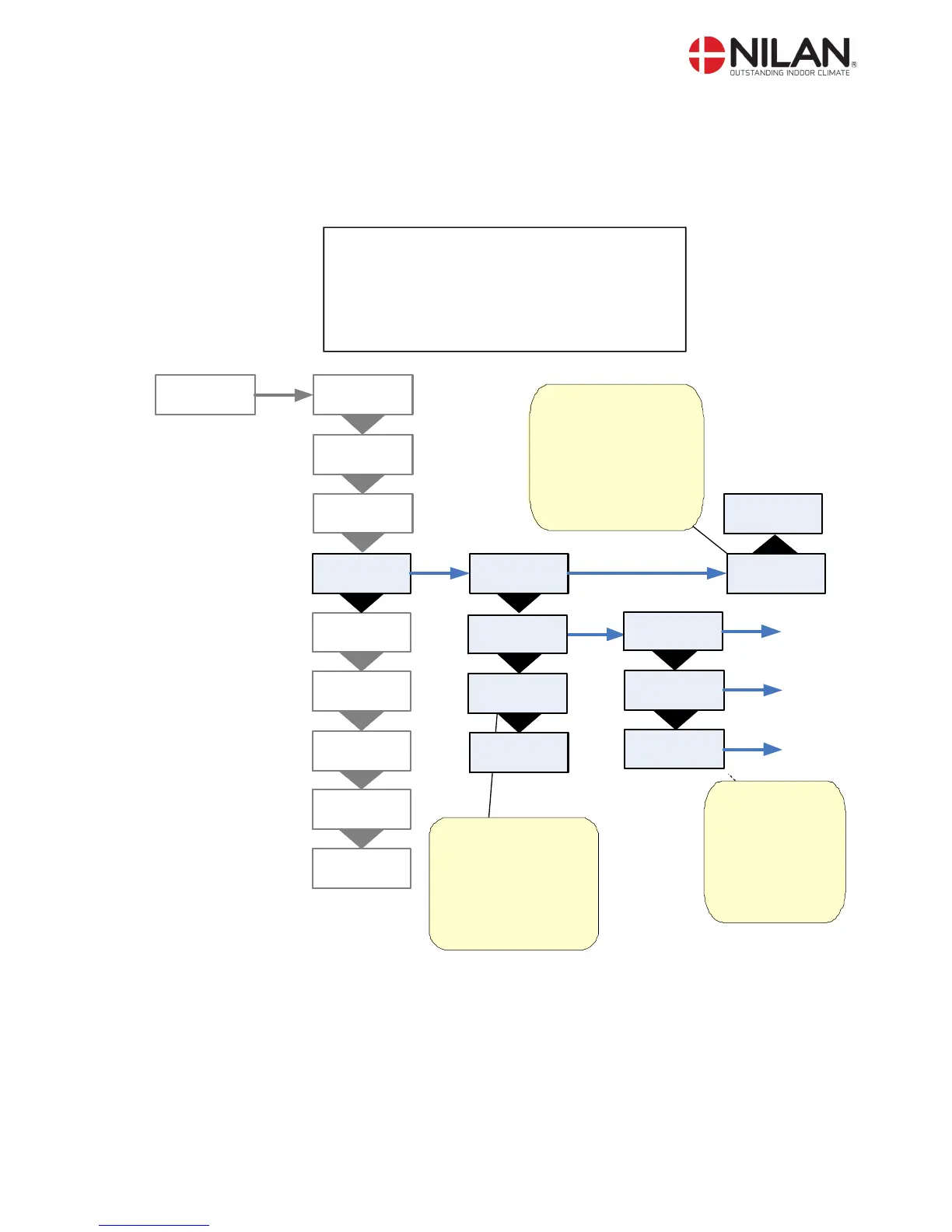
Temp. control
In the ”Temp. control” menu it is possible to chose a room temperature where the unit stops in
order to avoid further cooling of the building if the primary heating shuts down.
” ” indicates that the menu point flashes and can be set to another value
Use of t he CTS 600 panel :
- pr ess ESC t o go one st ep back i n t he menu
- pr ess qpt o move up or down i n a menu or t o
adj ust an act i vat ed menu
- pr ess ENTER t o act i vat e a menu
- pr ess ENTER t o conf i r m a menu
- pr ess OFF t o t ur n of f t he uni t
- pr ess ON t o t ur n t he uni t on

HEATING
SURFACE
Indicates which sensor
that needs to be the
controlling one.
PANEL T15 (Panel
sensor).
EXTERNAL T10 (to be
installed in representative
extraction fitting).
TEMP.
CONTROL
SENSOR
PANEL
SENSOR
”PANEL”
PRIORITY
”HP”
PRIORITY
”OFF”
ENTER ENTER
ENTER
ROOM
LOW 10°C
PRIORITY
HP+EXT
AIR
EXCHANGE
DEFROST
INLET
CONTROL
SERVICE
ENTER
RESTART
OFF
MANUAL
OFF
PRESET
OFF
ROOM
CONTROL
The unit stops at this
room temperature (1-
20°C) - - means that the
function is unactive.
- - should be chosen if
the panel is placed in a
cold environment.
OFF: ventilation
without heatpump
HP: ventilation only
with heatpump activ
ENTER
ENTER
EXTERNAL
-1 °C
SENSOR
”EXTERNAL”
PRIORITY
”HP+EXT”
ENTER
HP+EXT: ventilation
with heatpump and
heating surface activ
Figure 11: The "Temp. control" menu

Related product manuals