ENGLISH INSTRUCTIONS FOR USE
8 SC500 - 9099974000
11/2014
revised 07/2017
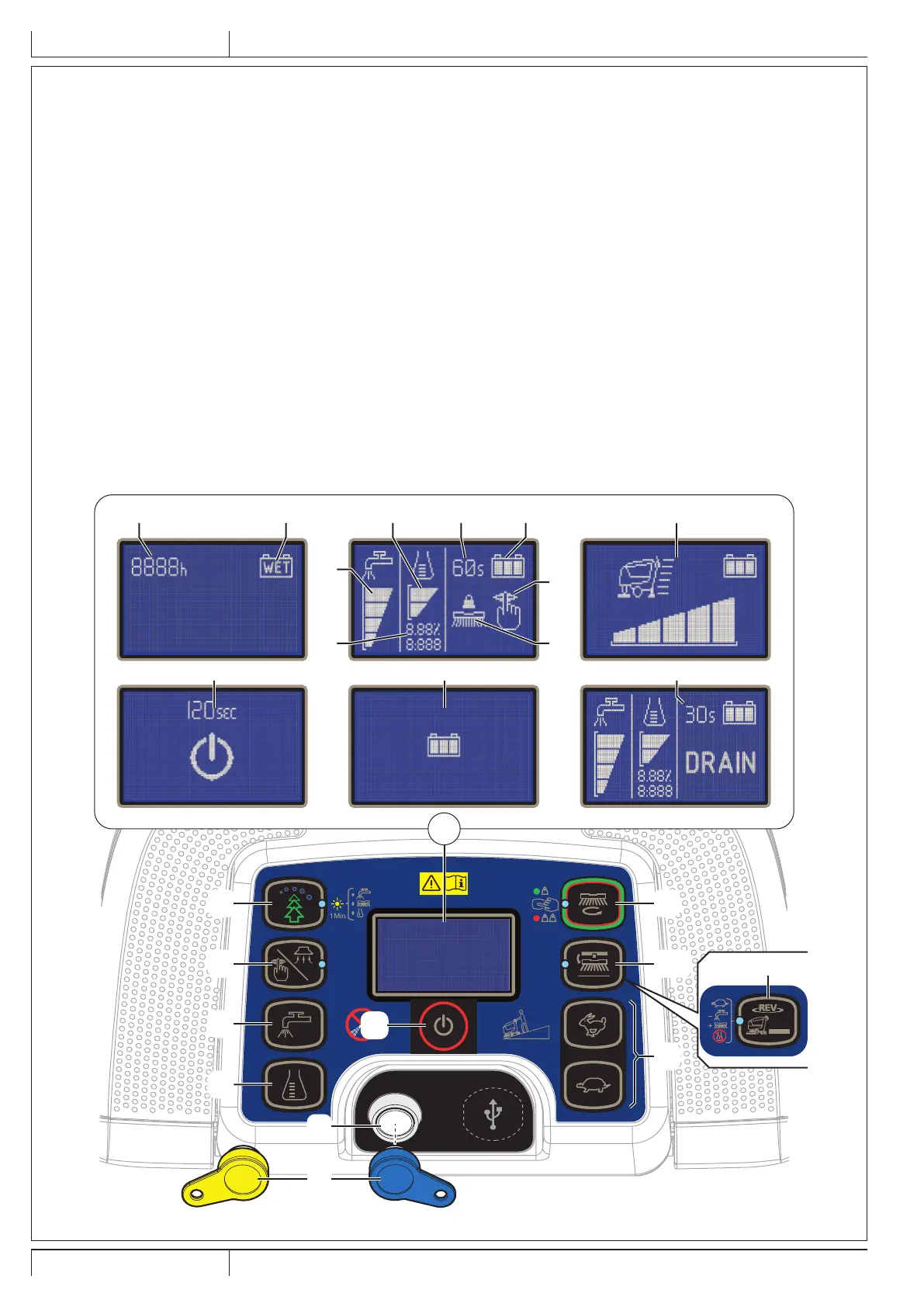
CONTROL PANEL
41. Smart key reader
42. Start/stop switch
43. One-Touch™ Scrub ON/OFF push-button
• Flashing green LED: Brush deck moving up/down
• Green LED: Ready for work
• Red LED - Extra pressure active (hold for one second)
44a. Brush release push-button
• Flashing LED - Releasing system activated
44b. REV function push-button (**)
• LED on - system activated
45. Maximum speed adjustment push-buttons:
• Hare - Increase speed
• Tortoise - Decrease speed
46. EcoFlex system push-button (*)
• LED on - EcoFlex system on
• Led ashing - Temporary override
47. Vacuum system adjustment/deactivation button
• LED on - vacuum system activated
48. Detergent ow adjustment button
49. Detergent percentage adjustment push-button (*)
50. Display:
A) Hours worked
B) Battery type
C) Battery charge level
D) Vacuum mode
E) Brush work mode
F) Detergent solution ow quantity
G) Detergent percentage quantity (*)
H) Percentages of detergent in the washing water (*)
I) EcoFlex system override timer (*)
J) Maximum machine speed setting
K) Auto shut-off timer
L) Battery charging with on-board battery charger (*)
M) EcoFlex system drain activation (*)
51. Magnetic smart key
• Blue = User key
• Yellow = supervisor key
(*) Optional for BASIC version
(**) For REV version only
max.2%
1s
46
47
48
49
42
43
44a
45
C JI
L
M
K
G
A B
F
H
D
E
50
44b
51
41
P100839


 To Next Page
 Loading...