HELLO
6 Programming
6.1 Control panel
6.1.1 Buttons
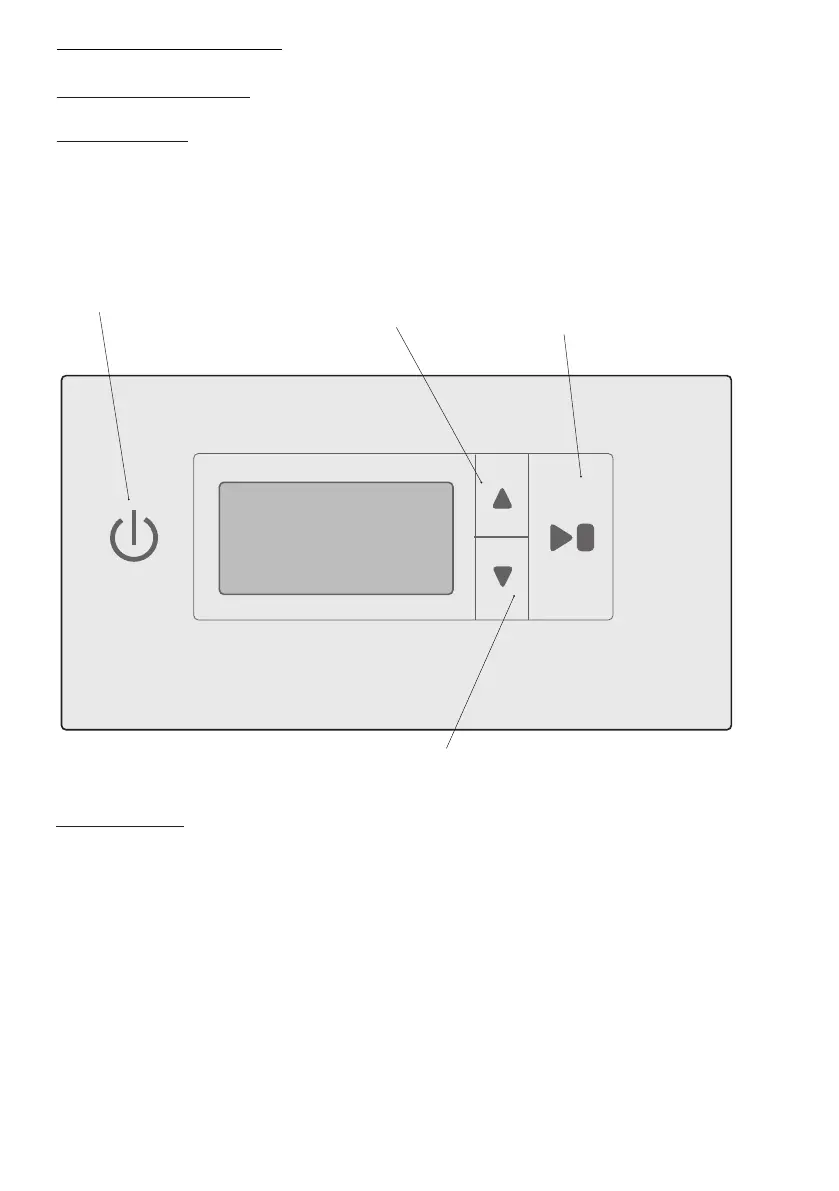
The control panel (user interface) has four touch buttons. The buttons have two functions.
ON / OFF
UP ARROW, increases
values or moves up
the programmes
START / STOP, starts and stops
the programme. OK, conrms a
selection and moves to the next
menu level
DOWN ARROW, increases values or moves
down the programmes
6.1.2 Display
Animated symbol that shows that the drying process is in progress.
Top line Shows informational text during the drying process, e.g. AU T.
In programming mode, it shows the actual parameter, e.g. P2132.
Bottom line Shows informational text during the drying process, e.g.
NORMAL.
In programming mode it shows the value set for the parameter.
Clock symbol for CHILD LOCK. This is lit during the entire drying process if it is in child lock mode.
ENGLISH 29


 To Next Page