EasyManua.ls Logo

Nintendo DSI - Saving Sounds and SD Card Music; SD Card Music Playback

Nintendo DSI
72 pages
Print Icon
To Next Page IconTo Next Page
To Previous Page IconTo Previous Page
Loading...
Recording
and
Playing
with
Sounds
Playing
with
Music
on
an
SD
Card
Saving
Altered
Sounds
Choose
a
Song
to
Play
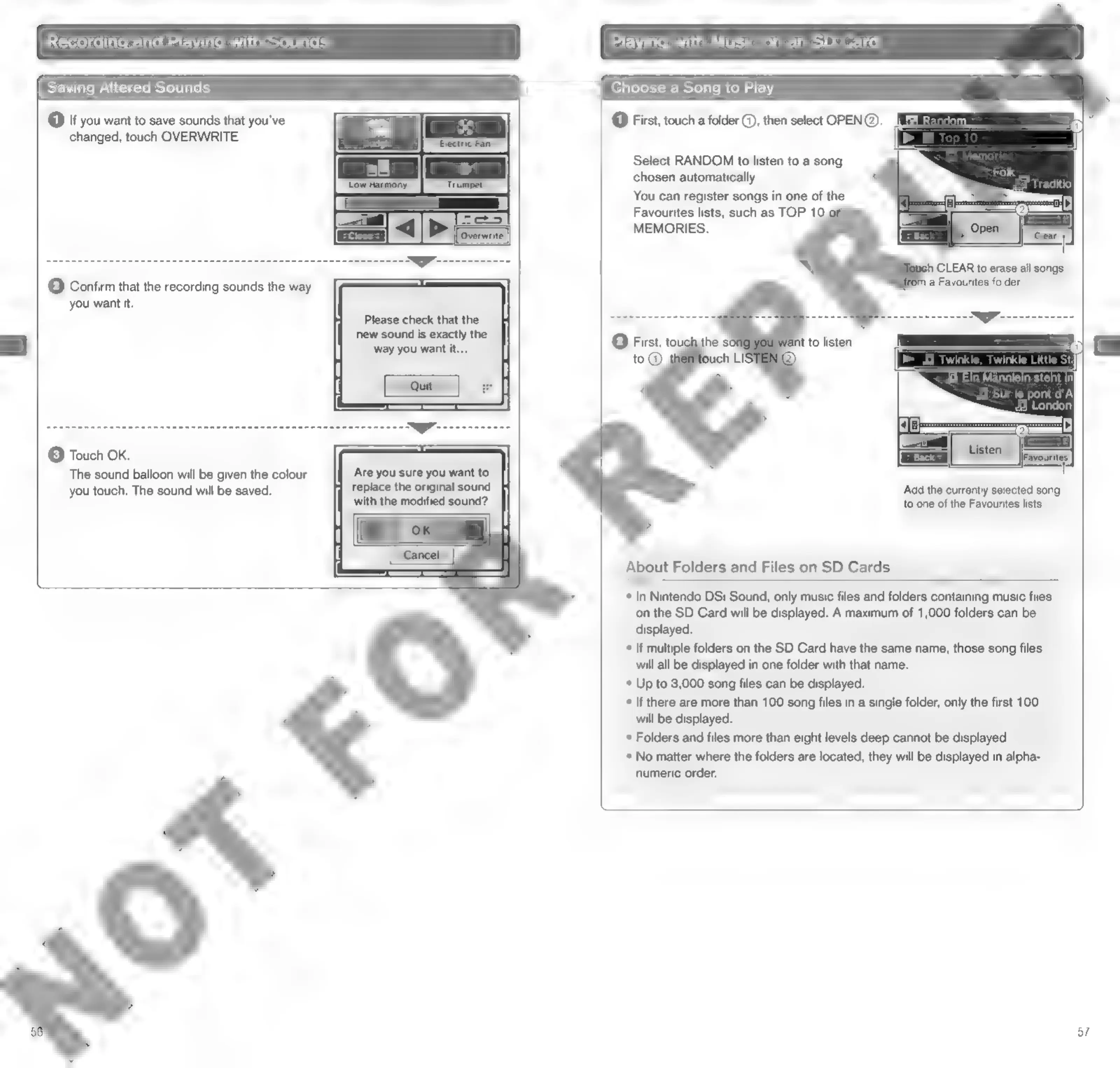
@
If
you
want
to
save
sounds
that
you've
changed,
touch
OVERWRITE.
@
First,
touch
a
folder
@,
then
select
OPEN@.
Select
RANDOM
to
listen
to
a
song
chosen
automatically.
You
can
register
songs
in
one
of
the
Favourites
lists,
such
as
TOP
10
MEMORIES.
9
CLEAR
to
erase
all
songs
©
Confirm
that
the
recording
sounds
the
way
(sl
a
Favourites
folder.
you
want
it.
Please
check
that
the
new
sound
is
exactly
the
(3)
Touch
OK.
The
sound
balloon
will
be
given
the
colour
you
touch,
The
sound
will
be
saved.
Are you
sure
you
want
to
replace
the
original
sound
with
the
modified
sound?
‘Add
the
currently
selected
song
to
one
of
the
Favourites
lists.
About
Folders
and
Files
on
SD
Cards
*
In
Nintendo
DSi
Sound,
only
music
files
and
folders
containing
music
files
on
the
SD
Card
will
be
displayed.
A
maximum
of
1,000
folders
can
be
displayed.
°
If
multiple
folders
on
the
SD
Card
have
the
same
name,
those
song
files
will
all
be
displayed
in
one
folder
with
that
name.
*
Up
to
3,000
song
files
can
be
displayed.
*
If
there
are
more
than
100
song
files
in
a
single
folder,
only
the
first
100
will
be
displayed.
*
Folders
and
files
more
than
eight
levels
deep
cannot
be
displayed.
*
No
matter
where
the
folders
are
located,
they
will
be
displayed
in
alpha-
numeric
order.
57

Other manuals for Nintendo DSI

Related product manuals