EasyManua.ls Logo

Nintendo DSI - Data Management and Wireless; Data Transfer and Wireless Setup; Brightness Adjustment

Nintendo DSI
72 pages
Print Icon
To Next Page IconTo Next Page
To Previous Page IconTo Previous Page
Loading...
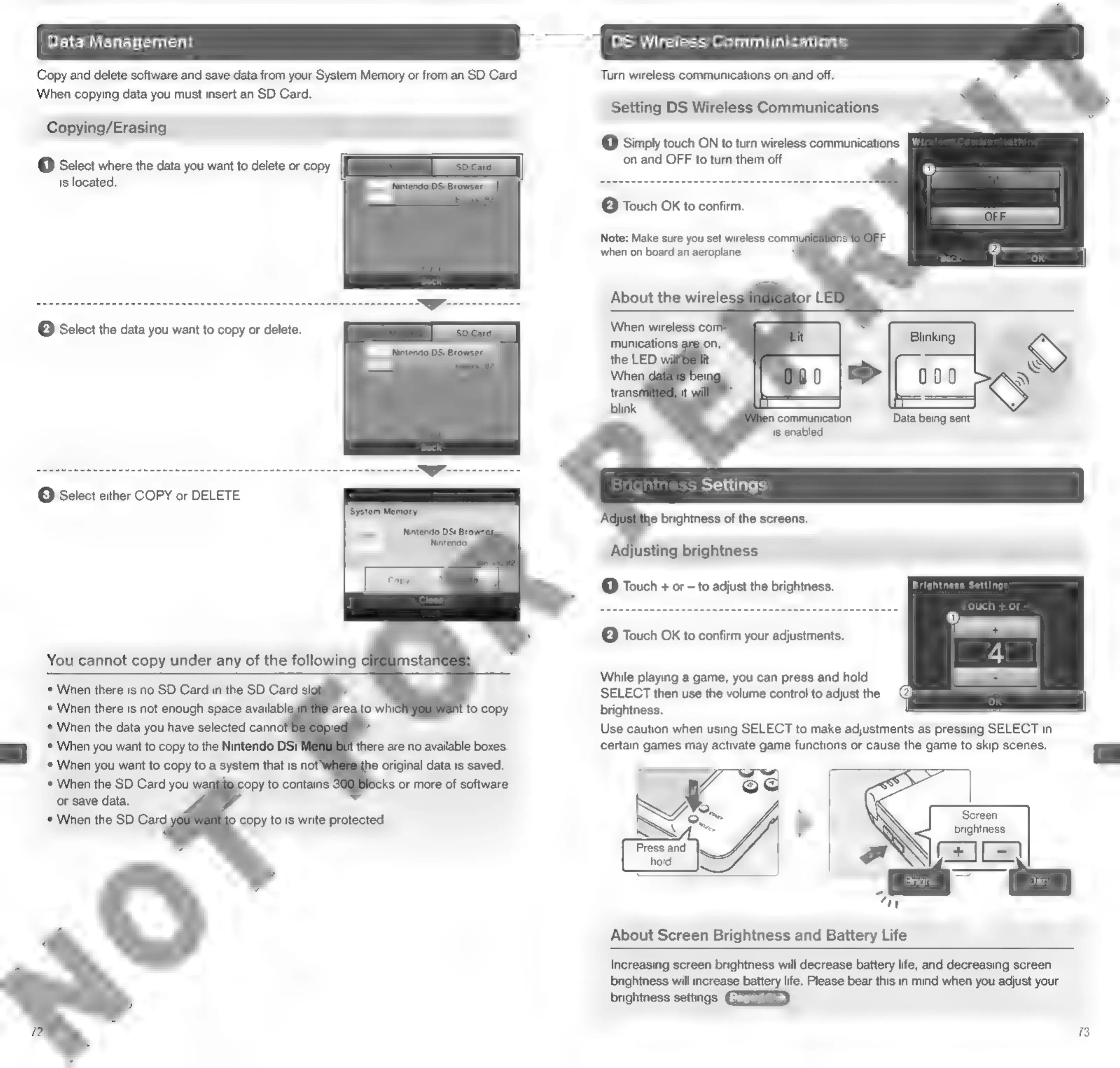
Data
Managem
DS
Wireless
Communications
Copy
and
delete
software
and
save
data
from
your
System
Memory
or
from
an
SD
Card.
Turn
wireless
communications
on
and
off.
When
copying
data
you
must
insert
an
SD
Card.
Setting
DS
Wireless
Communications
Copying/Erasing
(1)
Simply
touch
ON
to
turn
wireless
communications
on
and
OFF
to
turn
them
off.
(1)
Select
where
the
data
you
want
to
delete
or
copy
is
located.
e
Touch
OK
to
confirm.
Note:
Make
sure
you
set
wireless
comm
when
on
board
an
aeroplane.
About
the
wirele:
When
wireless
co
munications
a
(2)
Select
the
data
you
want
to
copy
or
delete.
n
communication
Data
being
sent
is
enabled
S
Settin:
©
Select
either
COPY
or
DELETE.
s
Settings
he
brightness
of
the
screens.
Adjusting
brightness
@
Touch
+
or
-
to
adjust
the
brightness.
Brightness
Settings
Touch
+
or
-
(2)
Touch
OK
to
confirm
your
adjustments.
While
playing
a
game,
you
can
press
and
hold
SELECT
then
use
the
volume
control
to
adjust
the
brightness.
=
*
When
the
data
you
have
selected
cann
i
Use
caution
when
using
SELECT
to
make
adjustments
as
pressing
SELECT
in
*
When
you
want
to
copy
to
the
Nintendo
DSi
‘there
are
no
available
boxes.
certain
games
may
activate
game
functions
or
cause
the
game
to
skip
scenes.
=
When
you
want
to
copy
to
a
system
that
is
not’
e
original
data
is
saved.
J
When
the
SD
Card
you
we
copy
to
contains
fo)
|
or
save
data.
5
©
When
the
SD
Card
copy
to
is
write
protected.
NZ
on
ae
Press
and
=
4
=
=
About
Screen
Brightness
and
Battery
Life
Increasing
screen
brightness
will
decrease
battery
life,
and
decreasing
screen
brightness
will
increase
battery
life.
Please
bear
this
in
mind
when
you
adjust
your
brightness
settings.
73

Other manuals for Nintendo DSI

Related product manuals