EasyManua.ls Logo

Nintendo DSI - Profile and Time Settings; User Profile, Date, and Time

Nintendo DSI
72 pages
Print Icon
To Next Page IconTo Next Page
To Previous Page IconTo Previous Page
Loading...
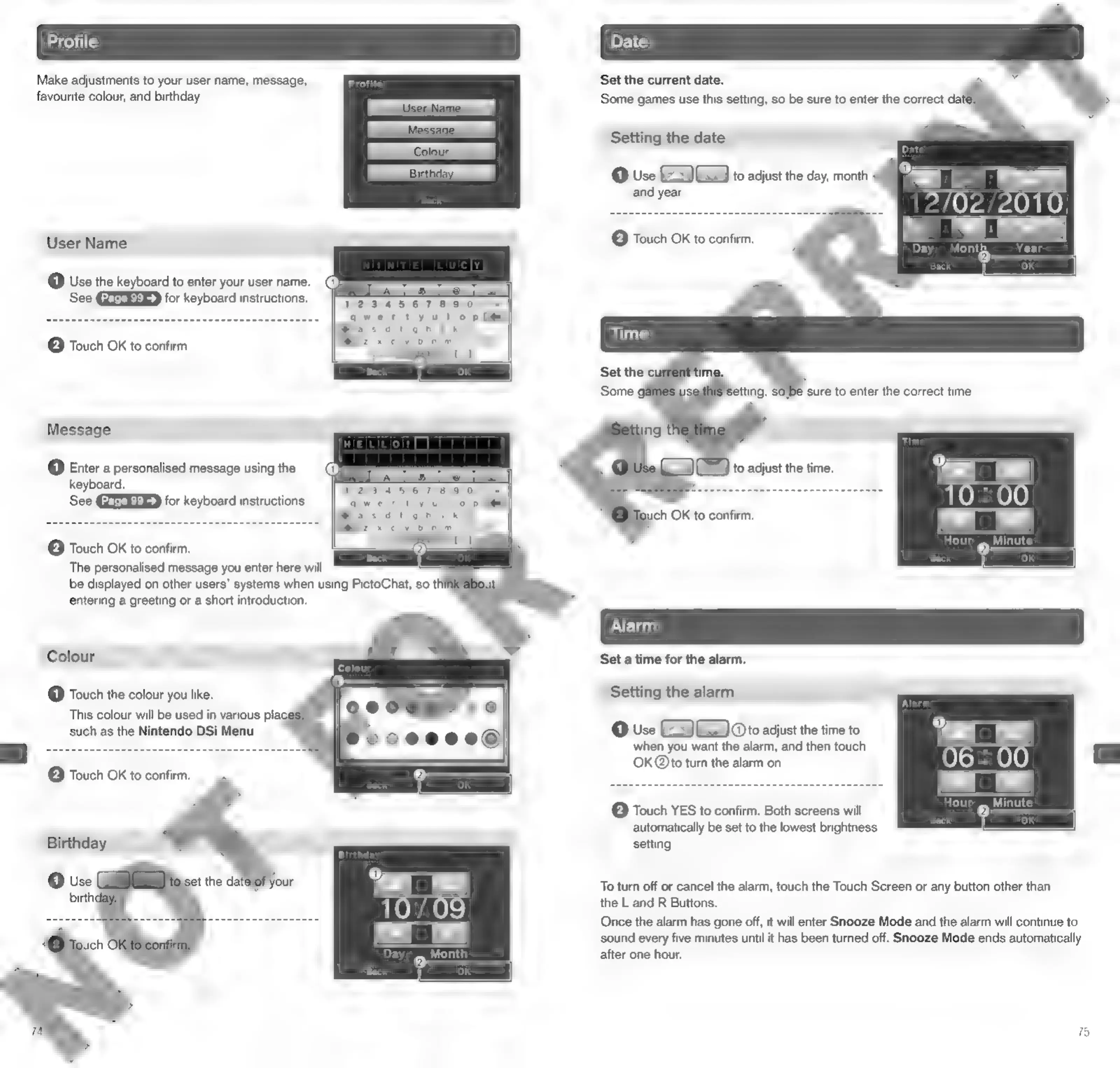
Make
adjustments
to
your
user
name,
message,
favourite
colour,
and
birthday.
Set
the
current
date.
Some
games
use
this
setting,
so
be
sure
to
enter
the
correct
date:
Setting
the
date
@
Use
EG
to
adjust
the
day,
month
User
Name
Back
@
Use
the
keyboard
to
enter
your
user
name.
See
for
keyboard
instructions.
123456789
qwertyulop
i
Basdhionjki
Bz
xcvbnm,.
7
;
°
:
(2)
@
Touch
OK
to
confirm.
Message
(1)
Enter
a
personalised
message
using
the
keyboard.
See
for
keyboard
instructions.
()
to
adjust
the
time.
ich
OK
to
confirm.
@
Touch
OK
to
confirm.
The
personalised
message
you
enter
here
will
be
displayed
on
other
users’
systems
when
using
PictoChat,
so
thi
entering
a
greeting
or
a
short
introduction.
Colour
Set
a
time
for
the
alarm.
@
Touch
the
colour
you
like.
This
colour
will
be
used
in
various
pla
such
as
the
Nintendo
DSi
Menu.
Setting
the
alarm
@
Use
EG
GEV
Oto
adjust
the
time
to
when
you
want
the
alarm,
and
then
touch
OK
@to
turn
the
alarm
on.
e
Touch
OK
to
confirm.
[2]
Touch
YES
to
confirm.
Both
screens
will
automatically
be
set
to
the
lowest
brightness
setting.
Birthday
To
turn
off
or
cancel
the
alarm,
touch
the
Touch
Screen
or
any
button
other
than
the
L
and
R
Buttons.
Once
the
alarm
has
gone
off,
it
will
enter
Snooze
Mode
and
the
alarm
will
continue
to
sound
every
five
minutes
until
it
has
been
turned
off.
Snooze
Mode
ends
automatically
after
one
hour.

Other manuals for Nintendo DSI

Related product manuals