
 Need help?
Do you have a question about the NIX Spectro 2 and is the answer not in the manual?
Lists various materials like liquids, powders, solids, and textured surfaces that can be scanned by the Nix Spectro 2.
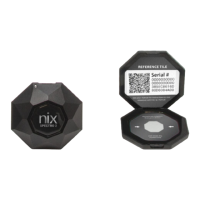
Lists the Nix Spectro 2 device, charging cable, and reference tile included in the box.
Identifies external ports, attachments, lens, and reset button on the Nix Spectro 2.
Covers carrying case, pouch, and microfiber cloth for protection and maintenance of the device.
Guide on acquiring and setting up the essential Nix Toolkit mobile application for the device.
Instructions for powering up the Nix Spectro 2 and charging its battery.
Steps to establish a wireless connection between the Nix Spectro 2 and a smartphone/tablet.
Instructions on utilizing the reference tile for device verification and calibration to ensure accuracy.
Steps for scanning control strips using the alignment jig for the Nix Spectro 2 - 2mm model.
Further steps for scanning control patches using the alignment jig for the Nix Spectro 2 - 2mm model.
Best practices for scanning surfaces to achieve accurate color measurements with the Nix Spectro 2.
Guidelines for maintaining the device and reference tile to ensure longevity and accuracy.
Details on warranty coverage, terms, and how to obtain service for the Nix Spectro 2.
The Nix Spectro 2 is a versatile color sensor designed to seamlessly integrate into various industry workflows, offering precise color measurement for a wide range of materials. This device is capable of measuring the color of almost any product, whether it's a solid, liquid, powder, or gel, making it a valuable tool for quality control and color management across diverse applications.
The primary function of the Nix Spectro 2 is to accurately measure and identify colors. It operates in conjunction with the Nix Toolkit app, which is compatible with both Android and iOS devices. The app serves as the central interface for controlling the sensor and accessing its various features.
Key functions enabled by the Nix Toolkit app include:
The Nix Toolkit app also offers user interface customization, allowing users to select between dark or light modes, or to use their system's default settings, enhancing the user experience.
The Nix Spectro 2 is designed for ease of use, with several features that facilitate accurate and efficient color measurement.
Device Setup and Connectivity: The device arrives in a "sleep" state and needs to be woken up by plugging it into a USB-C charging cable. The gel sticker on top of the device illuminates when connected to power, indicating it's charging. A full charge typically takes four hours. Battery levels can be monitored through the Nix Toolkit app once the device is connected via Bluetooth.
Connecting the Nix Spectro 2 to a smartphone or tablet is done via Bluetooth. Users need to ensure Bluetooth is enabled on their mobile device and open the Nix Toolkit app. The app may request location access, which is necessary for Bluetooth connectivity. The device connection icon in the app indicates the connection status. Users select the device with the highest signal strength from the list, and connection typically takes 15-20 seconds, though it can take up to 60 seconds. The app will confirm a successful connection.
Reference Tile Calibration: Periodic verification of the Nix Spectro 2's specifications is required using a reference tile. The app may request camera access to scan a QR code on the reference tile, which is part of the verification process. To calibrate, users press the icon in the top right corner of the app and select "Calibrate." It's important to remove any adapters from the device before calibration. The app guides the user through the process, confirming if the device is calibrated to factory settings.
Scanning Techniques: For solid, opaque surfaces, the Nix Spectro 2 should be placed flat against the surface, ensuring it's flush to block out ambient light for the most accurate results.
For specific applications, such as measuring control strips in print and packaging, the Nix Spectro 2 - 2mm model is used. The process involves:
It's important to note that the alignment jig should not be used when white tile calibrating the Nix Spectro 2 - 2mm device. If the device is connected via USB during scanning, ensure it sits flat, as the USB cable can potentially cause it to tilt. The Spectro 2 - 2mm model is specifically for control strips; it is not needed for other types of measurements.
For liquids, powders, gels, or textured and soft surfaces, special adapters and specific scanning techniques may be required. Information on these specialized methods and custom solutions is available on the Nix Sensor website.
Proper care and cleaning are essential to ensure the longevity and accuracy of the Nix Spectro 2.
Storage: To prevent dust buildup and other damage, the Nix Spectro 2 should always be stored in its provided Industrial Carrying Case. The reference tile should also be stored in its container within the carrying case to prevent dirt or dust buildup, which can impact future measurements.
Cleaning the Device: Dust can be removed from the device by gently wiping it with the provided microfiber cloth. For a more thorough cleaning of the device body, lens, or LEDs, a provided cleaning solution should be sprayed onto the microfiber cloth, and then the device should be gently wiped down. It is crucial never to spray the device directly with any cleaning solution.
Cleaning the Reference Tile: The reference tile should be wiped with a dry microfiber cloth (provided) if it requires cleaning. It is critical to never use any cleaning solution on the reference tile, as other materials or dyes in cleaning solutions can stain the tile, affecting its accuracy. Only the provided microfiber cloth should be used for cleaning the reference tile.
General Precautions: Users should only use the cleaning solution provided by Nix Sensor. Avoiding other solvents or cleaning products is important, as they may degrade the lenses over time. The Nix Spectro 2 does not need to be manually turned off; it will automatically hibernate when the Spectro app is closed, conserving battery life.
 General
| Brand | NIX |
|---|---|
| Model | Spectro 2 |
| Category | Measuring Instruments |
| Language | English |

 To Next Page