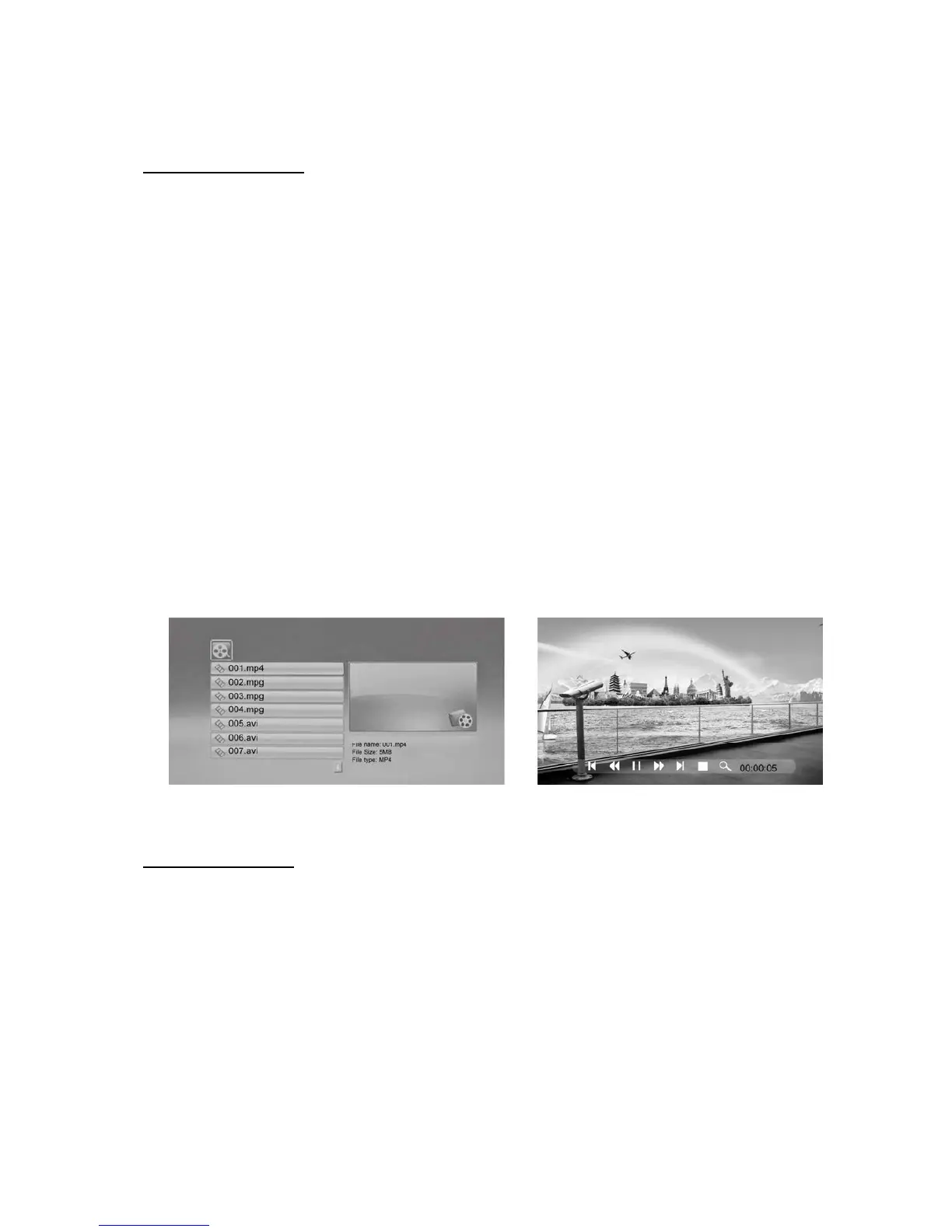
Viewing Your Videos
This Digital Photo Frame allows you to view MPEG-4/AVI Video files only. It is not “HD
Ready”.
If you encounter problems with video playback, please refer to our website FAQ section where
there are links to Video Conversion programs.
▪ Select the Movie icon from the Menu, then press ENTER. Your Video files will list on the
screen.
▪ Press [▲][▼] to choose the video you want to view and press ENTER to play.
▪ During the video, you can press the MENU button and an info bar will appear on the
screen.
This allows you to fast forward or rewind, skip back and forth through the video
collection, stop the video or zoom in on the screen.
▪ Press [◀][▶] and ENTER to make a selection.
Note: If there are no videos on your memory device, you will not continue to the next screen.
Clock and Calendar
1) To set the Time, press the ‘Setup’ button on the Remote Control. Scroll down the
screen, until ‘Time’ is highlighted. Now, using the [◀][▶][▲][▼] arrows, you can set
the time according to
YEAR/MONTH/DAY/ HOUR: MINUTE
Press ENTER to save these changes.



 To Next Page