10
Air Dry Light
Air Dry Button
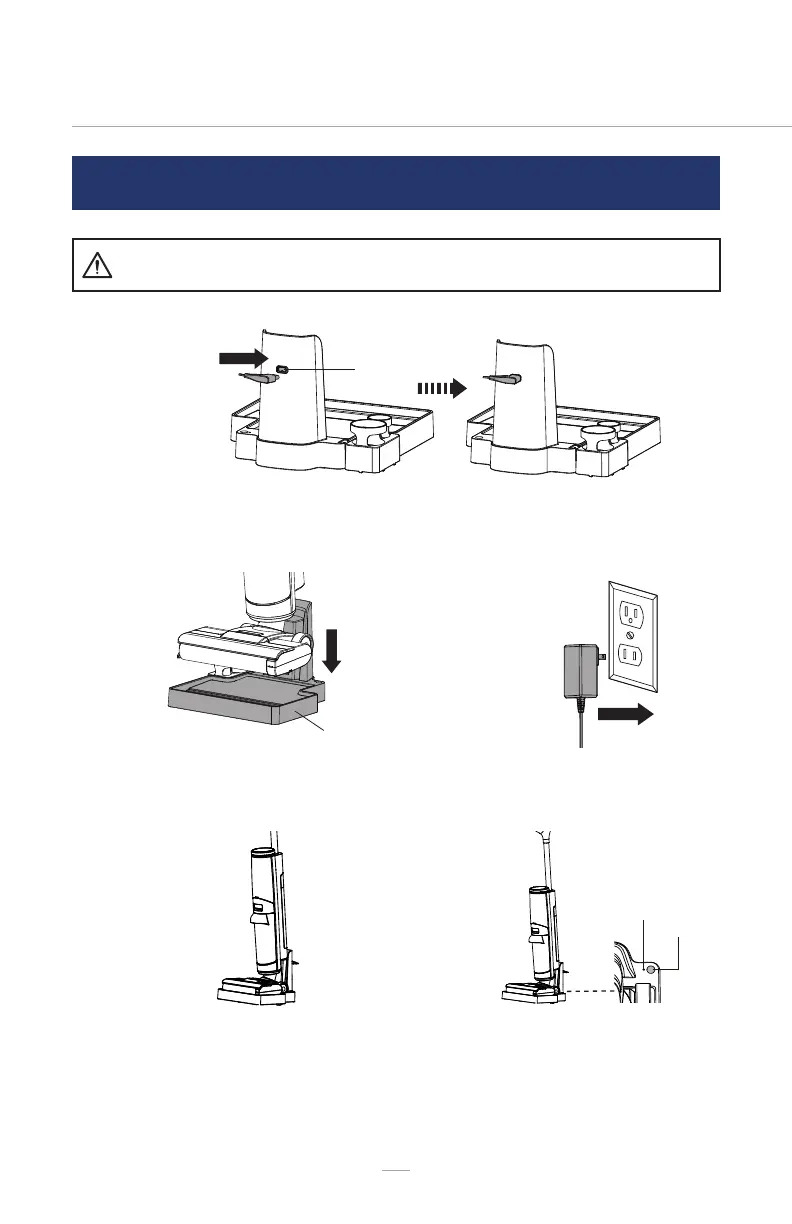
CHARGING AND BRUSH ROLLER AIR DRYING
01
Before charging make sure the hard oor cleaner is
turned OFF. Ensure the dirty water tank is empty.
WARNING
Insert the charging adapter into the charging port located on the back of the
storage base.
02
04 05
03
Place the hard oor cleaner onto the
storage base.
The hard oor cleaner begins to
charge. The battery indicator on the
display screen ashes continuously.
The battery status indicator turns on
while the cleaner is being charged.
The hard oor cleaner starts roller
air drying automatically while being
charged. The air dry light on the
storage base illuminates steadily.
The roller air drying indicator on the
display screen ashes continuously.
Plug the charging adapter into a wall
outlet.


 To Next Page