14
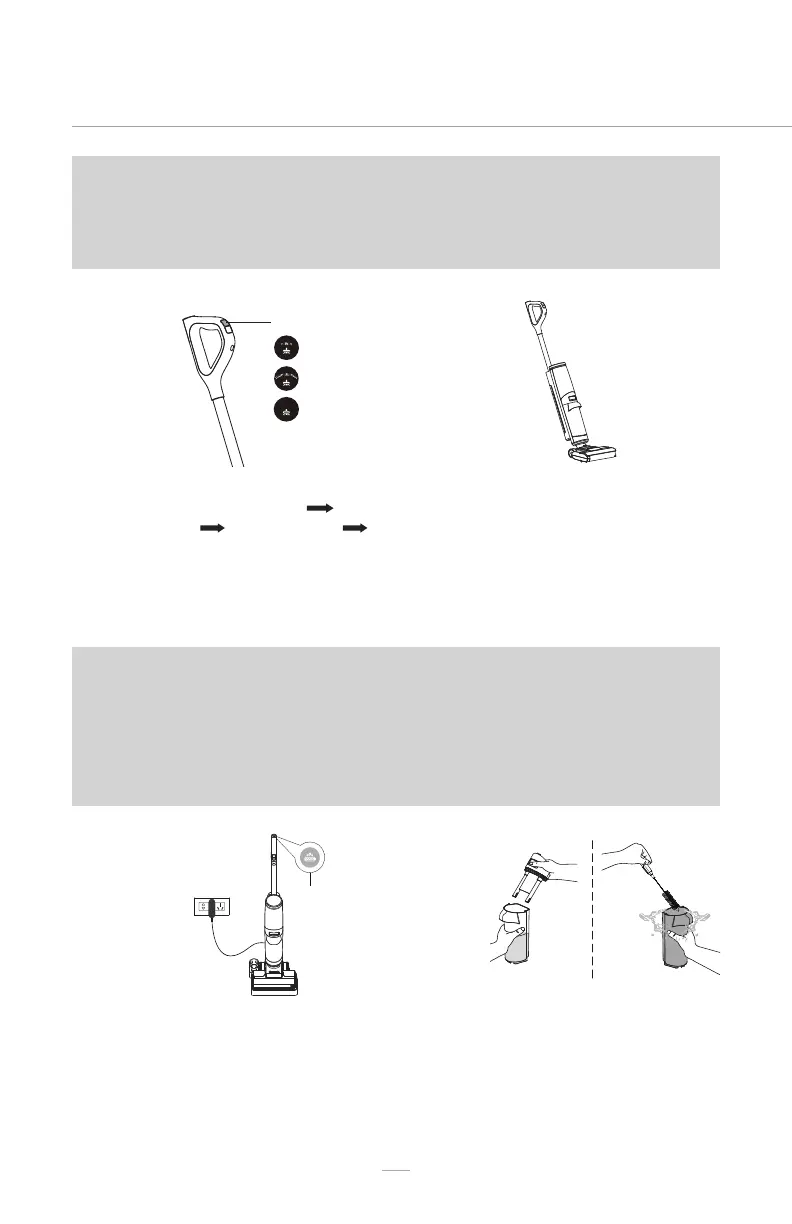
Mode Button
Standard Mode
Max/Mopping Mode
Suction Mode
04
06
03
05
Move the hard oor cleaner slowly
forwards and backwards.
After 20 minutes of continuous cleaning, the
brush roller self-cleaning indicator will ash.
Although the hard oor cleaner will continue
to operate, it is recommended to clean the
brush roller when the brush roller self-clean
indicator ashes. See instructions in BRUSH
ROLLER SELF-CLEANING (page 18-19).
Pressing the mode button will switch the
cleaner into: Standard Mode Max/
Mopping Mode Suction Mode
Standard Mode. The corresponding
indicators on the display screen will
illuminate to indicate the mode. Refer
to page 8.
Empty the dirty water tank when the DWT
full indicator ashes. See instructions in
EMPTYING THE DIRTY WATER TANK. Clean
the dirty water tank immediately after
use to avoid odour.
NOTE: When the hard oor cleaner is in the upright position, pressing
the power button cannot start the cleaner. The tilt vacuum indicator
on the display screen will ash for 5 seconds. Recline the cleaner for
operation.
NOTE: While the hard oor cleaner is operating, if you put the
appliance back in the upright position, the cleaner will turn off.
NOTE: When the battery status indicator ashes and the battery
indicator changes from green to red, the battery charge is low and
needs recharging. The hard oor cleaner will automatically turn off
when the battery charge is depleted.


 To Next Page