NAssistant Operations
Copyright © Nooploop LTd 2023. All Rights Reserved.
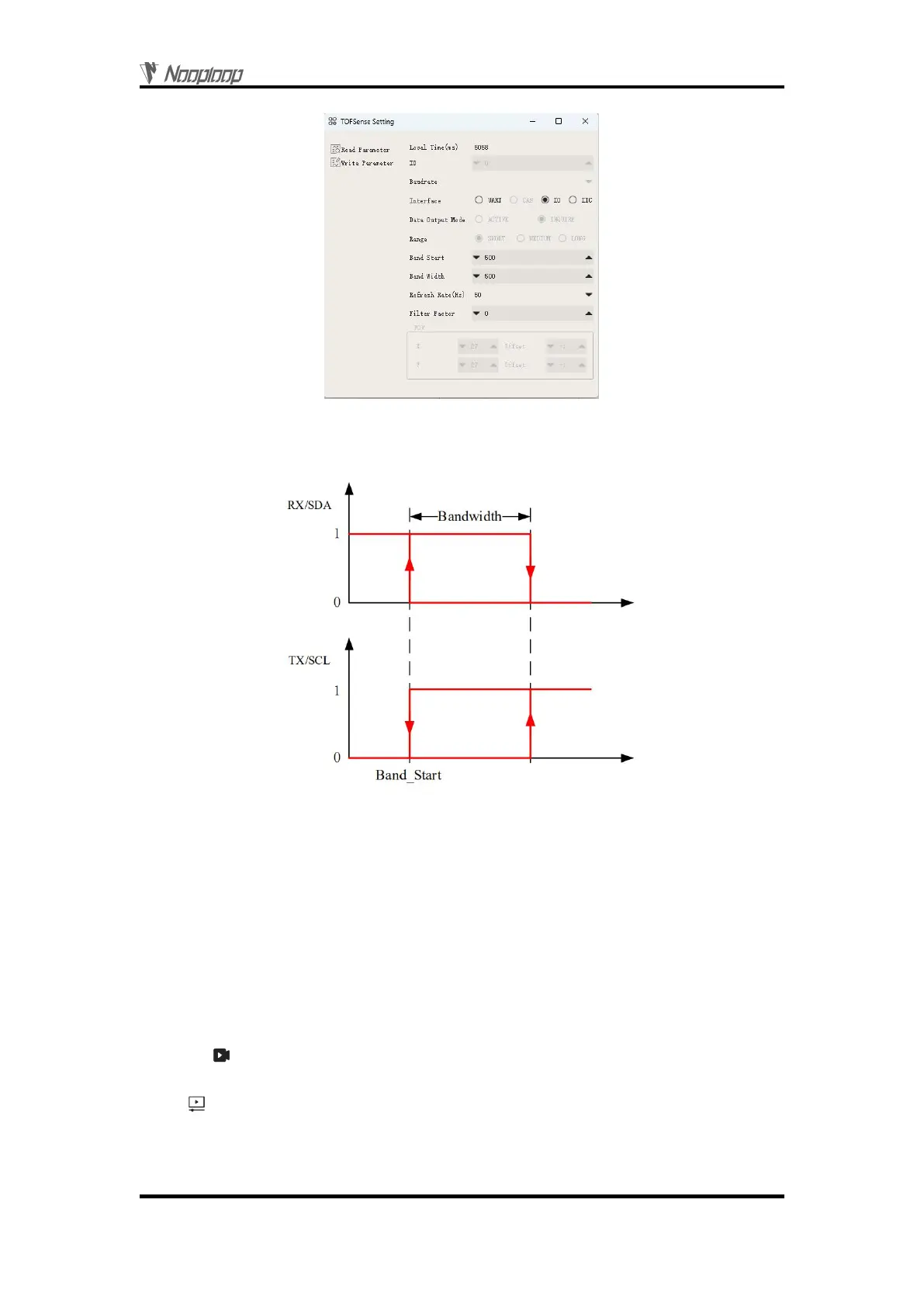
Figure 4: I/O output mode configuration diagram
For TOFSense-F/TOFSense-F P, the value range of Band_Start and Bandwidth is [0~15000] /
[0~25000], with the unit of mm.
Figure 5: Hysteresis comparison diagram
5
NAssistant Operations
5.1 Firmware Update
At present, TOFSense-F/TOFSense-FP does not support firmware online upgrading.
5.2 Record, Replay and Export
NAssistant provides a convenient data recording, playback, and export function. Users can click
the button on the main page menu bar to start real-time raw data recording, and click the button
again to stop recording and output the *.dat file. The recorded *.dat file can be extracted by clicking the
button to open the default storage path and sent to the after-sales engineer for troubleshooting. The
software is equipped with a playback control bar, which can adjust the playback rate, progress, etc. (the
recorded data is the data received by the NAssistant software during the time between the two clicks of
the recording button).


 To Next Page