ith the 3 screws.
Refrigerator Controls and Operating Instructions
A 12 VDC suppl
is re
uired to maintain the refri
erator’s operatin
control functions. The refri
erator receives its DC
power from the vehicle’s 12 volt s
stem; either an auxiliar
batter
, a converter, or the en
ine batter
. The 12 VDC s
stem
supplies power to the refri
erator and to other DC components in the vehicle.
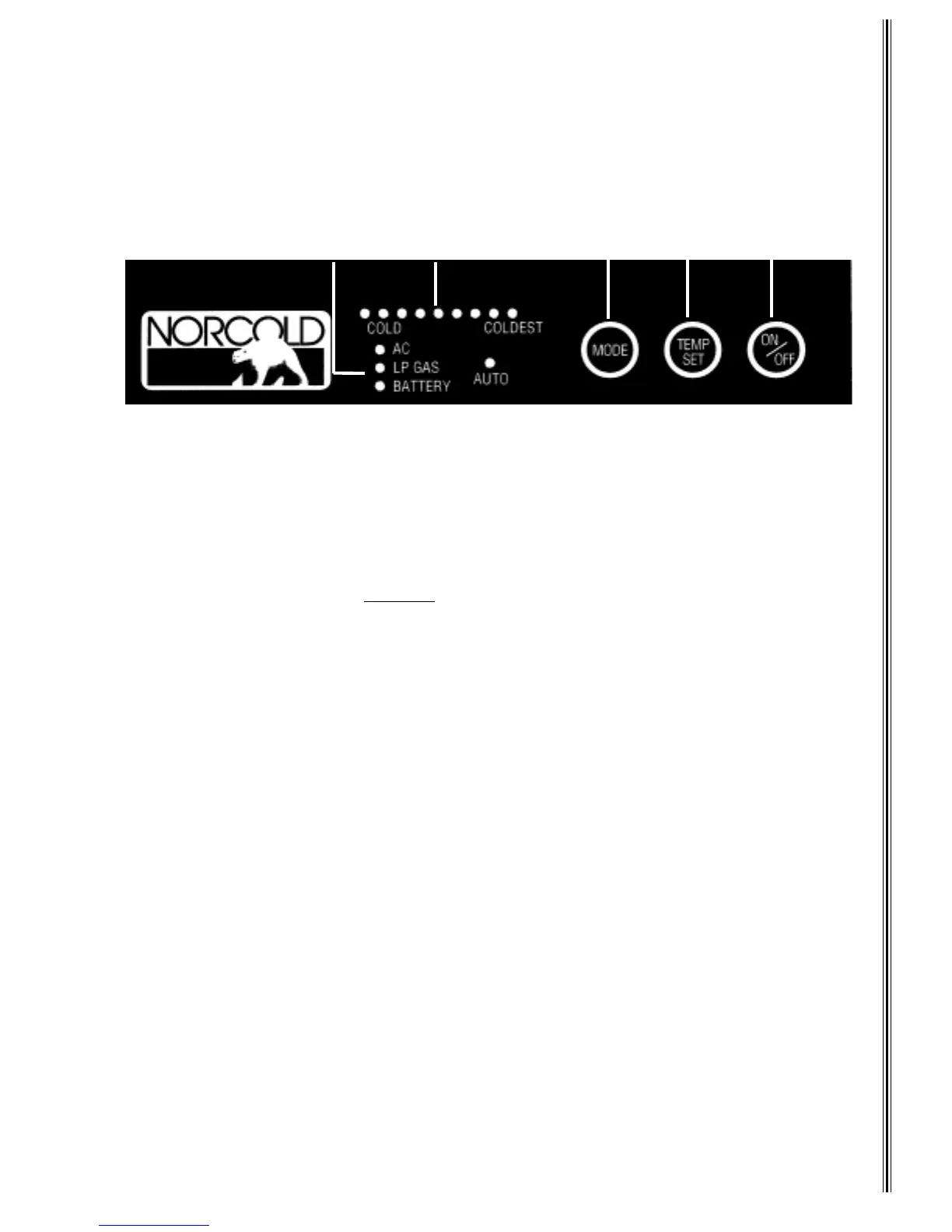
The control panel
between the freezer and fresh food compartments
, convenientl
locates all refri
erator
functionalit
. The AC, LP GAS, Batter
, and AUTO LED’s
A
li
ht indicatin
the operatin
mode.
ON/OFF
E
turns the refri
erator On or Off. If the refri
erator is Off, press this to turn it On and set the mode to
AUTO. If the unit is On, press this for
2 seconds
to turn the refri
erator Off.
Press and hold
MODE
C
to c
cle throu
h the choices; one AUTO and three manual modes
AC, LP GAS, or
BATTERY-3 wa
models onl
. The refri
erator does not switch to the new mode until
ou release
MODE
.
TEMP SET
thermostat
D
sets the refri
erator and freezer temperatures in both
as and electric operation.
Press and hold
TEMP SET
to select the temperature. The temperature settin
s are LEDs
B
. The li
hted LED
indicates the temperature, with COLD on the left and COLDEST on the ri
ht. The temperature LED turns off after
10 seconds. Quickl
press and release TEMP SET to displa
the temperature settin
.
Auto Mode
When AUTO mode is selected, the control automaticall
selects the ener
source usin
this scheme:
•
When 120 VAC is available, the AUTO and AC LEDs li
ht, meanin
the refri
erator is operatin
on AC. After
10 seconds, the AC LED turns off and onl
the AUTO LED sta
s lit. Press and
uickl
release
MODE
to displa
the operatin
mode.
•
If 120 VAC is not available, the refri
erator switches to
as operation. The AUTO and LP GAS LEDs li
ht. After
10 seconds, the LP GAS LED turns off and onl
the AUTO LED sta
s lit. Press and
uickl
release
MODE
to
displa
the operatin
mode.
•
If 120 VAC or LP
as is not available, the refri
erator switches to DC
3-Wa
models onl
. The AUTO and
BATTERY LEDs li
ht. After 10 seconds, the BATTERY LED turns off and onl
the AUTO LED sta
s lit. Press
and
uickl
release
MODE
to displa
the operatin
mode. DC operation is not as efficient as LP Gas or AC
operation.
DC electric should not be used to initially cool the refrigerator
. Onl
use DC when the other
modes are unavailable
for example; while in transit
.
Durin
operation in AUTO mode, if a hi
her priorit
ener
source becomes available, the controls stop usin
the current ener
source and switch to the hi
her priorit
ener
source. If AC becomes available while the
refri
erator is in AUTO LP GAS mode, the refri
erator switches to AUTO AC operation.
If an operatin
mode is not functional, its LED flashes and the refri
erator tries to operate in a lower ener
priorit
source. If a lower ener
priorit
source is not available, the LED continues to flash, and the refri
erator stops operatin
until the ener
source is corrected. See
Diagnostics
for corrective actions.
A
B
C
DE
Figure 6
Operating Controls
7



 To Next Page