6
Setting thermostat
The unit thermostat has a range of 3 °C – 15 °C, but is default set at the factory at approx. 5 °C.
The thermostat is located behind the front cover, down on the left side. Remove the front cover by
unscrewing the 4 screws. To increase temperature (warmer), turn the thermostat dial ANTICLOCK-
WISE To decrease temperature (colder), turn the thermostat dial CLOCKWISE. The condenser fan
on the cold room side should run constantly (to maintain as constant a temperature as possible).
Compressor and condenser fan are controlled by the thermostat.
Audible alarm
The units are fitted with a pressostat (pressure switch) and alarm function, which gives an audible
signal. The pressostat disconnects the compressor and condenser fan if the temperature on the
hot side becomes too high. If this occurs, the alarm will sound. High temperatures can reduce the
product’s service life considerably. They can be caused by failure to clean the condenser properly,
or because the condenser fan has broken down. If the alarm sounds, clean the condenser as de-
scribed in “Cleaning and maintenance”. Reset the system by pressing the red button on the pres-
sostat, which is located on the left, behind the front panel. Contact Service if the fan has broken
down.
Cleaning and maintenance
It is important to clean the unit on both warm and cold sides at least four times a year to ensure
performance. The consumer is responsible for keeping the condenser clean. This is essential to
ensure that the guarantee will apply in the event of unit malfunction. Unplug the unit from the
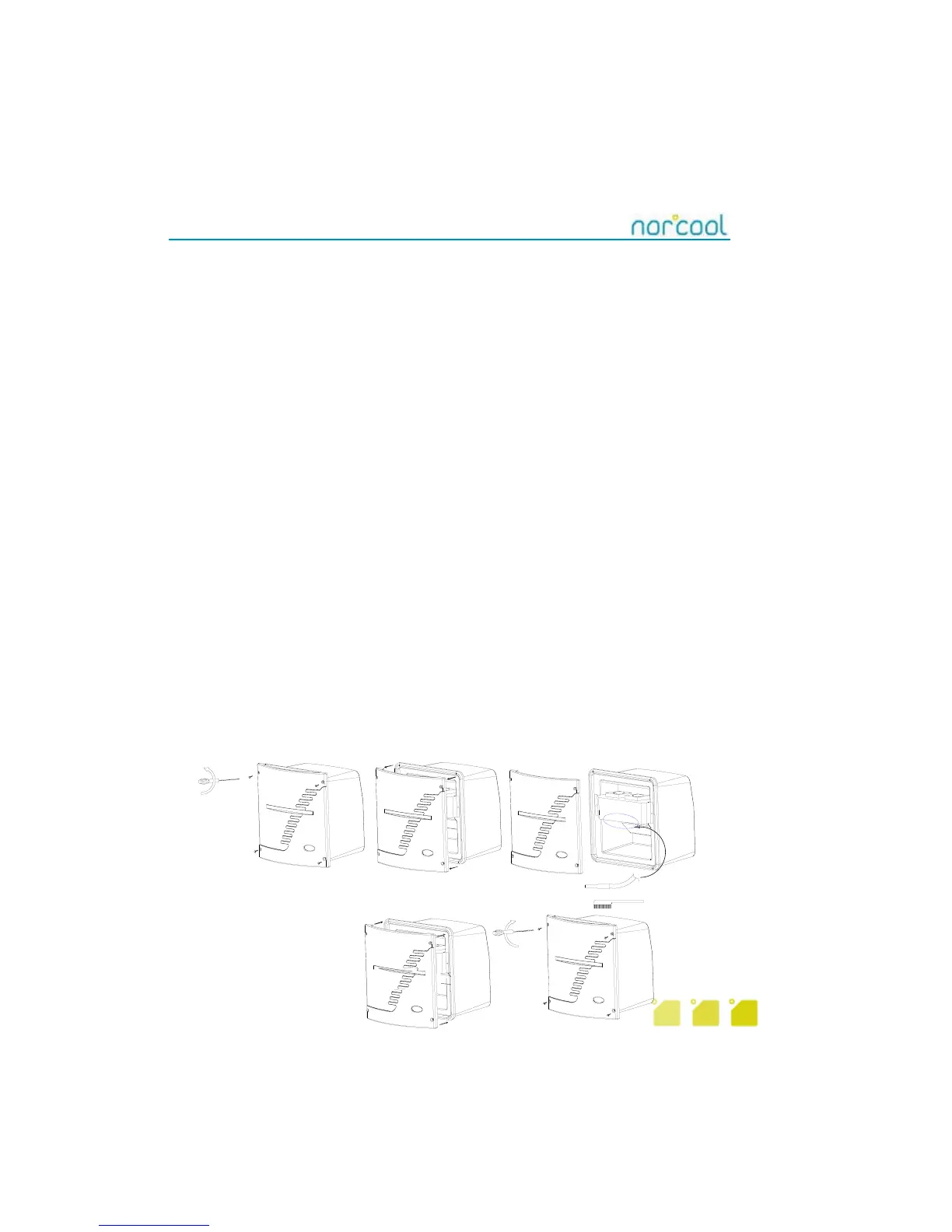
mains. Remove the 4 screws on the front cover, and remove (fig 6). Vacuum clean or gently brush
the condenser fins visible under the large steel bracket. Be careful not to damage the thin fins.
This will reduce the unit’s cooling function. Clean the water collector on the cold side using a damp
cloth.
In very dusty conditions, check that the unit is properly clean. This can be done by projecting a light
from the underside up through the condenser fins using a flashlight. When looking directly down on
the fans, it should be possible to see through the fins. If the light cannot penetrate, there is still too
much dust in the unit. To avoid mould forming, bad smells etc, regular cleaning (including inside
the cold room) is essential. We recommend mild, warm soapy water for cleaning inside the cold
room.
Figure 6



 To Next Page