12
How to Use (Using the optional remote controller)
Remote Controller
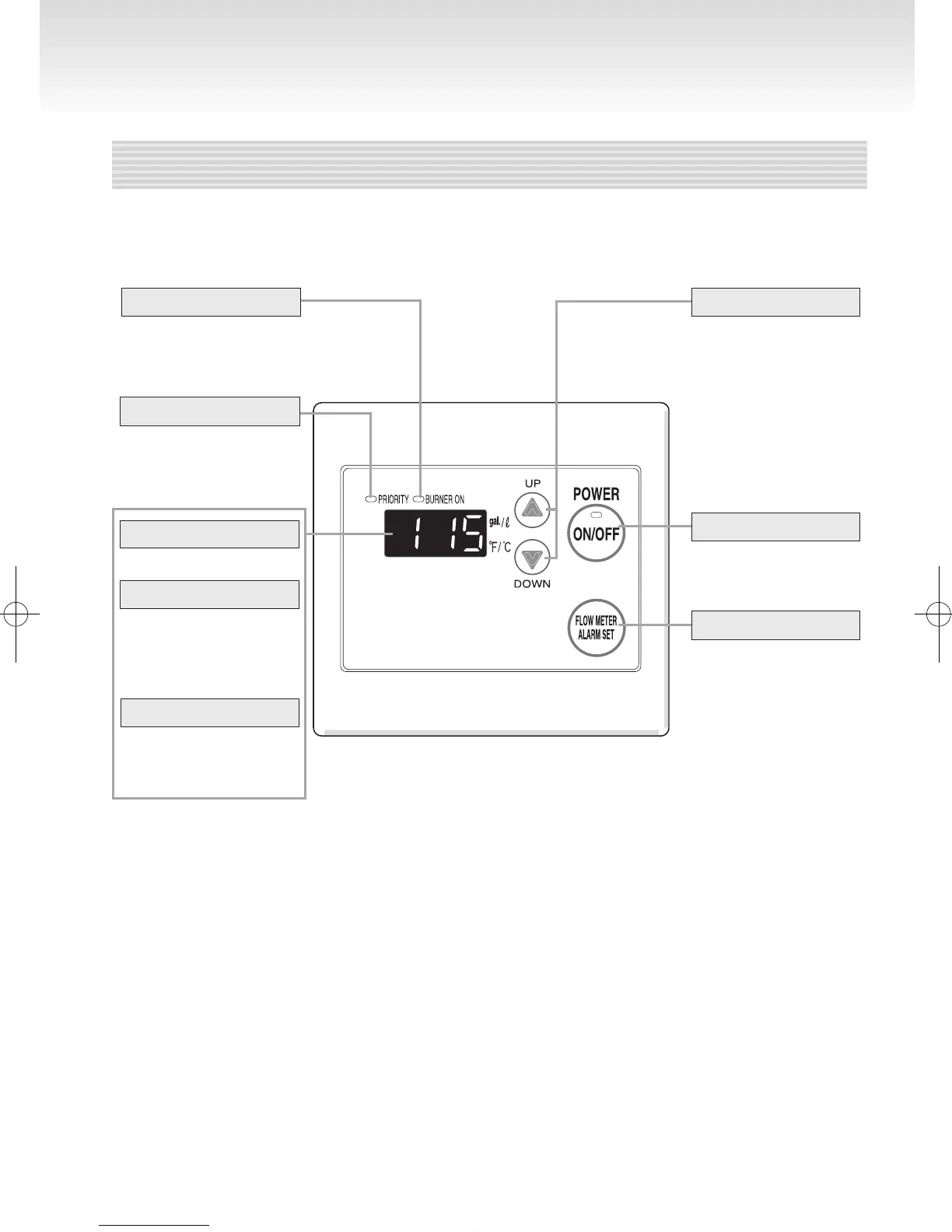
OptionalRemoteController(RC-7651M)
For setting the hot
water temperature,
the ow meter alarm,
and other settings.
PowerOn/OffButton
For turning electrical
power to the unit on
and off.
Flow Meter Alarm Set Button
For setting the ow
meter alarm.
(pages16-17)
Setting Buttons
* Before use, remove the protective sheet from the remote controller surface.
Temperature Setting
(Ex.:115°F)
Flow Meter Setting
The display will ash
after hitting the ow
meter alarm set button.
(page16)
Error Code
When this indicator is lit,
the hot water temperature
can be set. (page13)
Ifyouwanttochangethetemperatureofsuppliedhotwaterfrequentlyoryouwanttoset
theamountofhotwatertoaccumulatethehotwater,thisremotecontrollerisuseful.
A number will ash if
a failure occurs.
(page 24)
PriorityIndicator
Burner On Indicator
When burning, the
indicator is lit.
(pages13and16)
Note: Initial factory setting is set to display in °F and gallons.
To adjust the display to °C and liters, refer to the Installation Manual.
Whatisactuallydisplayeddependsonhowthewaterheaterisset.





 To Next Page