16
How to Use (Using the optional remote controller)
Flow Meter Alarm
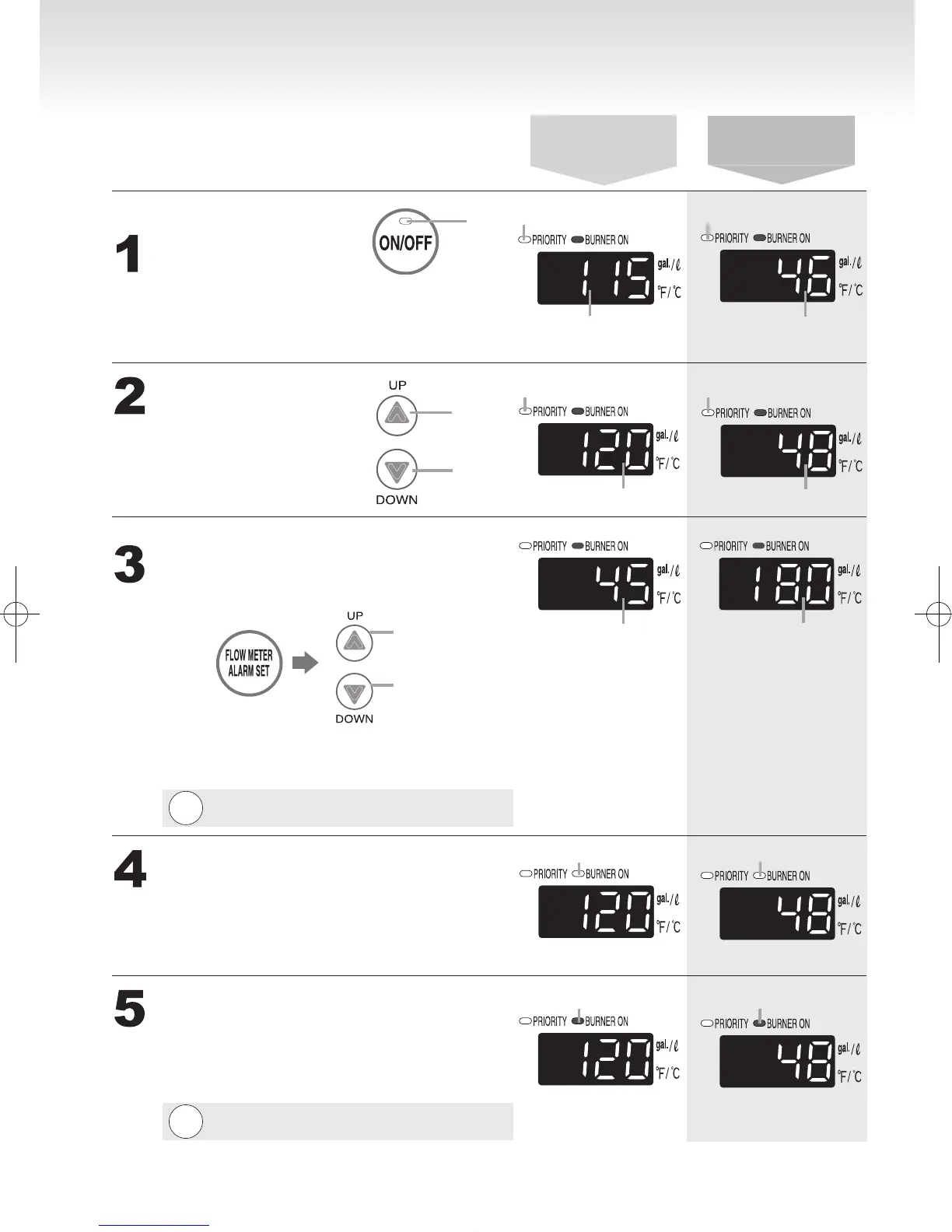
Plug the bath drain.
(Starting with the power off)
Press the Power
On/Off Button.
Set temperature.
(Always check the temperature
setting before use. )
Adjust ow meter alarm setting.
Turn on hot water.
Turn off the hot water when the
alarm sounds.
Check the indicator lights.
Water temperature
Previous set temperature
(example:115°F)
On
The temperature will be
displayed on the remote
control thermostat.
When the display
setting is in Celsius.
When the display
setting is in Fahrenheit.
On
On
Previous set temperature
(example:46°C)
Hot
Cold
Check the indicator lights.
Water temperature
Press the ow meter alarm set button (the setting will
ash on the display) and adjust with the setting buttons.
Increase
Decrease
Choose the ow meter alarm setting from the following
options:
10 - 60 gallon (40 - 240L) (In 5 gallon (20L) intervals), 70 gallon (260L),
80 gallon (300L), 90 gallon (340L), 100 gallon (380L) , 990 gallon.
Note:
The alarm will not sound if it is set for 990 gallon.
Flow meter setting
will be ashing
(ex. 45 gallon)
* The level can only be adjusted
while the indicator is ashing.
* After ten seconds, the remote
will again display the temperature.
Flow meter setting
will be ashing
(ex. 180L)
The a alarm will sound when the set level
has been reached. Stop the water.
On
Off
On
Off
Preparation
To set the ow meter alarm:
Mix water to control the temperature of hot
water as occasion demands.
If water is mixed, ll larger quantity of hot
water than the quantity of water you set.
Note:
The alarm will not sound if it is set for 990 gallon.





 To Next Page