17
1
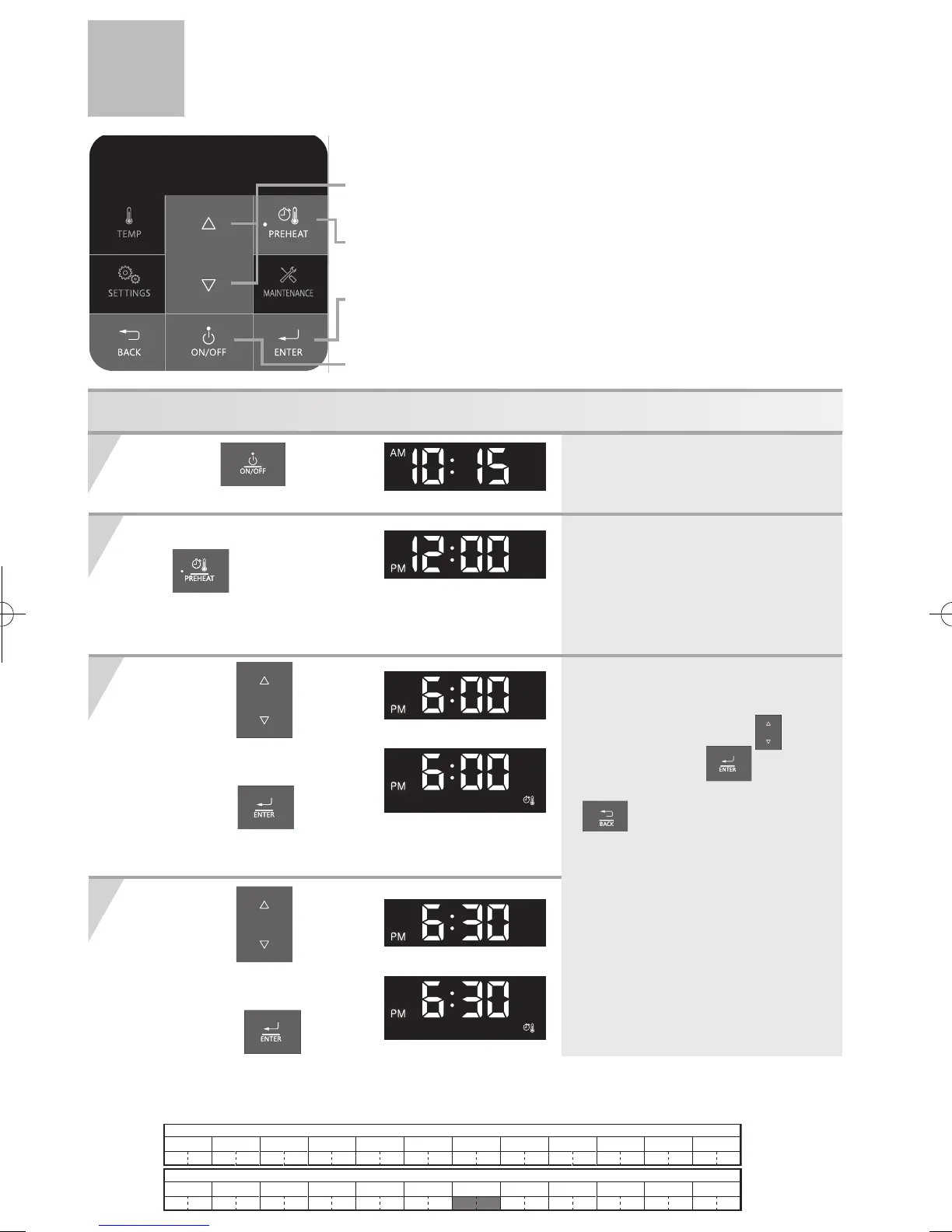
Setting DHW Preheat Timer
Thisexampleshownissettingthe"ONtime"and"OFFtime"to6:00PMand7:00PM.
2
3
4
Press and hold
the
buttonfor
approximately2seconds.
* Time changes in 30-minute increments
when each button is pressed.
* If you want to set the ON time OFF , select
the desired time by using the
buttons.
And then press button .
* To return to the home screen, press the
button or let panel sit for
approximately 20 seconds.
* DHW Preheat Icon will appear to confirm
when the preheat function is scheduled for
that 30 minute block. If it is not present,
the preheat function is off.
* In order to use the DHW Preheat function,
the clock must be set first. The DHW Preheat
Timer is disabled until the clock is set.
* When entering DHW Preheat Timer setting
mode, the clock display will be blinking.
* When the preheat function is activated,
you cannot set DHW Preheat Timer.
Press the
buttonON.
1 )
Press the buttons
until ‘the desired time’
isdisplayed.
2)
Press the
buttonto
savethecurrentsetting.
(DHW Preheat Icon is lit)
1 )
Press the buttons
until ‘the desired time’
isdisplayed.
2) Press the
buttonto
savethecurrentsetting.
(DHW Preheat Icon is lit)
(e.g.: 10:15AM)
(e.g.: 12:00PM)
(e.g.: 6:00PM)
(e.g.: 6:30PM)
(e.g.: 6:00PM)
(e.g.: 6:30PM)
1)
1)
2)
2)
12 123456
AM
78 91011
12 123456
PM
78 91011
e.g.DHWPreheatisscheduledtorun6:00PM-7:00PM.
1
3,4
2
3,4


 To Next Page