21
To return to the home screen, press the button three times
or let it sit for approximately 30 seconds.
To change other settings,
Select option and press the
button.
3
1
2
ON:the temperature setting is locked.
OFF:the temperature setting is not locked.
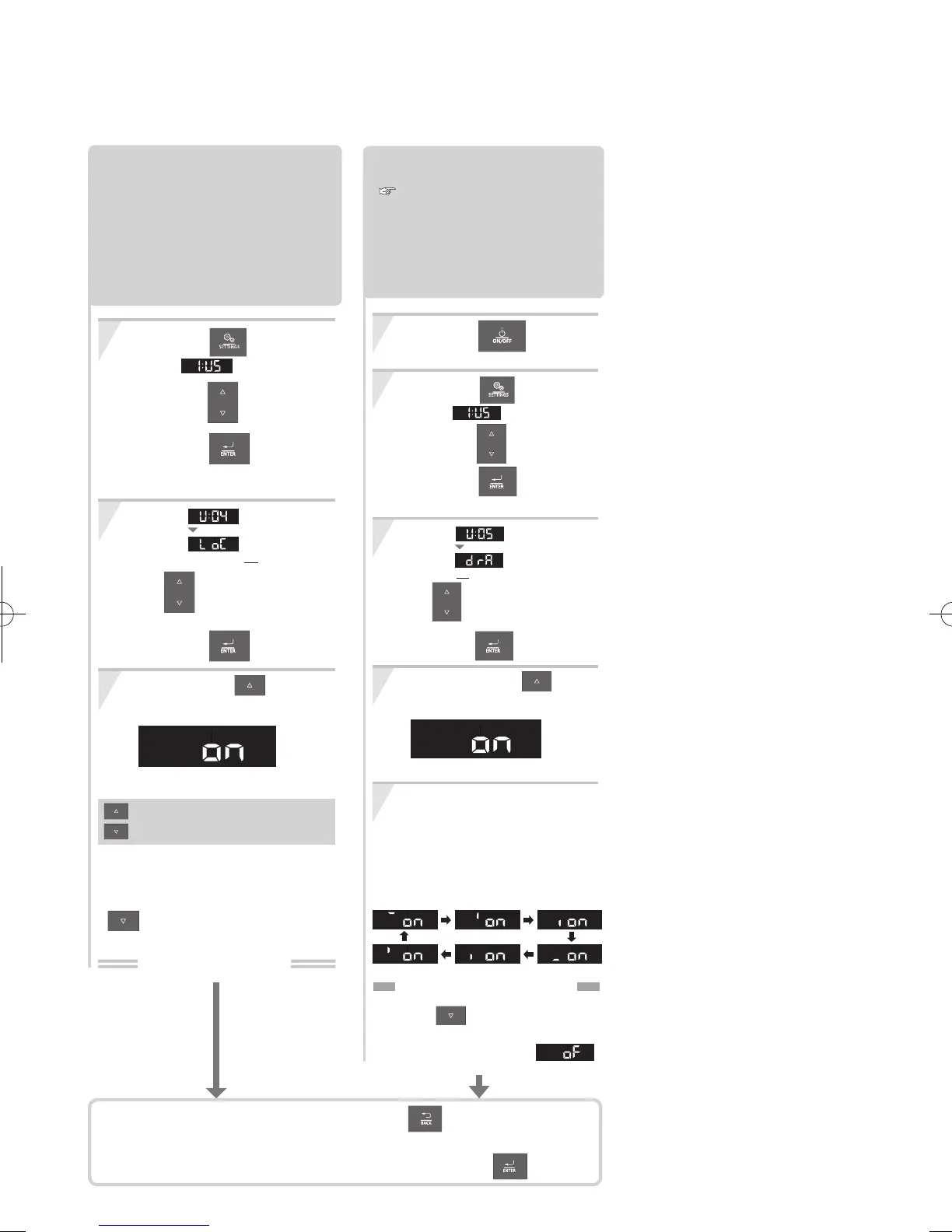
Temperature Lock.
Temperature Settings can be
locked so that it does not change
temperature setting if a button is
pressed by mistake.
Both DHW and Heating temperature
setting are locked.
Press the button,
Select
using the buttons.
Press the button.
The "UserMode" screen appears.
Press and hold the button for
approximately 2 seconds to turn "ON".
(e.g.: ON)
(Default setting=OFF)
* If you want to set "Temperature Lock"
from "ON" to OFF", press and hold the
b
utton for approximately 2 seconds
to turn "OFF".
Setting completed
Select using
After 1 sec.
(LoC:Temperature Lock)
the buttons,
and then
press the button.
4
5
2
3
1
Draining the Combi Boiler.
( Refer to page 26 for details.)
Drain the Combi Boiler following the
procedures described on page 26.
During draining, the display will change
to the following rotational pattern.
When the drain the water is complete, "the
rotational pattern " turns off automatically.
Press and hold the button
approximately 2 seconds to turn "ON".
To stop draining water
from the Combi Boiler
Press the button during draining,
the drain function will be stopped and
the screen display shows .
Press the button,
Select
using the buttons.
Press the button.
The "UserMode" screen appears.
(e.g.: ON)
Select using
After 1 sec.
(drA:Drain The Water)
the buttons,
and then
press the button.
button OFF.
Press the
The Operation Panel must be off.


 To Next Page