25 | Start Up
Nortec Digital Controls
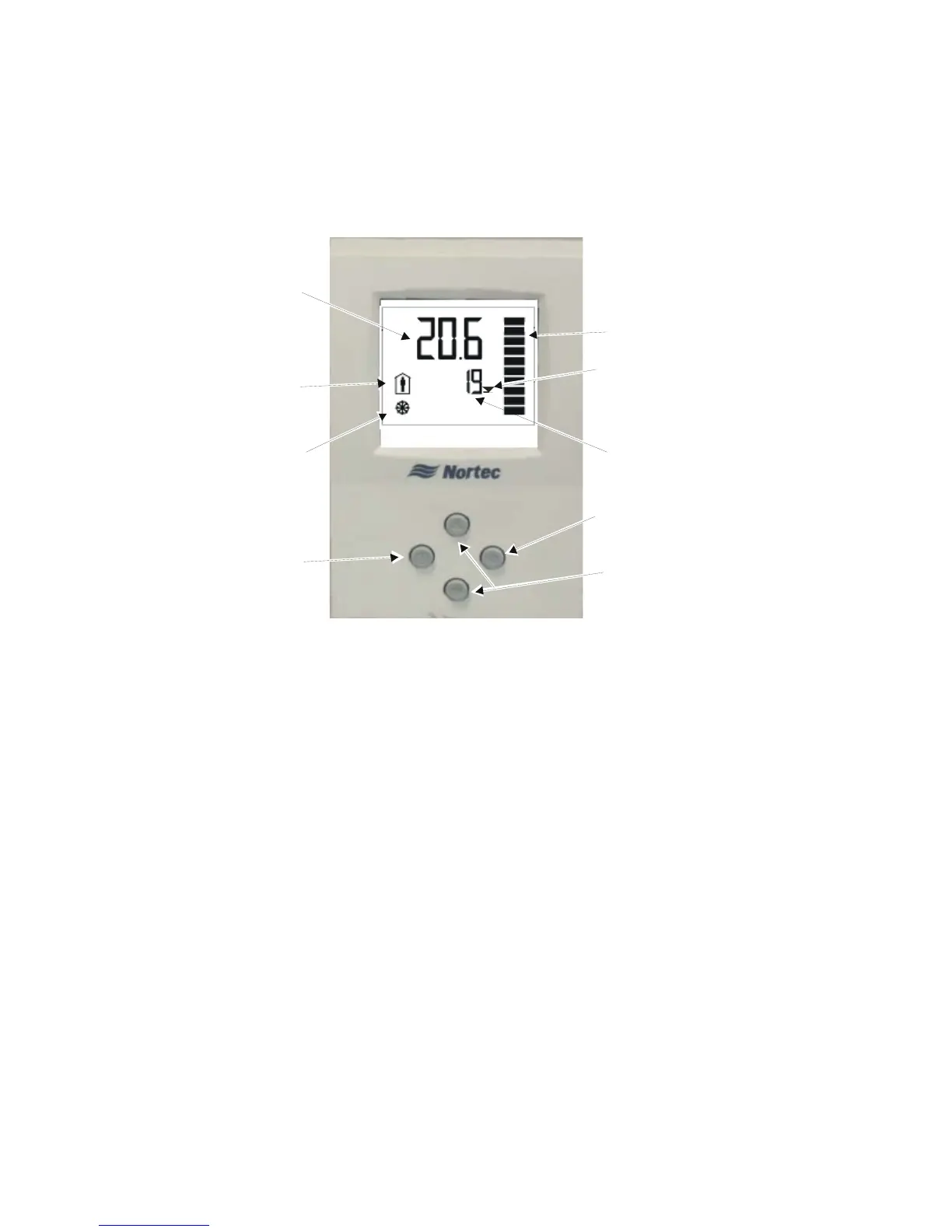
Nortec provides optional On/Off and Modulating digital controls. Figure 25 show the function
and meaning of the Digital Control’s display and buttons. All controls are available either wall
mounted or with a remote sensor for duct mounting.
Figure 25: Modulating and On/Off Digital Control Operation
Modulating Control
The modulating controls use a PI control algorithm to transmit a 0-10V control signal to the
humidifier. Adjust the setpoint to the desired setting by using the up/down arrow buttons on
the controller.
On/Off Control
The On/Off controls use a PI control algorithm to open and close a relay that opens and closes
the humidifier’s On/Off loop. Adjust the setpoint to the desired setting by using the up/down
arrow buttons on the controller.
Note: It is possible to field calibrate Nortec digital controls if the displayed humidity is found to
be different than a known trusted source. See chapter on Troubleshooting starting on
page 45.
Output signal is shown on
modulating controller
proportional to the demand.
State of On/Off humidistat
Setpoint (RH%)
Humidity (RH %)
Indicates the
humidistat is on.
A half moon
indicates it is off.
Snowflake indicates the
setpoint is being
overridden by outdoor
temperature.
Option button accesses
sensor calibration.
See troubleshooting
Increase / Decrease Setpoint
Power button turns
off the humidiistat if
pressed for 2 seconds


 To Next Page