49 | Troubleshooting
RH Faults
The self-diagnostic system built into the RH is continually monitoring the operation of the
humidifier. When an abnormal condition occurs that cannot be self corrected by the software
the RH will turn off power to the cylinder, drain the cylinder, and annunciate the fault using the
yellow status LED.
LED Flash Sequence
To differentiate between different fault conditions the yellow LED is flashed in different
sequences. Table 8 lists the fault sequences that can be displayed, their meaning, possible
cause and suggested corrective actions.
Clearing a Fault
• Check the flash sequence against the list of fault messages and take any necessary actions
to correct the cause(s) as outlined in Table 8: Troubleshooting RH Faults.
• Power cycle the humidifier with the On/Off switch waiting 10 seconds between turning it off
and on.
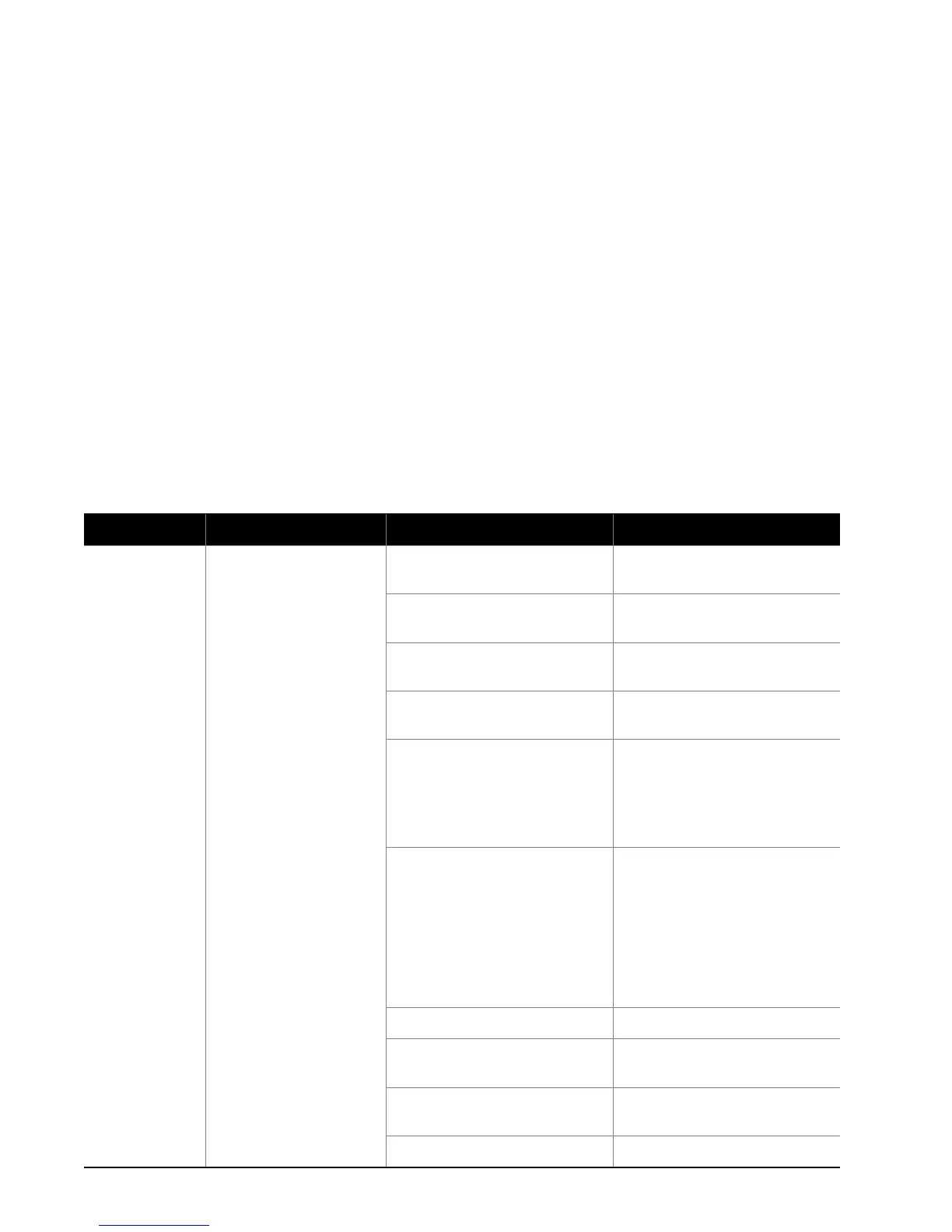
Table 8: Troubleshooting RH Faults
Yellow LED System Detected Cause Corrective Action(s)
1 flash
Excess Current
Current has exceeded
130% of max
1 Drain blocked water over
concentrated
1 Clean the drain line
2 Drain solenoid not energized,
water over concentrated
2 Check and correct wiring to
drain valve.
3 Filling too fast, fill valve
damaged
3 Replace the fill valve
4 Filling too fast, wrong fill valve 4 Check for correct fill valve in
parts list, replace if incorrect
5 Water supply too conductive 5a Contact Nortec
representative for
recommendation on alternate
cylinder
5b Change the water supply
6 Humidifier short cycling 6a Check if high limit or other
On/Off control is cycling
On/Off in less than 5
minutes. Check location and
setting of high limit.
6b Reduce the output by
turning down the capacity
potentiometer.
7 Wrong cylinder installed 7 Install correct cylinder model
8 Cylinder Spent but not
detected by software
8 Replace the cylinder (see
maintenance chapter)
9 Condensate from other
source
9 Remove condensate returns
other than from steam line.
10 Back pressure 10 Eliminate back pressure


 To Next Page