3DJH
User’s Manual of Remote Controller
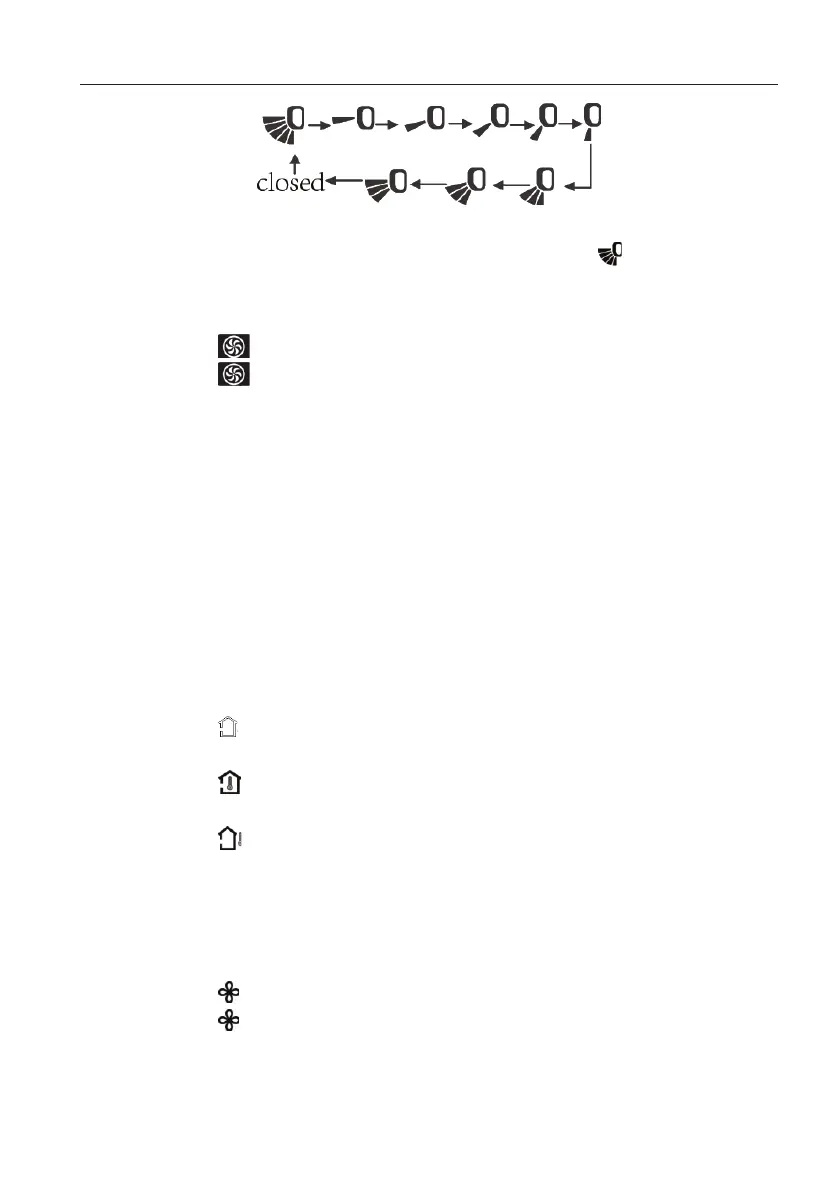
Note: operate continuously left&right swing in 2 seconds, swing states will change
according to above-mentioned order, or switch closed state and
state;
(
5
)
Setting turbo function
1
)
Under cool or heat mode, press TURBO button to set turbo function.
2
)
When is displayed, turbo function is on.
3
)
When is not displayed, turbo function is off.
4
)
When turbo function is on, the unit operates in super high speed to achieve
quick cooling or heating. When turbo function is off, the unit operates in
setting fan speed.
(
6
)
Setting light function
The light on the receiver light board will display present operation status. If
you
want to turn off the light, please press LIGHT button. Press this button again to turn on
the light.
(
7
)
Viewing ambient temperature
1
)
In unit on status, receiver light board or wired controller is defaulted to display
setting temperature. Press TEMP button to view indoor or outdoor ambient
temperature.
2
)
When is displayed, it means the displayed temperature is setting
temperature.
3
)
When is displayed, it means the displayed temperature is indoor ambient
temperature.
4
)
When is displayed, it means the displayed temperature is outdoor
ambient temperature.
Note: setting temperature is always displayed in Remote Controller.
(
8
)
Setting X-FAN function
1
)
In cool or dry mode, press X-FAN button to set X-FAN function.
2
)
When is displayed, X-FAN function is on.
3
)
When is not displayed, X-FAN function is off.
4
)
When X-FAN function is on, the water on the evaporator will be blown away
until turning off the unit to avoid mildew.


 To Next Page