Northstar M121/M84 Installation and Operation Manual10
Note: Display refers to ALL windows and the data header/Compass
Window refers to a part of the display in which a particular function is shown
e.g. The Chart window on a Chart + Sonar display.
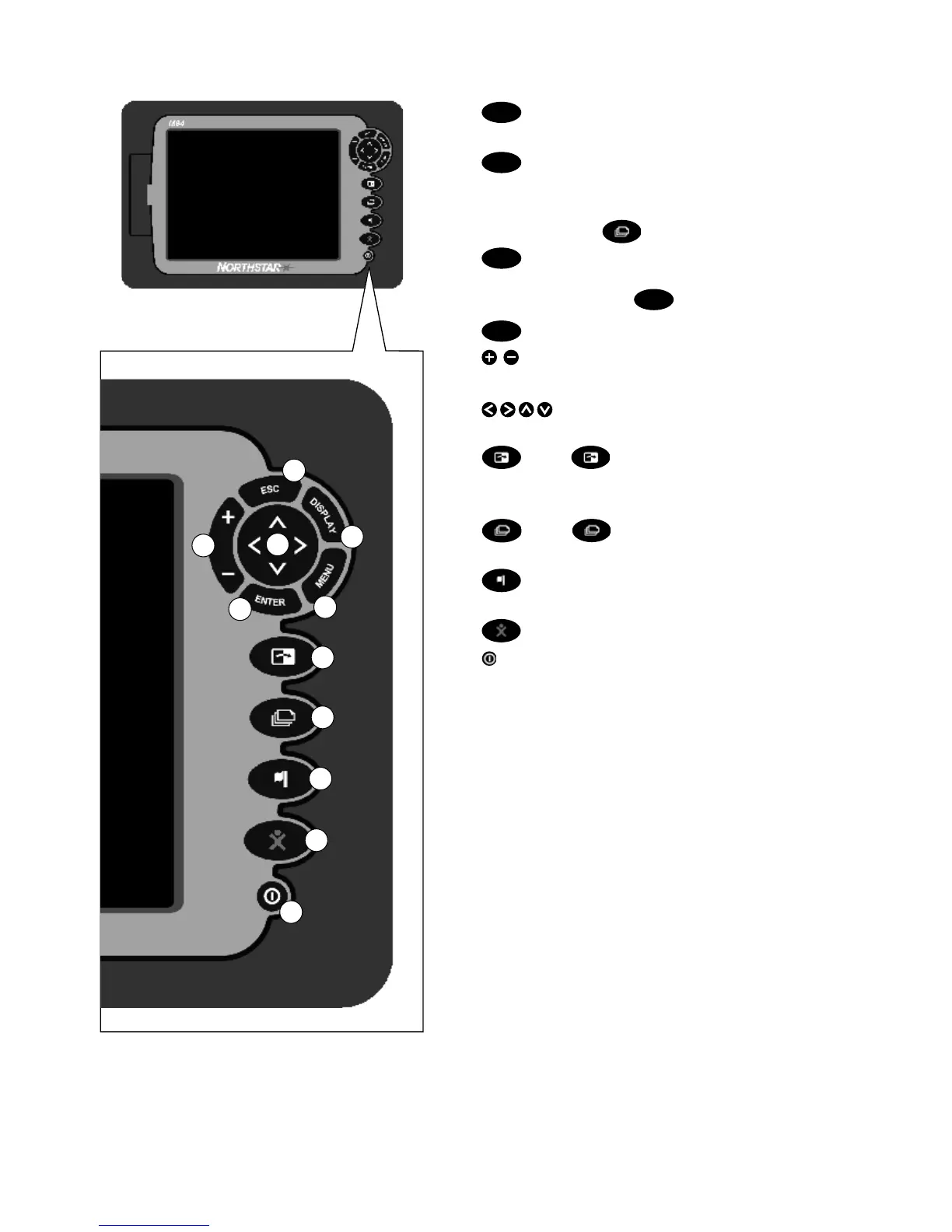
Overview of the M84 keys
q
ESC
– Go back to an earlier menu or window. In
chart mode centers chart at boat’s position.
w
DISPLAY
– This is a powerful key that allows you
to setup the display the way you want. Main
displays can be saved as favorite displays for easy
access from the
key.
e
MENU
– Show a menu of the options for the
current active window. The setup menu can be
opened by pressing
MENU
twice.
r
ENTER
– Start an action or accept a change.
t / – Changes the range on a window eg. Chart
or Sonar zooms
y , , , – Cursor keys, to move the cursor or
the selection highlight.
u – The key selects which window you
are working with. The Active window is indicated
with a red border.
i – The key allows you to quickly
switch between your saved favorite displays.
o – This key places a waypoint on the Active
Chart Window.
a – Man overboard (MOB, see section 2-4).
s – Turn Instrument on and off (see section 2-2);
adjust the backlighting (see section 2-3).
1
5
2
3
6
4
7
8
9
10
11


 To Next Page