VX400 All-in-One Controller User Manual
Upper Limit: The maximum ambient brightness; screen brightness: the screen brightness corresponding to
the maximum ambient brightness
Number of Subsections: The number of segments of ambient brightness between the maximum and
minimum ambient brightness
Lower Limit: The minimum ambient brightness; screen brightness: the screen brightness corresponding to
the minimum ambient brightness
Step 9 Click OK to complete brightness section settings. The sections and the corresponding brightness values will
be shown in the table on the light sensor settings page.
Click to add a section for the relation between the ambient brightness and screen brightness.
Click to delete the selected section.
Step 10 Select Opening to enable the automatic adjustment mode at night.
The night mode control the screen brightness at night. When surrounding lights interfere with the light sensor
or an exception occurs when the light sensor is collecting ambient brightness data, screen brightness may be
too high. This can be avoided in night mode.
In night mode, when the screen brightness adjusted according to the ambient brightness collected by the light
sensor is higher than the set maximum brightness for night mode, the system will adjust the screen brightness
to the maximum brightness for night mode, otherwise, the system will automatically adjust the screen
brightness according to the brightness mapping table.
1. Select Opening to enable night mode.
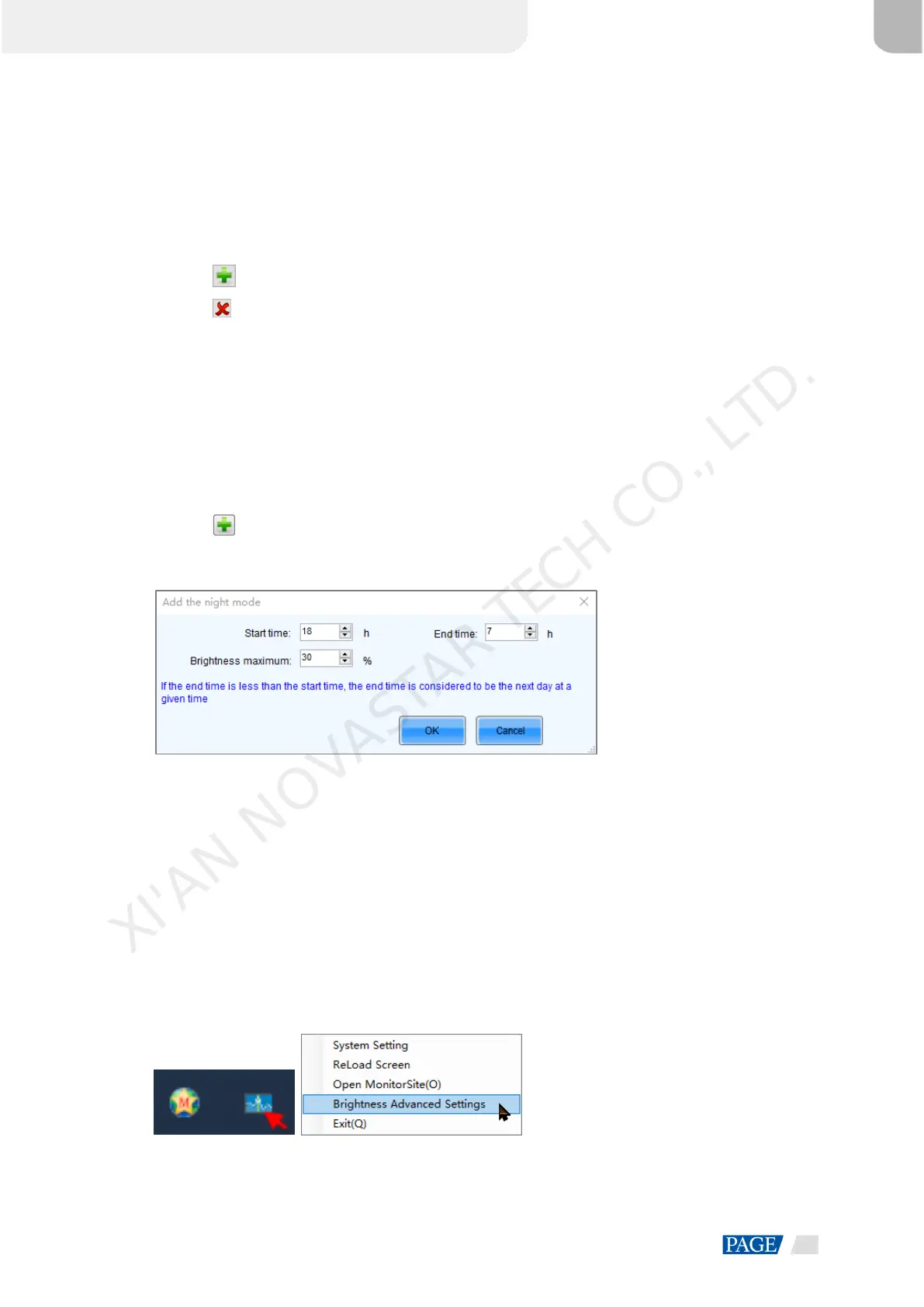
2. Click to add night mode setting options, including Start time, End time, and Brightness maximum.
Figure 8-5 Adding the night mode
− Start time: Set when the night mode starts.
− Start time: Set when the night mode ends.
− Brightness maximum: Set the maximum screen brightness in night mode.
3. Click OK to complete night mode settings.
Step 11 Click Finish to complete light sensor brightness adjustment configuration.
Step 12 Click Save to make the light sensor configuration parameters take effect.
Step 13 Set the effective time for the automatic brightness adjustment.
1. On the task bar, right click the MonitorSite icon and choose Brightness Advanced Settings.
Figure 8-6 Brightness settings
2. Select Enable Brightness Gradient.
XI'AN NOVASTAR TECH CO., LTD.


 To Next Page