This document is a user manual for the NOVEXXX SOLUTIONS XLS 20x/XLS 256/XLS 272 series of labelers. It provides comprehensive information on the device's operation, technical specifications, and maintenance.
Function Description
The XLS series labelers are designed for dispensing and applying pre-printed self-adhesive labels to products or packages. The label material, typically supplied on a roll, is punched in roll shape. The labels adhere individually, separated by punching, on a carrier material. The labelers are integrated into a superordinate system, such as a packaging system, and are moved by an automatic conveyor.
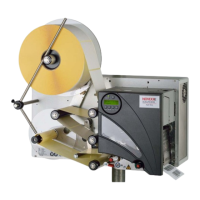
In labeling mode, the label strip is pulled from the label roll around the dancer arm, which maintains even tension. A feed roller behind the dispensing edge draws the strip across the dispensing plate. The label is unpeeled from the backing paper on the dispensing plate and pressed onto the product by a pressure roller. The spent backing paper is then run from the dispensing edge around the drive roller to the rewinder, with the dancer arm regulating the rewinding speed.
The entire operation is controlled and monitored electronically. If errors occur, the device provides appropriate notification to the operator, and the labeling operation may be halted automatically. An electronic signal output is available for external control and evaluation.
The labelers are available in both right-hand (RH) and left-hand (LH) versions, indicating the side from which the label exits the machine.
Important Technical Specifications
Dispensing Speed:
- XLS 204: max. 40 m/min
- XLS 206: max. 30 m/min
- XLS 256: max. 50 m/min
- XLS 209: max. 25 m/min
- XLS 272: max. 70 m/min
The maximum usable dispensing speed depends on label geometry.
Labeling Halt Precision:
- At fixed dispensing speed (5 m/min to max. speed in steps of 10 m/min): ±0.5 mm at the peeling edge, ±1 mm on the product (tested with L-shape dispensing edge on blocks on a conveyor).
- At variable dispensing speed: XLS 272: ±0.5 mm at the peeling edge; all other machines: ±1 mm at the peeling edge.
Speed Control:
- Fixed setting or automatic speed adaptation (APSF) via rotary encoder. APSF does not work with pneumatic dispensing edge.
Labels:
- Label material: Converted self-adhesive label material with liner.
- Internal rewinding: Yes.
- Material width (including backing paper):
- XLS 204: 10-110 mm
- XLS 206: 10-160 mm
- XLS 256: 10-160 mm
- XLS 209: 50-229 mm
- XLS 272: 10-53 mm
- Label length: 5 to 1000 mm.
- Distance between labels on carrier material: min. 1 mm.
- Label roll winding direction: Labels inside or outside.
- Dispenser (outer) Ø: up to 300 mm.
- Rewinder (outer) Ø: up to 200 mm.
- Core (inner) Ø: 38.1/76.2/101.6 mm (1.5/3/4").
Label Sensor:
- Distance to peel edge: 19 mm (L-shape dispensing edge), 77 mm (V-shape dispensing edge for XLS 204).
- Sensor type: Transmission sensor; NPN/PNP (switchable).
Power Supply:
- XLS 20x: 110 V (AC) at 60 Hz power frequency or 230 V (AC) at 50 Hz power frequency (permissible tolerance ±10%). Max. 460 VA power consumption. Fuses: T5AH 250 V.
- XLS 256/XLS 272: 100-240 V (AC) at 50-60 Hz power frequency (permissible tolerance ±10%). Max. 560 VA power consumption. Fuses integrated in the power supply.
Electronics:
- Processor: ARM926-EJ CPU, 32 Bit, 400 MHz.
- RAM: 128 MBytes DDR2.
- ROM: 8 MBytes.
- Control panel: Graphical display with 128 x 64 pixels, 5 buttons.
Interfaces:
- Sensor Interfaces for external sensors: Label sensor (NPN, 24 V), Alternative label sensor (PNP/NPN, 24 V), Product sensor (PNP/NPN, 24 V), APSF-sensor (Rotary encoder: single-phase/two-phase, PNP/P-P, 24 V, max. 20 kHz), Stock sensor (PNP, 24 V).
- Internal Sensor Interfaces: Material unwinder (Light barrier), Dancer arm (bi-phase light barrier encoder), PLC interface (Sub D15, optically insulated, optionally via two 8-pin M12 separate inputs/outputs in each case).
- Outputs: 4x PNP, 24 V, a maximum of 500 mA/channel, total permissible output current: 1500 mA.
- Inputs: 3x PNP/NPN, 24 V.
- Data Interfaces: Serial (RS232C (Sub-D9), max. 115200 Baud), Ethernet (10/100 BaseT (RJ45)), USB (Device, USB B; Host, USB-A).
- Control panel interface: RS485 (Mini DIN 6 connection) for remote control.
Dimensions (Width x height x depth):
- XLS 204: 492 x 488 x 371 mm
- XLS 206: 492 x 488 x 402 mm
- XLS 256: 492 x 488 x 402 mm
- XLS 209: 492 x 488 x 505 mm
- XLS 272: 492 x 488 x 352 mm
Weight:
- XLS 204: 36 kg
- XLS 206: 38 kg
- XLS 256: 40 kg
- XLS 209: 41 kg
- XLS 272: 31 kg
Ambient Conditions:
- Installation location: Inside buildings, protected from wind and spray water, dry. Not in areas with potentially explosive atmospheres.
- Operating temperature: 5 to 40°C.
- Humidity: 30 to 85% (non-condensing).
- Noise (at a distance of 1 m): 72 dB(A).
- Protection class: XLS 20x: IP 41 (IP 65 with special equipment); XLS 256/XLS 272: IP 21.
- Sea level: Operation to max. 2000 m above sea level.
Usage Features
Operating Modes:
The unit primarily operates in "Dispensing Mode" upon startup, where it dispenses labels. A "Configuration Mode" allows for detailed settings adjustments.
Control Panel:
The integrated control panel features an LCD display showing functions, configured values, operating states, and error messages. Buttons allow for sending commands, navigating menus, and adjusting settings. An optional external control panel can also be connected.
Label Material Handling:
- Inserting a label roll: The unwinder's core diameter can be adjusted to match the label roll's core. The label roll is pushed onto the unwinder, and a handle is turned clockwise to secure it. The label web is then threaded through the machine according to specific diagrams for different models and label orientations (labels facing outwards or inwards).
- Changing label material: Involves removing the spent label roll and inserting a new one.
- Threading the label roll onto the drive roller: Requires opening the pressure roller, aligning it over the backing paper, and then closing and tightening it.
- Fastening the material web to the rewinder: The backing paper is clamped to the rewinder. If the machine is off, the rewinder can be manually rotated. If on, the dancer arm is pushed against its upper stop to slacken the tensioning mechanism.
Mechanical Settings:
- Adjusting the unwinder's core diameter: Core adapters are used to fit 76.2 mm (3") or 101.6 mm (4") cores. No adapter is needed for 38.1 mm (1") cores.
- Positioning the pressure roller: The pressure roller is opened, aligned centrally over the backing paper, and then closed and tightened.
- Positioning the label sensor: The sensor is positioned along the side in a way that allows it to register the spaces between labels.
- Setting the dancer arm restoring force: An adjusting screw allows for increasing or decreasing the restoring force, which is important for handling narrow or delicate label materials.
Configuration and Monitoring:
- Label pitch: Can be calibrated automatically or entered manually.
- Label stop position: Configured to ensure the label protrudes slightly over the dispensing edge.
- Dispensing speed: Can be set to a fixed value or configured for automatic speed adaptation using a rotary encoder.
- Suppressing start signals: Allows the machine to ignore unwanted additional start signals caused by product shape or reflective surfaces.
- Label position on the product: Adjusts the start offset to ensure labels are applied flush with or at a specific distance from the product's front edge.
- Monitoring functions: Includes material end/roll diameter control (internal or external OD-control) to alert the operator before the label roll runs out.
- Product profiles: Allows storing and loading up to 16 sets of machine settings for recurring production jobs, including a text identifier for each profile.
Maintenance Features
Replacing Fuses:
The XLS 20x uses two fuses (F1 and F2) for the primary side of the transformer, which depend on the voltage selector switch setting. The XLS 256/XLS 272 have fuses integrated into the power supply. Replacing fuses requires turning off the unit, unplugging the power cable, and using a screwdriver to access the fuse holder.
Cleaning Agents:
- Rubber rollers: Use roller cleaner (order number 98925) to prevent corrosion.
- Metal deflection rollers: Use cleaning solvent, alcohol-based solvent, isopropyl alcohol, or spray for removing labels.
- Unit's housing: Use commercially available neutral cleaning liquid.
- Caution: Avoid abrasive, plastic-corroding, acidic, or alkaline cleaning agents, as they can damage the unit.
Regular Maintenance:
The label dispenser is designed to be maintenance-free but requires regular servicing for reliable long-term operation.
- Removing paper debris: Wipe paper residue from rollers and edges, and clean sensor lenses with a soft brush or cloth at least once a week.
- Deflection rollers: Clean glue residue with a cloth moistened with cleaning solvent.
- Rubber rollers: Clean glue residue with a cloth moistened with roller cleaner.
- Renewal of the dust filter liner (XLS 256/XLS 272): The filter liner should be replaced regularly (at least monthly) to prevent overheating. This involves unscrewing thumb screws, removing the filter cover, replacing the liner, and reassembling.
Error and Warning Messages:
The unit displays status messages, warnings, and error messages to inform the operator about operational failures.
- Error messages: Stop the machine immediately and require operator intervention (e.g., pressing a button to delete the message, switching the device off and on, or calling a service technician).
- Warnings: Indicate less severe issues that do not interrupt labeling (e.g., "Material low"). Warnings can be cleared by pressing a button.
- Specific error messages: Include "Bus device" (I²C Bus communication failure), "No gap found" (material end, missing labels, incorrect sensor/label settings), "Material end" (internal OD-control activated), "MotorProtectFeed/MotorProtectRew" (dust filter exhausted, voltage selection switch faulty, or other causes), "Material end unw" (material roll diameter reached critical value), "Rewinder control" (backing paper torn or dancer arm issues), "Rewinder full" (rewound backing paper exceeds admissible diameter), "Tandemsynch.init" (master/slave communication failure), "Home position" (applicator not reaching home position), "Touch down" (applicator lower end position not reached), "New prog. vers." (new firmware loaded), "New parameters" (new functions added to menu), "No file card" (external memory medium not found), and "No network link" (Ethernet address assignment or network connector issue).

 Need help?
 General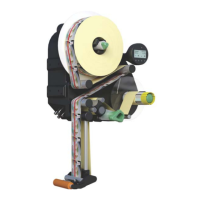


 To Next Page